Add persistent memory to your agent with Hindsight
Hindsight is an open-source memory service that helps AI agents remember information across conversations. It stores memories on your Olares device and calls models through Router to organize and search them.
This guide uses Hermes Agent to save a fact, retrieve it in a new conversation, and control when memories are saved.
Prerequisites
An Olares device running Olares 1.12.7 or later, with sufficient disk space and memory.
Access to Router for local model connections.
Hermes Agent installed and configured to respond to messages.
The following models:
Model type Model How to get it Chat Qwen3.8-27B (llama.cpp) Install from Market Embedding EmbeddingGemma Install from Market
Optional: Use a different model
Install another chat model from Market, or create a model instance with Engine Base apps. Then select it as the default chat model on Router's Default models page. Clients configured with default-chat use the new default without changing their model settings.
To keep a client on one specific model, use the full model name from Router's How to call this model window instead.
Check model availability
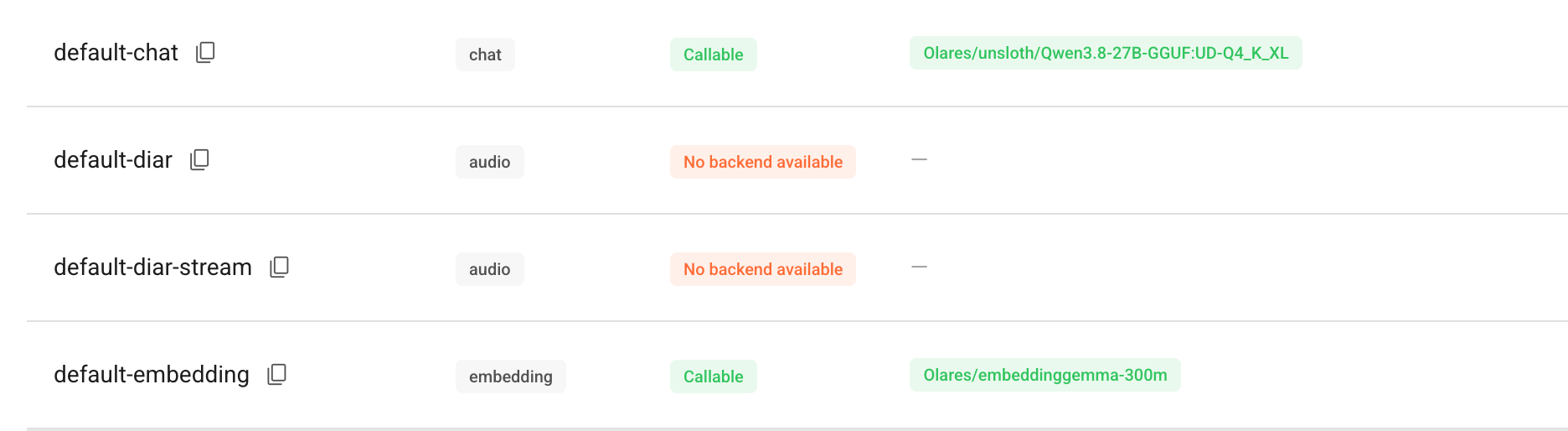
Hindsight needs a chat model to organize memories and an embedding model to search them. Both models must be available through Router before installation.
Configure embeddings before installation
If the default embedding model is not configured or cannot be called, Hindsight fails to start. Complete the checks below before installing Hindsight.
Open Router from Launchpad and go to Default models.
Set Qwen3.8-27B (llama.cpp) as the default chat model and EmbeddingGemma as the default embedding model, or confirm they are already selected. Check that both show Callable.
Install Hindsight
Open Market and search for "Hindsight".
Click Get, then Install, and wait for installation to complete.
Get the Hindsight API URL
Hermes uses the Hindsight API to save and retrieve memories. This API has its own entrance, separate from the web console and Router's model API.
Hindsight connects to Router with its default settings. You do not need to enter a model URL or Router API key. To use other chat or embedding models, see Change the models Hindsight uses.
Go to Settings > Applications > Hindsight. Under Entrances, select Hindsight API and copy its endpoint URL.
Your URL will look similar to this example:
texthttps://2b85162e1.laresprime.olares.comOpen Hermes CLI from Launchpad to check the connection from Hermes. Replace the example URL below with the endpoint you copied, then run:
bashexport HINDSIGHT_API_URL="https://your-hindsight-api-host" curl -fsS "${HINDSIGHT_API_URL%/}/health"Example output:
json{"status":"healthy","database":"connected","db_acquire_ms":1.4,"db_pool_waiting":0,"db_pool_in_use":0,"db_pool_max":100,"db_pool_idle":1}The values
"status":"healthy"and"database":"connected"confirm that Hermes can reach the API and Hindsight can connect to its database. For a sign-in page or redirect, see Why does the API health check show a login prompt?.
Connect Hermes Agent
The Hindsight plugin lets Hermes save information from your conversations and use it in later ones.
A memory bank groups memories under one ID. By default, the plugin uses a bank named hermes. Start with this bank, then create or select other banks when you need to separate projects or share memories between agents.
In Hermes CLI, install the Hindsight plugin:
bashhermes plugins install hindsightWhen prompted to enable the plugin, type
yand press Enter.Start the memory setup wizard:
bashhermes memory setupUse the arrow keys to navigate the wizard and Space or Enter to select an option. Configure the following settings:
Setting Action Memory provider setup Select hindsight Select mode Select Local External Hindsight API URL Paste the Hindsight API URL. API key Press Enter to skip. Starter memory template Select a template that suits your needs, or select Blank to start with an empty memory bank. Open the Hermes Dashboard from Launchpad and go to Plugins. Under Runtime Provider Plugins, check that Memory Provider is
hindsightand its status is ready or active.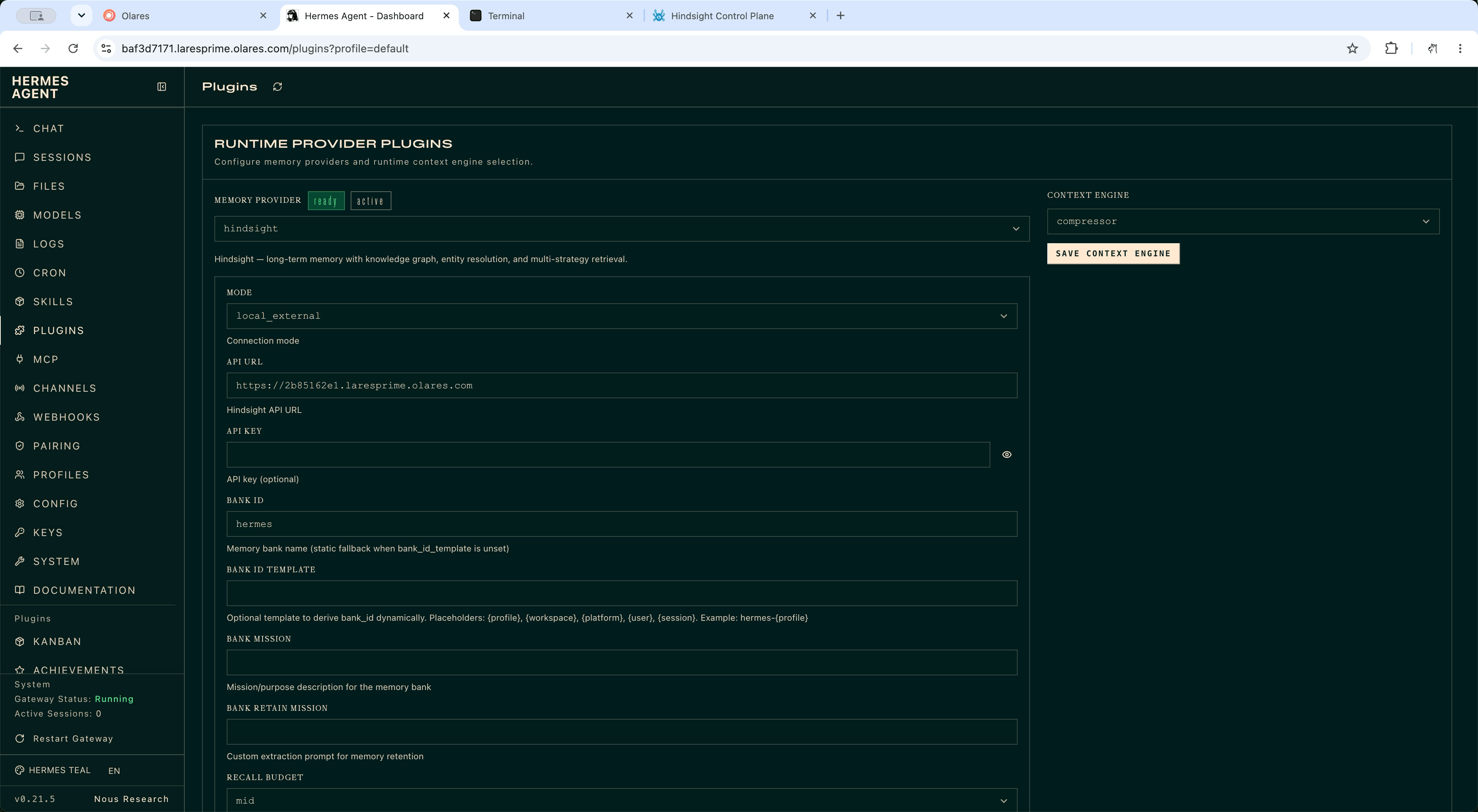
Check that Hermes saves memories
Start a new conversation in Hermes CLI or Hermes Dashboard and share a fact. For example:
textI develop and deploy applications on Olares.Hermes automatically uses Hindsight to store the fact.
Open Hindsight from Launchpad, select the
hermesmemory bank, and wait for the fact to appear. This confirms that Hermes has saved it through Hindsight.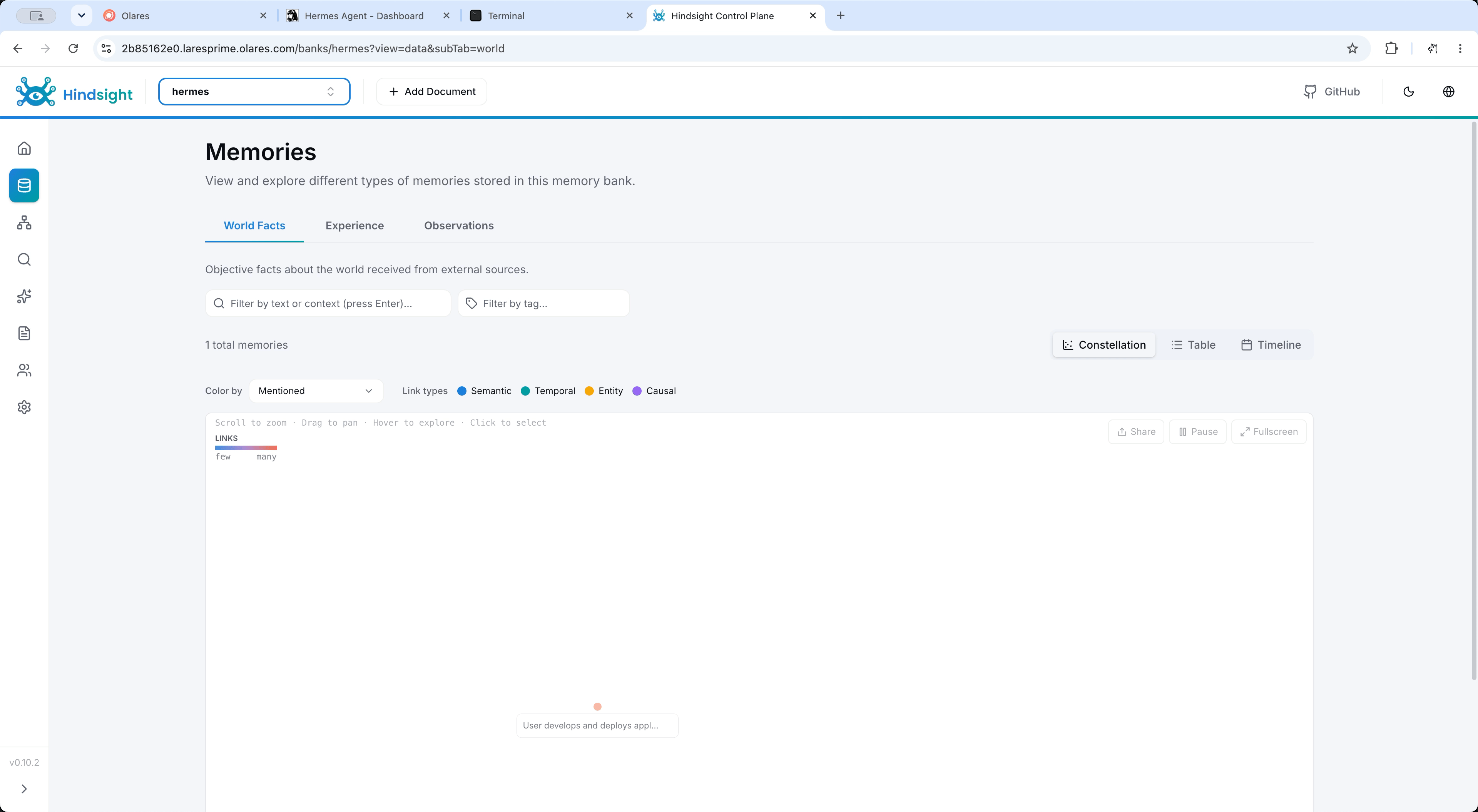
Control how Hermes saves and recalls memories
Turn off automatic memory
Hermes can automatically retrieve memories before each turn and save new conversations.
To read and write memories only when you ask, turn off automatic recall and retention:
- On the Hermes Dashboard's Plugins page, check that the active profile is the one you configured.
- In the Hindsight provider settings, turn off Auto Recall and Auto Retain. Keep Mode, API URL, and Bank ID unchanged.
- Click Save, refresh the page, and check that both switches remain off.
Edit the configuration file when the switches are missing
These settings belong to the Hindsight plugin in Hermes Agent.
Open Files and go to Data > hermesagent > home > hindsight.
Open
config.jsonand add or update these fields. Keep the other fields, including the connection and bank settings:json{ "auto_retain": false, "auto_recall": false }Save the file.
Start a new Hermes conversation to load the changes.
Save and recall memories manually
In Hermes CLI or Hermes Dashboard, you can ask Hermes to save information, retrieve it, or draw conclusions from your memories.
To save a fact or preference, ask Hermes to use
hindsight_retain:textUse hindsight_retain to remember that I deploy applications on Olares and prefer self-hosted services.To retrieve information in a later conversation, ask Hermes to use
hindsight_recall:textUse hindsight_recall to find which platform I use to deploy applications.To get advice based on your saved preferences, ask Hermes to use
hindsight_reflect:textUse hindsight_reflect to suggest what I should prioritize when choosing a deployment platform, based on my saved preferences.Open Hindsight and select the bank configured for Hermes, which is
hermesby default. Check that your deployment preference appears in the bank.
To let Hermes manage memories automatically, turn Auto Recall and Auto Retain back on.
Manage memory banks
Use separate banks for different projects or users. Connect agents to the same bank to share memories.
Create a memory bank
Open Hindsight from Launchpad.
Create a bank named
hermes-personalfor Hermes Agent.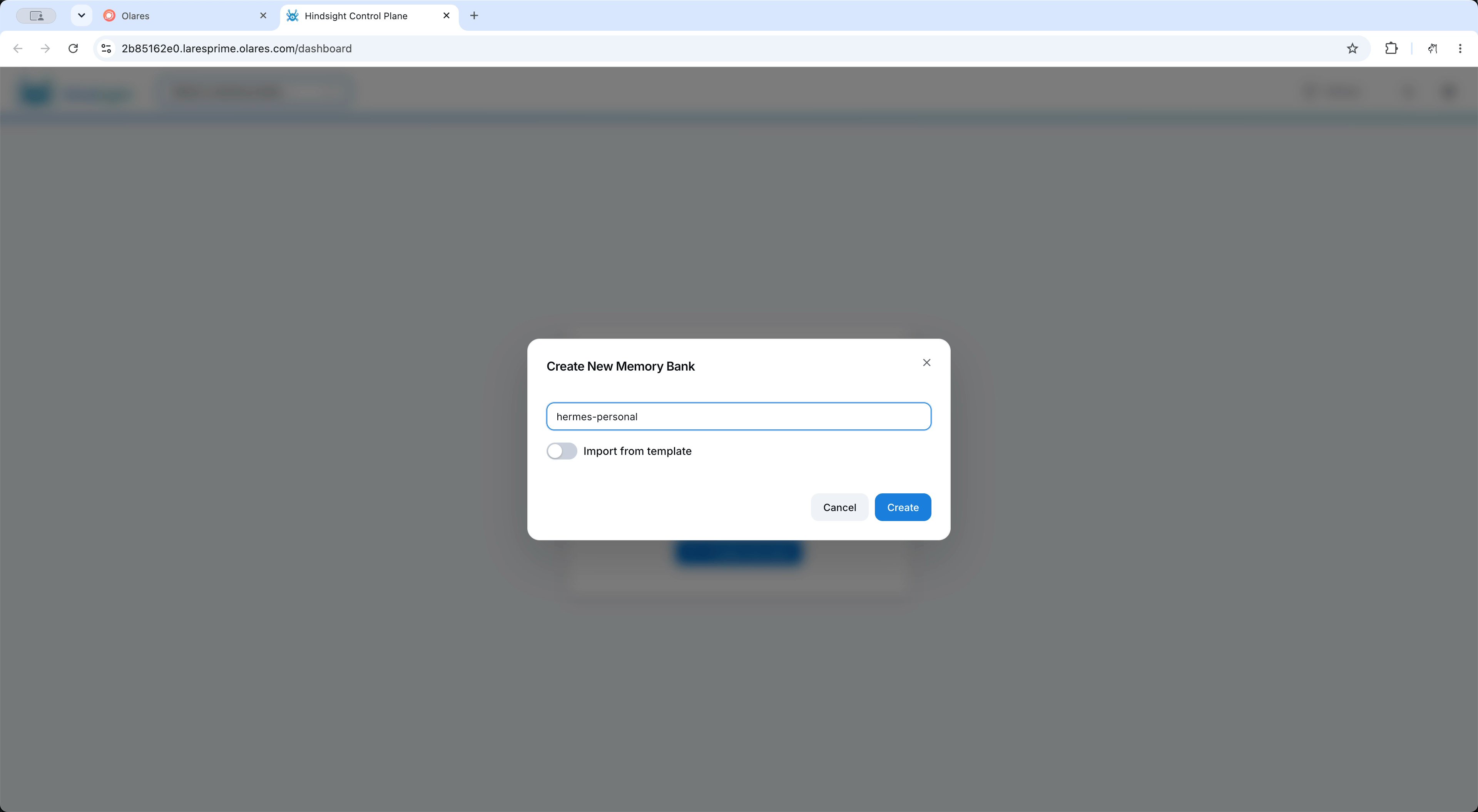
Copy the bank ID,
hermes-personal, for the Hermes configuration.
Choose the bank Hermes uses
- Open Hermes Dashboard and go to Plugins. Under Runtime Provider Plugins, find the Hindsight settings.
- Set Bank ID to
hermes-personaland leave Bank ID Template empty to use this fixed bank. - Click Save, then refresh the page to check that the bank ID is saved.
- Start a new Hermes conversation. Save a fact and check that it appears in
hermes-personal.
Change the bank in the configuration file
You can also change the bank in the Hindsight plugin's configuration file.
Open Files and go to Data > hermesagent > home > hindsight.
Open
config.jsonand update these fields. Replacehermes-personalwith your bank ID and keep the other fields, including the connection settings:json{ "bank_id": "hermes-personal", "bank_id_template": "" }Save the file.
Start a new Hermes conversation to load the changes. Save a fact and check that it appears in the selected bank.
Change the models Hindsight uses
To change models for all apps that use default-chat or default-embedding, select another chat or embedding model on Router's Default models page. Hindsight follows these defaults without further changes.
To change only Hindsight, get the full model name from Router's How to call this model window. Find chat models under LLM and embedding models under Tools. See Get connection details from Router.
You can also connect Hindsight to another OpenAI-compatible service. The base URL is shared by chat and embedding requests, so the endpoint must support both.
Open Settings > Applications > Hindsight.
Click Manage environment variables and update the following values as needed:
Environment variable Default What to enter HINDSIGHT_API_LLM_BASE_URLEmpty. The app generates your Router URL. Keep empty for Router, or enter another OpenAI-compatible base URL. HINDSIGHT_API_LLM_MODELdefault-chatThe full chat model name from Router or your model service. HINDSIGHT_API_EMBEDDINGS_MODELdefault-embeddingThe full embedding model name from Router or your model service. HINDSIGHT_API_LLM_API_KEYEmpty. The app supplies not-required.Keep empty for Router, or enter the API key required by your model service. Click Confirm, then Apply.
To use Router's defaults again, restore the values in the Default column.
Connect OpenClaw or OpenCode
You can also connect OpenClaw or OpenCode running on Olares to the same Hindsight service. Use the Hindsight API URL, and check the plugin's compatibility requirements before installation.
A Hindsight API token, when required, authenticates the agent to Hindsight. It is separate from a Router API key or an Olares login password.
Connect OpenClaw
The plugin replaces OpenClaw's selected memory provider. Its automatic-memory settings are separate from Hermes. Review the OpenClaw plugin compatibility requirements before proceeding.
Open OpenClaw CLI from Launchpad and install the plugin:
bashopenclaw plugins install @vectorize-io/hindsight-openclawRun the setup wizard:
bashnpx --package @vectorize-io/hindsight-openclaw hindsight-openclaw-setupSelect External API and paste the Hindsight API URL. Leave the token empty for the default Olares setup.
Open Settings > Applications > OpenClaw, click Stop, then Resume to load the plugin.
Start a conversation in OpenClaw and share a fact. Open Hindsight and check that it appears in the bank created for that conversation's context.
For bank selection and automatic-memory settings, see the Hindsight plugin guide for OpenClaw.
Connect OpenCode
These steps configure @vectorize-io/opencode-hindsight for a project. The plugin provides memory tools and can save and recall conversations automatically.
Open your project folder in Files and locate
opencode.json. For projects in OpenCode's default workspace, the path isHome/Code/<project>/opencode.json. Create the file in that folder if it does not exist.Add the following entry to the
pluginarray, keeping existing plugins and settings. Replace the example URL with your Hindsight API URL:json{ "plugin": [ [ "@vectorize-io/opencode-hindsight", { "hindsightApiUrl": "https://your-hindsight-api-host", "bankId": "opencode" } ] ] }Use
opencodefor a separate bank, or enter an existing bank ID to share its memories.Save the file. Open OpenCode Terminal from Launchpad, change to the project directory, and run
opencode. The plugin installs automatically on startup.Ask OpenCode to save a fact with
hindsight_retain, then retrieve it in a new session withhindsight_recall. Check the results in the selected Hindsight bank.
See the Hindsight plugin guide for OpenCode for additional settings and its successor, the Coding Agents plugin.
FAQs
Why does Hindsight report that an LLM API key is required?
Hindsight received an empty model API key.
- Open Settings > Applications > Hindsight > Manage environment variables.
- Set
HINDSIGHT_API_LLM_API_KEYtonot-requiredfor Router. For a model service that requires authentication, enter its valid key. - Click Confirm, then Apply.
Why does the API health check show a login prompt?
Check the Hindsight API entrance's authentication level and confirm it is set to Internal. Run the check from Hermes CLI as described in Get the Hindsight API URL. When accessing the entrance from your computer, enable LarePass VPN.
Why does Hindsight fail to start with upstream_circuit_open?
Router has stopped forwarding requests after repeated failures from a model service. Check the model set in HINDSIGHT_API_EMBEDDINGS_MODEL. Send it a short input and inspect its logs in Control Hub.
If the logs show infer failed on device GPU.0: general error, fix the embedding model's inference problem before retrying Hindsight. Increasing Hindsight's resources does not resolve an error in a separate model service.
Why can't Hermes recall a newly saved fact?
Check that the fact appears in the bank and both conversations use the same bank ID. The Hindsight plugin can limit searches to observation, which contains summaries of stored facts. New facts might not appear until Hindsight finishes creating those summaries.
To include raw facts, set recall_types to "observation,world,experience" in the provider configuration, then start a new session. This setting affects both automatic recall and the manual recall tool.
Why are memory operations slow?
Hindsight extracts facts, creates embeddings, and processes memories in the background. These tasks can continue after Hermes replies. Check the bank and tool result before submitting the same content again.
Memory processing also shares model capacity with chat requests. Try saving a short fact and check the Hindsight and model logs. Turn off automatic memory to save memories only when you ask. Check resource usage before increasing the app's CPU or memory allocation.
Learn more
- Hermes Agent: Set up the agent and its model connection.
- Olares Router: Configure model routes and understand authentication.
- Hindsight documentation: Explore memory banks, integrations, and API features.