Share project memory across AI agents with MemPalace
MemPalace is a local memory service for AI agents. It stores notes and conversations in their original wording and helps you find relevant passages by meaning.
On Olares, your imported memory persists independently of an agent's chat sessions. Hermes Agent and OpenClaw can use the same memory through MCP, while Olares Files holds your source documents. The default text embedding and search run locally without a cloud API key.
This guide follows a fictional kitchen renovation project called Lakeview. You will import its brief, use Hermes Agent to search the imported file and save a meeting note, then retrieve that note in a new conversation and from OpenClaw. The MCP connection gives each agent memory tools. This workflow does not configure automatic saving or recall: you explicitly ask the agents to search and save records.
Learning objectives
- Import a project brief from Files and search its original text.
- Ask Hermes Agent to read the brief and save a meeting note.
- Retrieve the meeting note in a new Hermes conversation.
- Ask OpenClaw to retrieve the note saved by Hermes.
Prerequisites
- Olares OS: Version 1.12.7 or later.
To make project information easier to organize and find with AI agents, set up these apps before following their sections:
- Hermes Agent: Follow the Hermes Agent setup guide and select Router's
default-chatmodel. - OpenClaw: Follow the OpenClaw setup guide with OpenClaw 2026.10.5 or later, using Router's
default-chatmodel.
How MemPalace organizes memory
MemPalace organizes stored text in three levels:
| Level | What it holds | In this guide |
|---|---|---|
| Wing | Records for a project, person, or other subject | The imported brief goes in lakeview-home. Hermes saves the meeting note in lakeview-agent. |
| Room | Records on a topic within a wing | The brief goes in general. The meeting note goes in client-meeting. |
| Drawer | The original text of a record or part of an imported file | Search results can identify a passage from brief.md or the saved meeting note by its drawer ID. |
Both wings are in the same MemPalace memory store and are available to connected agents. Use --wing to search one wing. A search limited to lakeview-home will not include the meeting note in lakeview-agent.
Install MemPalace
- Open Market and search for "MemPalace".
- Click Get, then Install, and wait for installation to complete.
First import may take longer
The first import or memory write downloads a local embedding model of about 80 MB. If the download times out, retry the operation when your connection recovers. MemPalace caches the model for later use.
Import a project from Files
Save the following example note as
brief.mdon your computer:markdown# Lakeview kitchen renovation The approved budget is EUR 18400. Cabinet delivery is booked for 10 November 2026. Installation starts on 12 November 2026. The delivery contact is Olivia Carter. The client prefers oak cabinetry and warm white, dimmable lighting. Northstar Joinery will supply the cabinets.Open Olares Files. In Home, create a folder named
MemPalace-demoand uploadbrief.mdinto it.Open MemPalace Terminal from Launchpad. The folder at
/Files/Home/MemPalace-demo/in Olares Files is mounted at/home/app/userdata/Home/MemPalace-demoin the terminal. Import it with:bashmempalace mine /home/app/userdata/Home/MemPalace-demo --wing lakeview-homeA successful import shows
brief.mdprocessed and one drawer filed: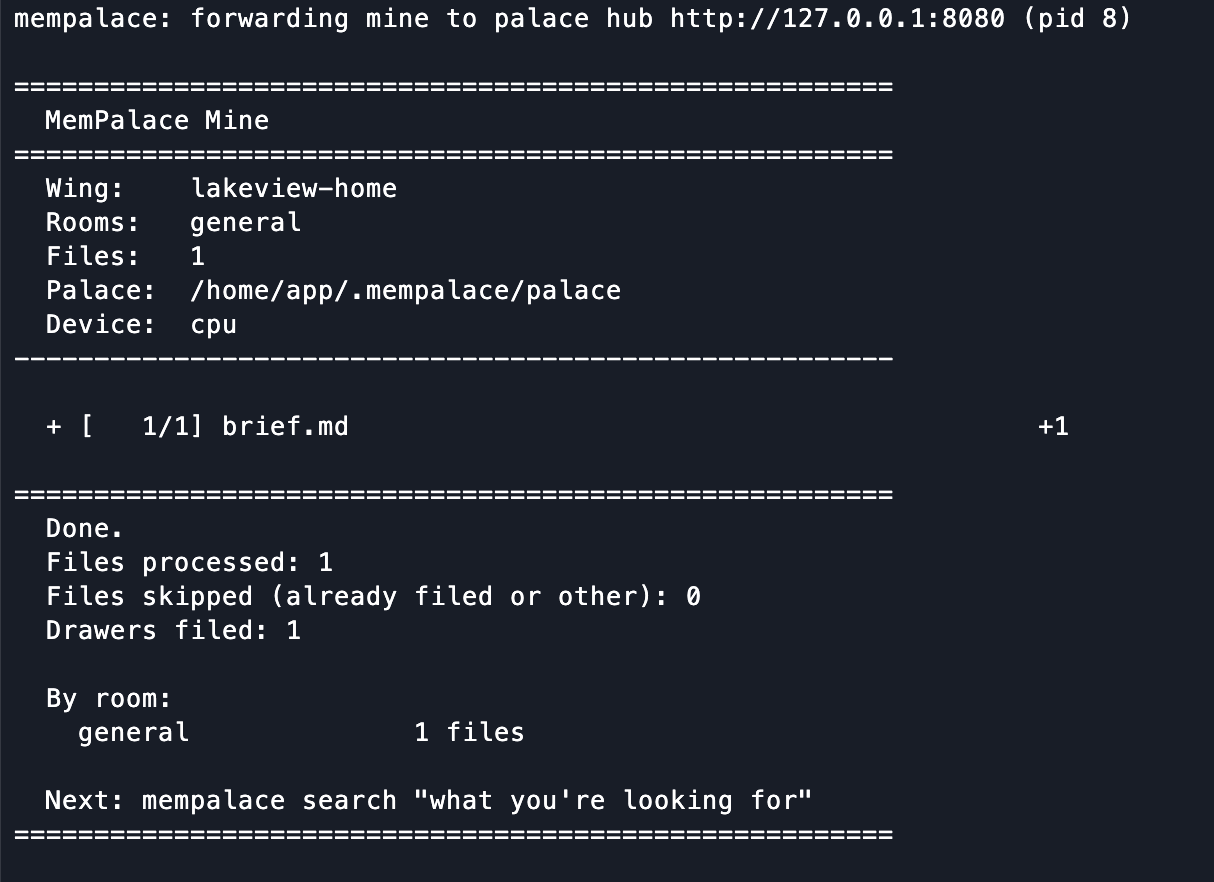
The Home mount is read-only. MemPalace stores the imported memory in its own application data.
Search the imported note for the cabinet delivery date:
bashmempalace search "When is cabinet delivery?" --wing lakeview-home --results 3Check that a returned passage gives the delivery date as 10 November 2026 and names
brief.mdas its source.
About this search
--wing lakeview-homelimits the search to the imported brief's wing.--results 3returns up to three matches. Change3to another number to request a different limit.
Use the same wing for later imports of the Lakeview brief.
Connect Hermes Agent to the same memory
You can use Hermes CLI without a messaging channel. This section shows Hermes reading the imported brief, then saving a note for later conversations.
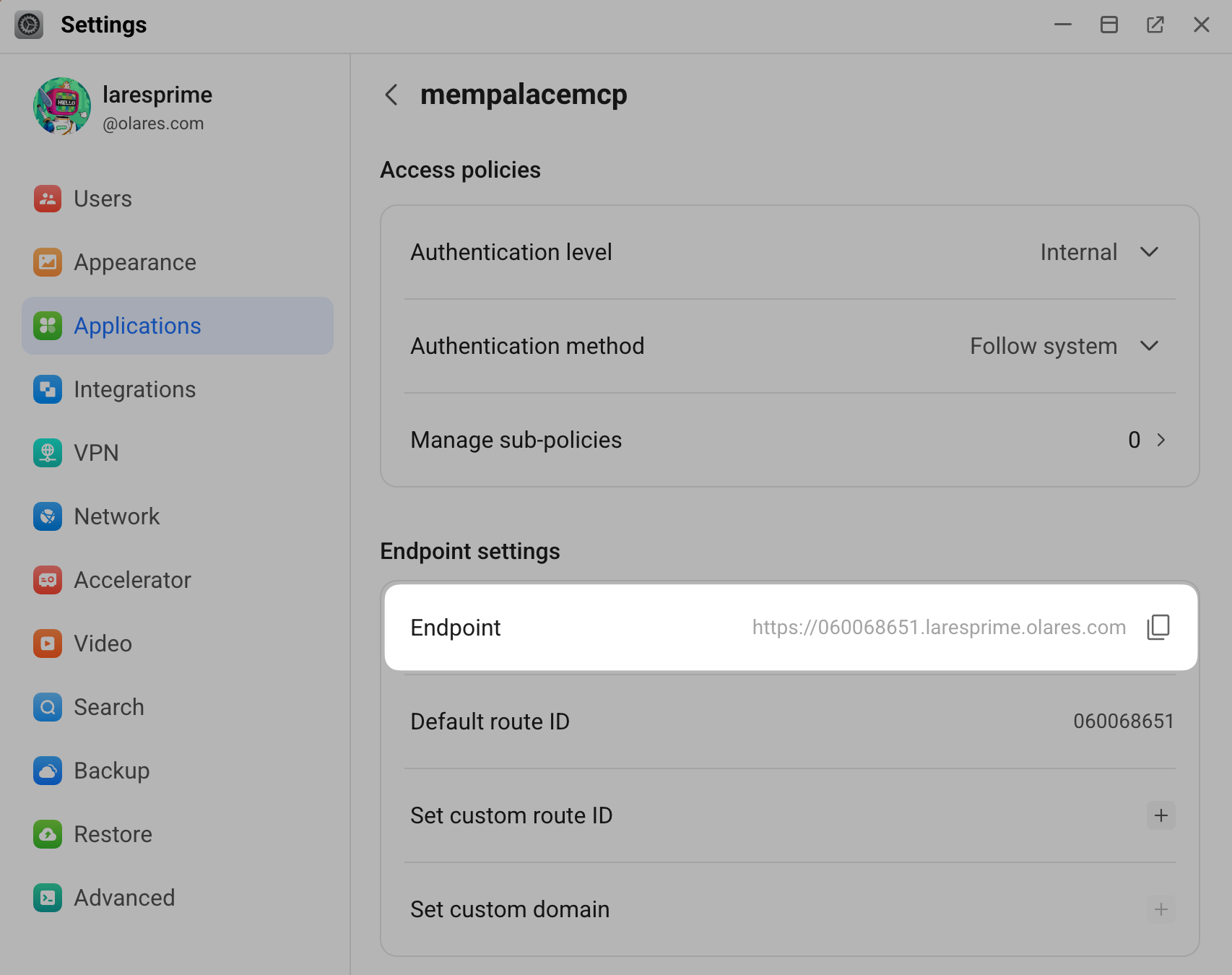
Copy the MCP endpoint
Open Settings > Applications > MemPalace.
Under Entrances, select MemPalace MCP.
Check that Authentication level is set to Internal.
Copy the Endpoint URL.
Add the connection in Hermes
Open Olares Files and locate Data > hermesagent > home >
config.yaml.Click edit_square to edit.
Add the
mempalaceentry undermcp_servers. Replace<mempalace-endpoint-url>with the full URL copied above:yamlmcp_servers: mempalace: url: "<mempalace-endpoint-url>/mcp" tools: include: - mempalace_status - mempalace_search - mempalace_add_drawer - mempalace_get_drawer - mempalace_diary_writeAdd
mcp-mempalaceto the existingplatform_toolsets.clilist:yamlplatform_toolsets: cli: - hermes-cli - mcp-mempalaceAdd these entries to the existing lists in
config.yamlwithout removing your other MCP servers or CLI toolsets.Click save to save the changes.
Read the imported brief
Start a new conversation in Hermes CLI:
bashhermes chatAsk Hermes to search the
lakeview-homewing:textSearch MemPalace's lakeview-home wing for the Lakeview kitchen brief. What's the approved budget and who supplies the cabinets? Include the source.Hermes should find the budget and supplier in
brief.mdand identify the source.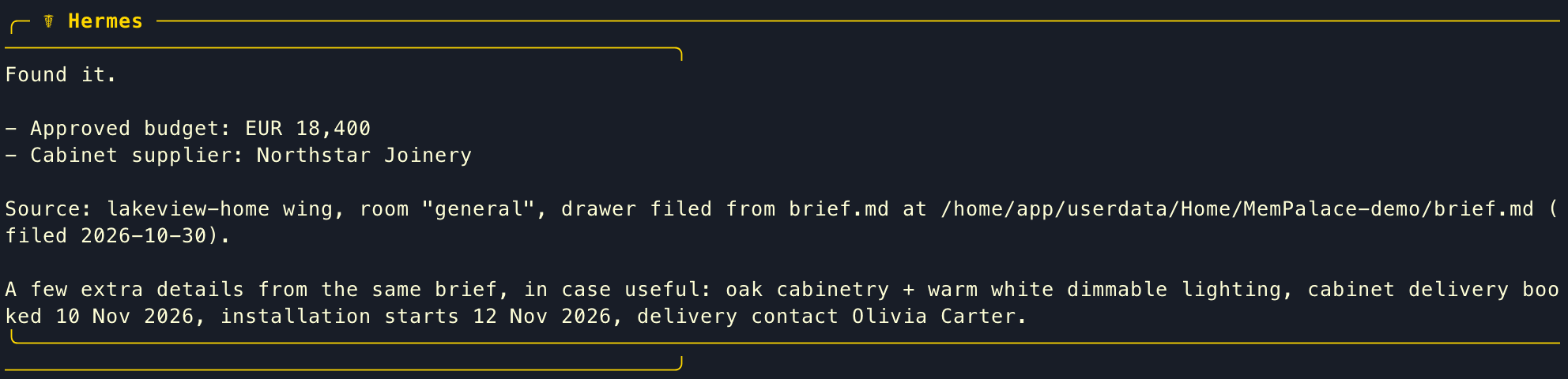
Save a meeting note and recall it later
The meeting note repeats the delivery details from the brief and adds a project reference.
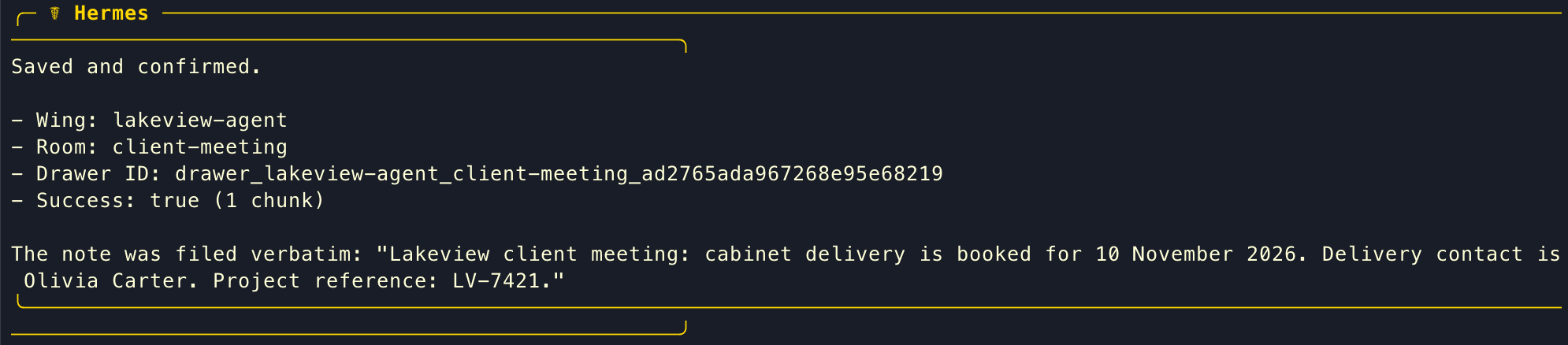
In your current Hermes CLI conversation, ask Hermes to save the meeting note:
textUse MemPalace to save this exact project note in wing lakeview-agent, room client-meeting: "Lakeview client meeting: cabinet delivery is booked for 10 November 2026. Delivery contact is Olivia Carter. Project reference: LV-7421." Confirm after the memory tool succeeds.Hermes may show a confirmation like this:
Type
/exitand press Enter to leave Hermes CLI. Then runhermes chatto start a fresh conversation.In the new conversation, ask Hermes to search the shared memory:
textSearch MemPalace for the Lakeview client meeting. What delivery date, contact, and project reference did we record? Include the source drawer ID.Hermes may return the meeting details and source drawer ID like this:

Use the memory from OpenClaw
OpenClaw can use the same MemPalace service to retrieve the meeting note saved by Hermes.
Open OpenClaw CLI and register the MemPalace MCP endpoint. Replace
<mempalace-endpoint-url>with the full URL from Copy the MCP endpoint:bashopenclaw mcp add mempalace \ --url "<mempalace-endpoint-url>/mcp" \ --transport streamable-http \ --include mempalace_search,mempalace_add_drawer,mempalace_get_drawer,mempalace_status,mempalace_diary_writeRun
openclaw mcp probe. The output should show five tools formempalace.In Market, open My Olares and find OpenClaw. Open the operation menu, select Stop, then select Resume. Wait until OpenClaw is running.
Open Control UI from Launchpad and select New Session.
Ask OpenClaw:
textSearch MemPalace for the Lakeview client meeting. What delivery date, contact, and project reference did we record? Include the source drawer ID.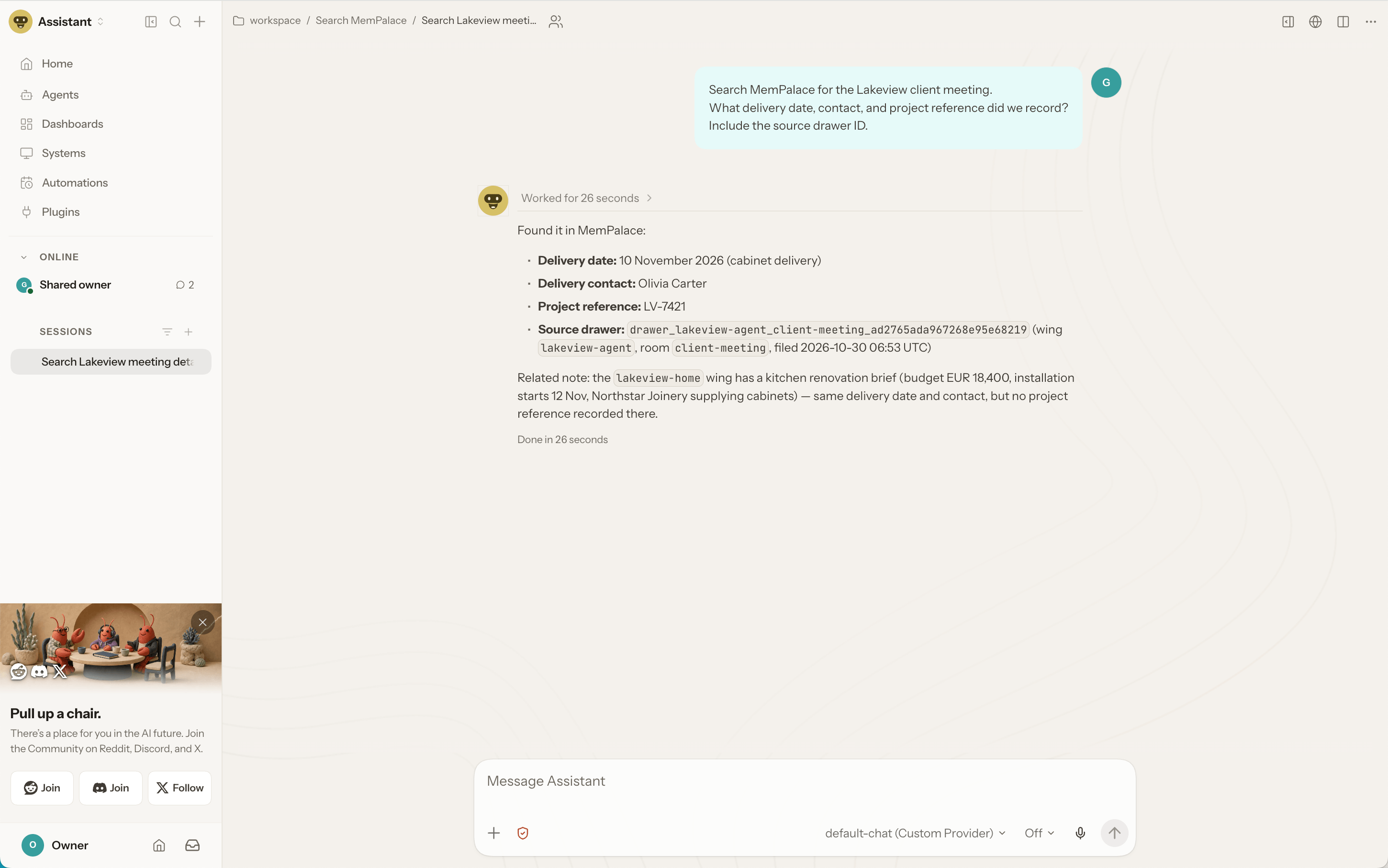
OpenClaw should return the delivery date, contact, and project reference from the meeting note saved by Hermes.
Add documents and conversation exports
Upload the files to a folder in Olares Files. Then, in MemPalace Terminal, run the command for that file type:
| Source | Command |
|---|---|
| Project notes, Markdown, and code | mempalace mine <folder> --wing <project> |
| Conversation exports | mempalace mine <folder> --mode convos --wing <project> |
| PDF, DOCX, PPTX, XLSX, RTF, and EPUB | mempalace mine <folder> --mode extract --wing <project> |
Replace the placeholders before running a command:
<folder>: The folder's mounted path in MemPalace Terminal.<project>: The wing where MemPalace will store the imported records. Uselakeview-hometo add files to the brief's wing.
Document imports
The extract mode imports searchable text, not a document's layout or images. Keep the original file in Olares Files, and run OCR on scanned pages before importing them. The required extraction tools are included with MemPalace.
Beyond the basic workflow
Review memory organization
Run the following command in MemPalace Terminal to view an organization report for the entire memory store:
mempalace auditThe scorecard rates how well your memory is organized, not search accuracy. Check the findings below the scores for specific issues to review. n/a means that an aspect has no score to report.
Optional: Organize project memory with Router
As a project accumulates records, you can group them into rooms by topic. MemPalace can use a model through Olares Router to suggest rooms for a wing. Review the suggestions and preview where records would move before applying the changes.
The Lakeview example has only one imported brief, so the proposal may include rooms with no records. A wing with several notes on different topics gives MemPalace more records to classify.
How app endpoints work
When a client connects to another Olares app, it uses that app's endpoint as the network address. If the app exposes multiple endpoints, choose the one that matches the feature or protocol the client needs.
Get the Router endpoint. Go to Olares Settings > Applications > Router > Entrances. Select Router, then copy the Endpoint URL.
Use this URL in place of
<router-endpoint-url>below. The command adds/v1and uses the model selected as the default chat model in Router.Finish active agent tasks first. The maintenance command pauses MCP while it works and automatically resumes the service afterward. Run the following command in MemPalace Terminal to suggest rooms for
lakeview-home:bashmempalace-maintenance rooms propose --wing lakeview-home \ --llm-provider openai-compat \ --llm-model default-chat \ --llm-endpoint "<router-endpoint-url>/v1" \ --accept-external-llm--accept-external-llmpermits sending sampled notes to the specified model endpoint. Whether the model runs locally or in the cloud depends on Router's currentdefault-chatroute.After
rooms proposefinishes, find the proposal file path on theSaved toline. In MemPalace Terminal, runcatfollowed by that path to review the suggested room names and descriptions. Continue only if they fit your project.Preview how records would be assigned to the proposed rooms:
bashmempalace-maintenance rooms apply --wing lakeview-home --from all --show 3This command previews changes without applying them.
--from allincludes records from every room inlakeview-home, and--show 3displays up to three examples per destination room. Check that the proposed assignments match the records' content.Apply the changes after reviewing the preview:
bashmempalace-maintenance rooms apply --wing lakeview-home --from all --yes
Back up your memory
The source files remain in Olares Files. Imported memory, diaries, and graph data persist in MemPalace's application storage. For a manual copy, stop MemPalace from Market, copy Data > mempalace > mempalace to your backup location in Files, then resume the app. Keep the source documents in your normal Files backup as well.
The default embedding model and search run on Olares. Agent conversations and optional model-assisted organization follow the model provider configured through Router. Select a local model there when you want those model calls to stay on your device.