Use Olares Router as your AI gateway
Olares Router is the AI gateway built into Olares, shipping with v1.12.7. It exposes every AI capability on your Olares, local or cloud, through a single access layer. Clients never connect to local models or cloud vendors directly: they connect to Router, and Router routes every request to the right backend.
What is Olares Router
To understand how Router simplifies your AI workflows, it helps to look at where it sits within the platform and how it unifies different AI workloads into standard capabilities.
Where Router sits
Router functions as the central dispatch layer for your entire AI ecosystem. Rather than interacting with fragmented backends directly, all traffic flows through this single gateway.
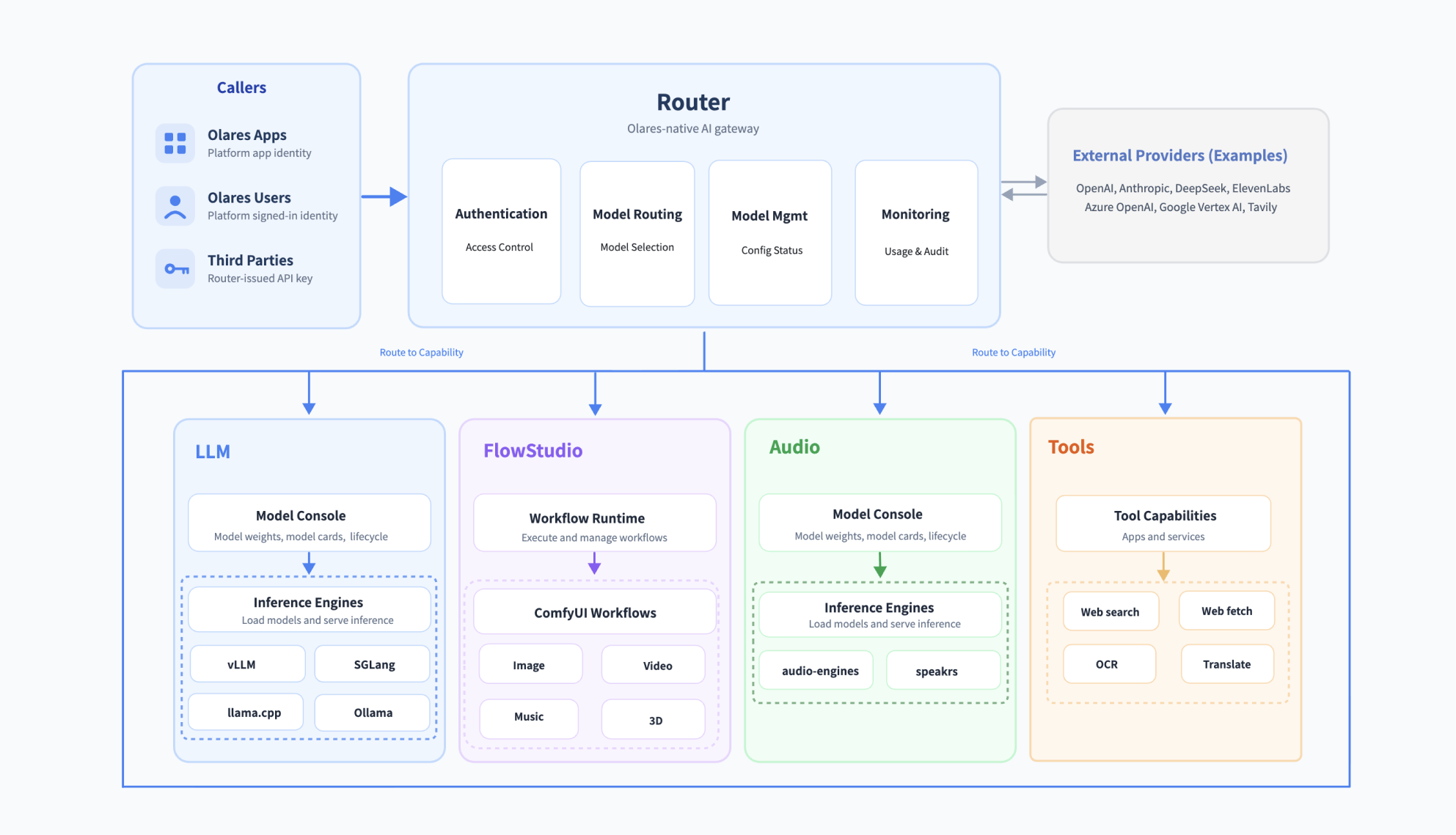
As shown in the architecture above, the system operates through three core layers:
- Callers: Whether the request comes from an app inside Olares, a signed-in Olares user, or a third party outside it, it connects to Router. Callers never interact with the backends directly.
- Router: Every call enters through this one gateway. Router handles caller authentication, access control, and quota management. It normalizes interfaces from every source and modality into one standard API, then routes the call to the named capability.
- Backend capabilities: Router dispatches each request to the corresponding destination as follows:
- Local Capabilities: Requests for local workloads are routed to specific backend capability based on the task. LLM and Audio run on local inference engines managed by the Model Console, FlowStudio runs on its own workflow runtime, and Tools are served by installed tool apps.
- External Providers: Requests for remote models are routed to cloud platforms, such as OpenAI, ElevenLabs, Google Vertex AI, and Tavily.
One gateway for every AI capability
While LLMs have converged on standard APIs because a single model usually completes the task, multi-modal and functional tools lack this standardization. For example, an audio workflow typically requires separate models for voice separation, enhancement, speech recognition, and text to speech. These models come from different providers with different API structures, and there is no common interface.
Router solves this fragmentation by acting as an abstraction layer over your entire AI ecosystem. It takes language models, audio/video models, and utility tools, and exposes them as unified system capabilities behind a single gateway. This provides one standard format for all your AI workloads.
To keep your ecosystem organized and accessible, Router groups these unified capabilities into four core categories:
| Category | What lives here | Examples |
|---|---|---|
| LLM | Chat and response models, local or remote | DeepSeek, OpenAI, Anthropic, Google Gemini, a local Qwen model running on your own GPU |
| Audio | Speech recognition, synthesis, and the rest of the audio pipeline | Speech-to-text (STT), text-to-speech (TTS), voice activity detection (VAD), diarization, alignment, speaker embedding, audio enhancement, sound FX, voice changer |
| Creative | Image and video generation | Text-to-image, text-to-video, music generation, 3D |
| Tools | Everything an agent reaches for around the model | Embedding, web search, web fetch, reranking, optical character recognition (OCR), translation |
Why Olares Router
Router is integrated directly into the Olares platform alongside your applications and models. It functions as a platform-level gateway that manages access, lifecycles, and multi-modal routing:
- Identity and access: Router utilizes the Olares identity system. Internal callers authenticate using their platform identity, and external callers use Router-issued API keys. Underlying cloud provider credentials are kept isolated within Router and are never exposed to callers.
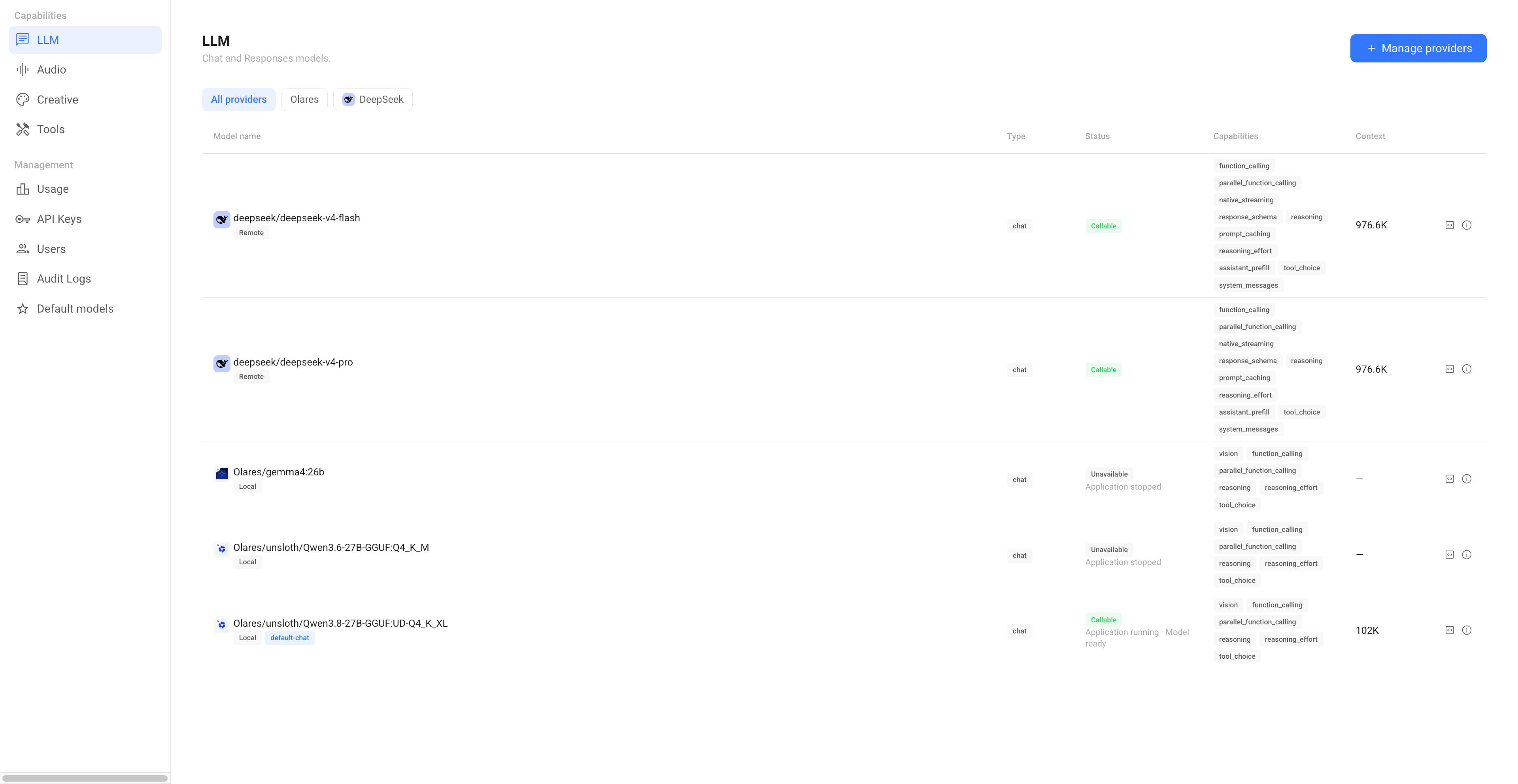
- Model observability: Router syncs automatically with the Model Console to discover installed models. It provides a UI to tune or restart underlying engines and tracks all request metrics by caller on the Usage page.
- Unified multi-modal capabilities: Router aggregates language, audio, video models, as well as utility tools (like search and embeddings), behind a single access layer. Clients use one standard interface and can invoke any system capability by its name.
How callers authenticate with Router
Every call through Router has an identified caller, and what the caller needs to provide depends on who that caller is.
| Caller | How Router identifies it | |
|---|---|---|
The platform stamps an identity header X-Olares-App-ID onto every request from an app inside Olares, so the caller needs to provide nothing else. | None | |
The platform stamps an identity header X-BFL-USER onto every request from a signed-in Olares user, so the caller needs to provide nothing else. | None | |
A caller that is neither an Olares app nor an Olares user presents a Router-issued API key (Authorization: Bearer <api-key>). Router validates the key and attributes the call to its owner. Delete the key and the access will end.This covers your own devices outside Olares and anyone you share the models with. | Router-issued API key |
Understand model naming conventions
When you view or configure models in Router, you will notice different naming formats. Router uses these names to identify the model's provider, origin, and routing logic. Understanding these rules is essential for configuring API requests and troubleshooting connections.
Names with a slash
If a model name contains one or more slashes, Router parses the string by splitting it at the first slash:
- Provider: The segment before the first slash
- Model Name: Everything after the first slash
For example:
deepseek/deepseek-v4-flash: The provider isdeepseek, and the model name isdeepseek-v4-flash.Olares/unsloth/Qwen3.5-27B-GGUF:Q4_K_M: The provider isOlares, indicating a local workload. The remaining string (unsloth/Qwen3.5-27B-GGUF:Q4_K_M) is the exact model name, which corresponds to its Hugging Face repository path.
Names without a slash
If a model name does not contain a slash, it does not point to a specific provider and model directly. Instead, it represents a custom routing configuration. It will always fall into one of the following three categories:
- Default system names: Names starting with the
default-prefix, such asdefault-chatordefault-tts, are system-level names. They automatically route requests to whichever model is currently assigned to that capability. - Model groups: A unified name created for load balancing. For example, you might create a group named
DeepSeek-V4that distributes requests across local models and remote services. The group name itself contains no slashes. - Aliases: Custom, user-defined short names created for convenience. For example, renaming a long model name to a simple one.
Get connection details from Router
Connecting to Router takes three parameters:
Base URL: Open a capability page such as LLM, find the model, and click the View connection example icon on the right.
Model name: Copy the model name from the How to call this model window. Or set a default model for each capability on the Default models page, and use the system name like
default-chatinstead of a specific model name.API key: Created on the API keys page. Required only for callers from the LAN or the internet. Apps in Olares do not need to enter API keys.