Applications
This documents covers essential concepts for managing application identifiers, types, permissions, and Market integrations within Olares.
Application identifier
In Olares, each application is assigned two identifiers: an application name and an application ID.
Application name
Application names are assigned by Indexers. The official Indexer address maintained by Olares is apps. The directory name of an application within this repository serves as the application name.
Application ID
The application ID is derived as the first eight characters of the MD5 hash of the application name. For instance, if the application name is "hello", the application ID becomes "b1946ac9".
Application IDs are utilized in endpoints.
Application types
There are multiple types of applications in Olares. You can distinguish a specific application type according to the namespace shown in Control Hub.
System applications
System applications encompass Kubernetes, Kubesphere, Olares components, and essential hardware drivers. The system-level namespaces include:
os-system
kubesphere-monitoring-federated
kubesphere-controls-system
kubesphere-system
kubesphere-monitoring-system
kubekey-system
default
kube-system
kube-public
kube-node-lease
gpu-system
os-system is a component developed by Olares team. Cluster-level applications and various database middleware provided by the system are installed under this namespace.
User system applications
Olares supports multiple users and provides two distinct namespaces for system applications accessible to Admin and Member users:
user-space-{Local Name}
The
user-spacenamespace is where system applications that users interact with daily are installed. These applications include:- Files
- Settings
- Control Hub
- Dashboard
- Market
- Profile
- Vault
These applications interact with each other while also calling system-level interfaces (such as Kubernetes'
api-serverinterface). To ensure system security, Olares deploys them in isolated user-space namespaces and uses sandbox mechanisms to prevent malicious program attacks and unauthorized access.user-system-{Local Name}
System applications and user's built-in applications are generally restricted from direct access by third-party applications.
However, if built-in applications or database clusters make specific service interfaces available through a service provider, community applications can request access by declaring these permissions.
When such access is granted, the system routes these network requests through secure proxies in the
user-systemnamespace, ensuring proper authentication and protection of resources.
Community applications
Community applications are applications created and maintained by third-party developers. They encompass a wide range of purposes, from productivity tools and entertainment applications to data analysis utilities.
The namespace of community applications consists of two parts: application name and the user's local name, for example:
n8n-alice
gitlab-client-bob
Shared applications
Shared applications are a special category of community applications in Olares. They are deployed and managed centrally by the administrator, and every member of the cluster can use them without installing their own copy.
This page explains what shared applications are, how members access them, and why Olares moved to a unified architecture in Olares 1.12.6.
Understand shared applications
A shared application provides shared resources or services to all users in an Olares cluster. Instead of every member installing and running their own instance, the administrator installs and manages one instance that everyone uses.
Key characteristics of shared applications include:
- Centralized management: Only administrators can install, upgrade, stop, resume, and uninstall shared applications. Administrators are responsible for configuring and hosting the app's service, resources, and runtime environment within the cluster.
- Easy identification: In Olares Market, shared applications are typically marked with labels such as "Shared", "Shared app", or the group icon.
- Flexible access: The way you access a shared application depends on its form.
Dependencies
Dependencies are prerequisite applications that must be present for certain applications to function properly. Before installing an application with dependencies, users must ensure all required dependencies are already installed in the cluster.
Service provider
The Service Provider mechanism enables community applications to interact with system applications and services from other community applications.
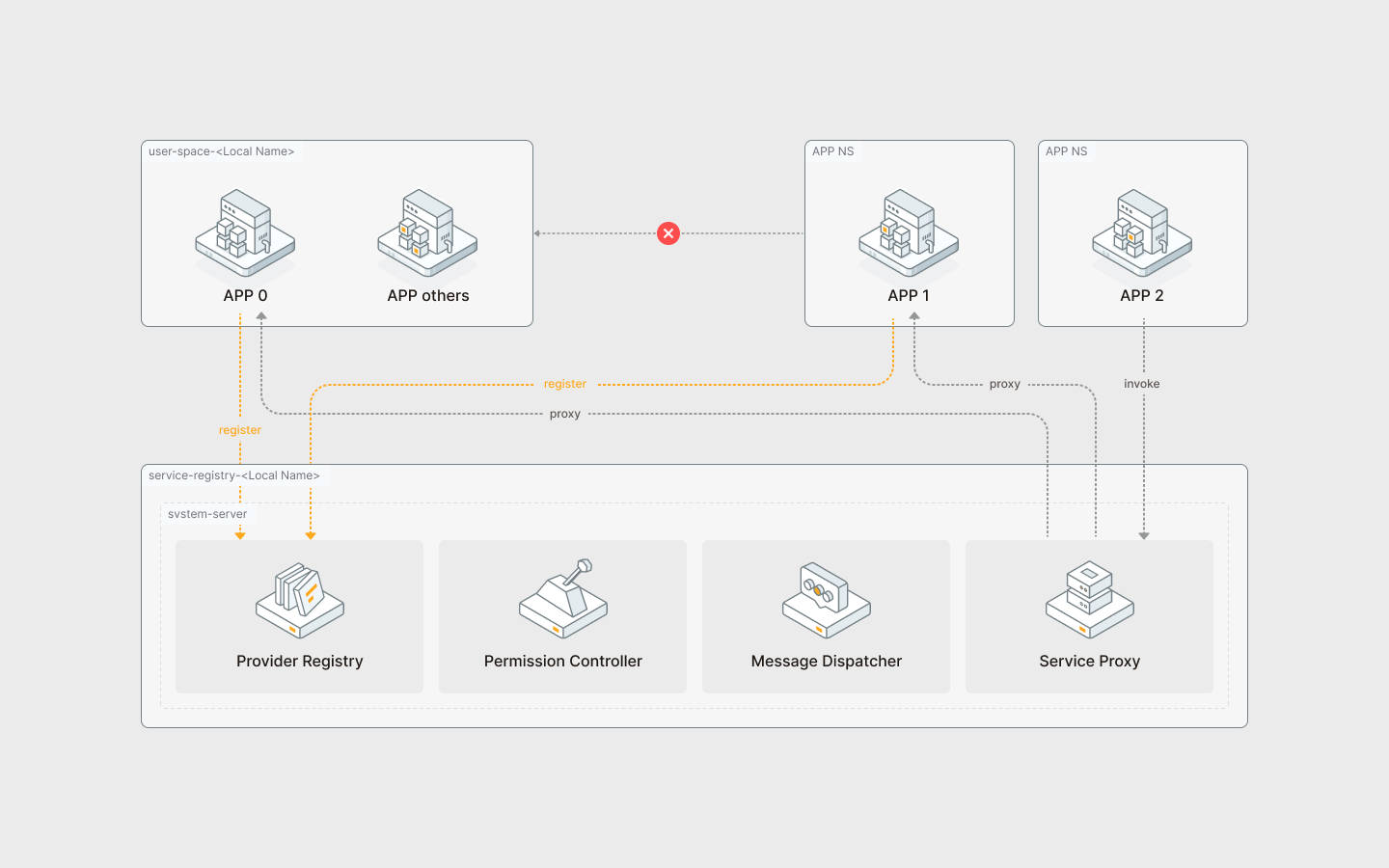
The mechanism consists of three procedures:
Provider declaration: Developers must declare their application as a provider for specific service interfaces. The system includes built-in Providers.
Permission request: Applications seeking to use a service interface must explicitly request provider access permissions.
Request handling:
system-serverservices underuser-systemact as an agent that handles incoming requests and performs necessary permission validations.