
A Small-Business Credential Offboarding Plan for Shared Accounts


When a collaborator leaves, a small business should go through every service that person could reach, one account at a time. Remove their own access, and change any shared password or key they could use.
Then check whether the service still accepts their existing sessions or tokens, and confirm the people who stay can still do their work.
Removing someone from a shared vault is only one part of credential offboarding. It stops them from opening the vault again. It does not change a password they already saw or copied.
Use a service-by-service offboarding plan
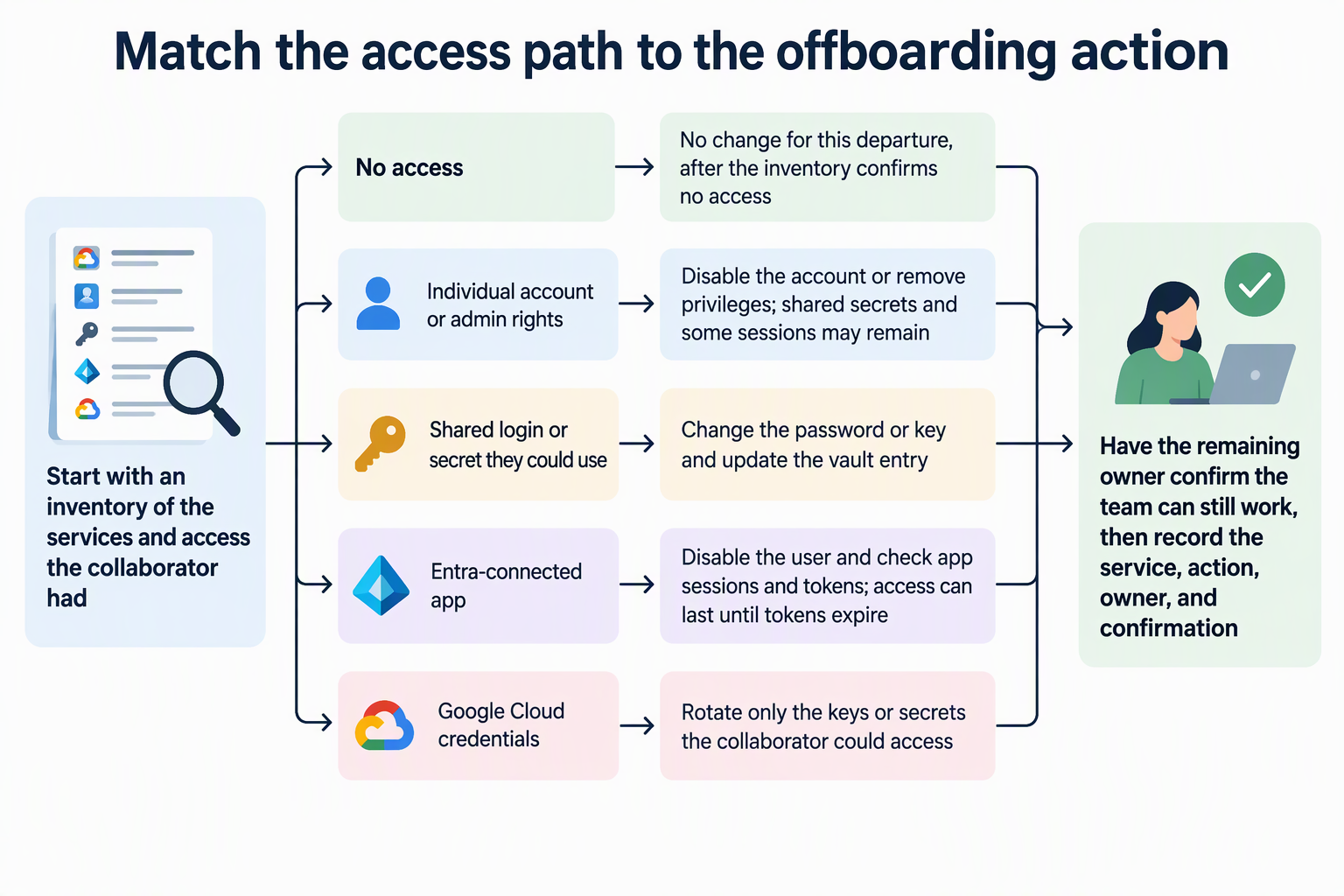
Start with a list, not with password changes. When you know exactly what the person could reach, you avoid missing an account or breaking one the team still needs.
- List every affected service and name an owner. For each service, write down the type of access: the person’s own login, a shared login, or a secret such as an API key. Note how they got in and which teammate stays responsible for that account. CISA’s identity and access guidance describes keeping an inventory of active accounts and privileges across systems and applications. For a small team, a simple shared sheet can serve the same purpose.
- Remove the person’s individual access. Disable or delete accounts issued to them and take away admin rights. NIST’s draft small-business guidance, written for firms with few employees or little IT support, recommends removing access to all business information, systems, and devices when an employee leaves or a third-party relationship ends. CISA also says separated users’ accounts and privileges should be ended promptly.
- Decide what to do about shared secrets, sessions, and tokens. Handle this per service, based on what the person could actually use. The sections below cover how to choose.
- Confirm access and close the record. The remaining owner checks that the team can still work, then marks the service as done.
Separate vault membership from service credentials
A vault controls who can open a stored set of passwords and keys. The service behind each entry is separate. While valid credentials usually remain accepted until changed, specific services may also terminate access through account suspension, token revocation, or session expiration.
So removing a collaborator from the vault stops future lookups. Anything they already copied, memorized, or saved in a browser can still work at the service. That is why each shared login needs its own decision.
NIST SP 800-53 control AC-2 calls for a process to change shared or group account authenticators when someone is removed from the group. The stated goal is that former members do not keep access to the shared account. An authenticator is whatever proves identity to the service, such as a password or key. If the departing collaborator knew a shared password, changing it belongs in your plan.
Choose an action based on the account and access path
Match each action to the access the person actually had. The table pairs common access situations with the step that fits.
| Access situation | Action | Scope note |
|---|---|---|
| Their own account or admin rights | Disable the account or remove the privileges | Leaves shared secrets and some sessions untouched |
| A shared login or secret they could use | Change the shared password or key | Update the vault entry for remaining users |
| An app connected to Microsoft Entra ID | Disable the user, then check app sessions and tokens | Access can last until tokens expire |
| Google Cloud project credentials they could reach | Rotate those keys and secrets | Limited to credentials they had access to |
| A credential they never had access to | No change for this departure | Only after the inventory confirms no access |
The Entra row needs extra care. In Microsoft’s guidance on revoking Entra access, the time until a user loses access depends on how each app grants it. Apps that use access tokens keep working for the user until the token expires. For apps that use session tokens, existing sessions end when the token expires. An app can end sessions automatically only if the user’s disabled state syncs to it and the app is set up to do that. After disabling the account, check each connected app’s own session controls instead of assuming the person is already locked out.
The Google Cloud row is narrow on purpose. Google Cloud’s guidance on revoking project access says to rotate project-level credentials, such as service account keys, OAuth client secrets, or API keys, when the departing person had access to them. If they never had that access, the departure alone does not call for rotating those credentials.
Other services have their own controls. Look in each provider’s admin documentation for ways to disable users, sign out active sessions, and revoke API tokens. If you can’t find a documented way to end sessions, mark that service as an open item for its owner rather than assuming it is closed.
Confirm the team still has needed access
Finish each service with a quick check by its remaining owner. After the change, that person should sign in or run the task the account exists for. For example, they might post from the shared social media login or run a scheduled job that uses the new API key.
Order matters when you replace a key. For a Google Cloud service-account key, Google’s documented rotation steps have you confirm the new key works as expected before you delete the old one. That order keeps automated jobs running during the switch.
Close the record for each service with four entries: the service, the action taken, the owner, and whether the owner confirmed access. A service stays open on its owner’s list until all four are filled in. That record is what turns credential offboarding from a one-time scramble into a repeatable process for the next departure.
FAQs
What if we can’t tell whether the collaborator copied a shared password?
Base the decision on access, not proof. If the person could open or use the shared password, plan to change it. NIST’s AC-2 control ties the change to someone leaving the group, not to evidence that they copied anything. Copying is hard to detect, so having had access is the practical trigger.
Do we have to change every password in the shared vault?
No. Change the shared credentials the departing person could see or use. Leave others alone once your inventory shows they had no access. Changing unrelated passwords creates extra work and can lock out teammates for no security gain.
Are NIST and CISA recommendations legal requirements?
They are published security guidance, not laws. The NIST small-business document is also an initial public draft. If your business has contracts, client agreements, or industry rules that cover access removal, check those terms separately.
Who should own credential offboarding in a business without IT staff?
Assign one person to run the list and one remaining owner for each service. The coordinator tracks progress, while each service owner makes the changes and confirms access still works. In a very small business, one person may fill both roles, as long as every service has a named owner.