
Remote Development on a Home Server: Keep Project Data Near the Server

Yes, you can keep project files on a home server instead of your laptop. It works when your editor opens a workspace that runs on the server, rather than a working copy stored on the laptop.
The tradeoff is reach. You can only work while the server and your route to it are available. You also need a plan for security and recovery.
Can You Develop on a Home Server Without a Laptop Project Copy?
Yes, as long as the project folder you open lives on the server and the development work runs there. With VS Code Remote Development, a remote machine acts as a full-featured development environment. Its extensions run commands and other extensions directly on that machine, and Microsoft states that no source code needs to be on your local machine for this setup.
In this arrangement, the laptop is the client. It shows the editor window, sends your keystrokes, and displays results. The project directory, the terminal commands, and the tools work on the server. The extensions install a VS Code Server on the remote OS for this purpose.
Check the editor’s remote-connection indicator, the host running its terminal and tools, and the opened project path. A path on network-mounted storage alone does not prove computation runs on the server. A local tool can read a remote mount while still executing on your laptop.
This claim covers the documented VS Code path, not every editor. It also says source code is not required locally. It does not say the laptop keeps no cache, logs, or other temporary data. Treat those as unknown unless your tool documents them.
A Browser Workspace and a Local CLI Are Different Paths
The location of the project directory decides which path you are on, even when you use the same tool. Our OpenCode guide for Olares 1.12.7 and later shows both paths side by side. OpenCode is a third-party AI coding agent that can run on Olares.
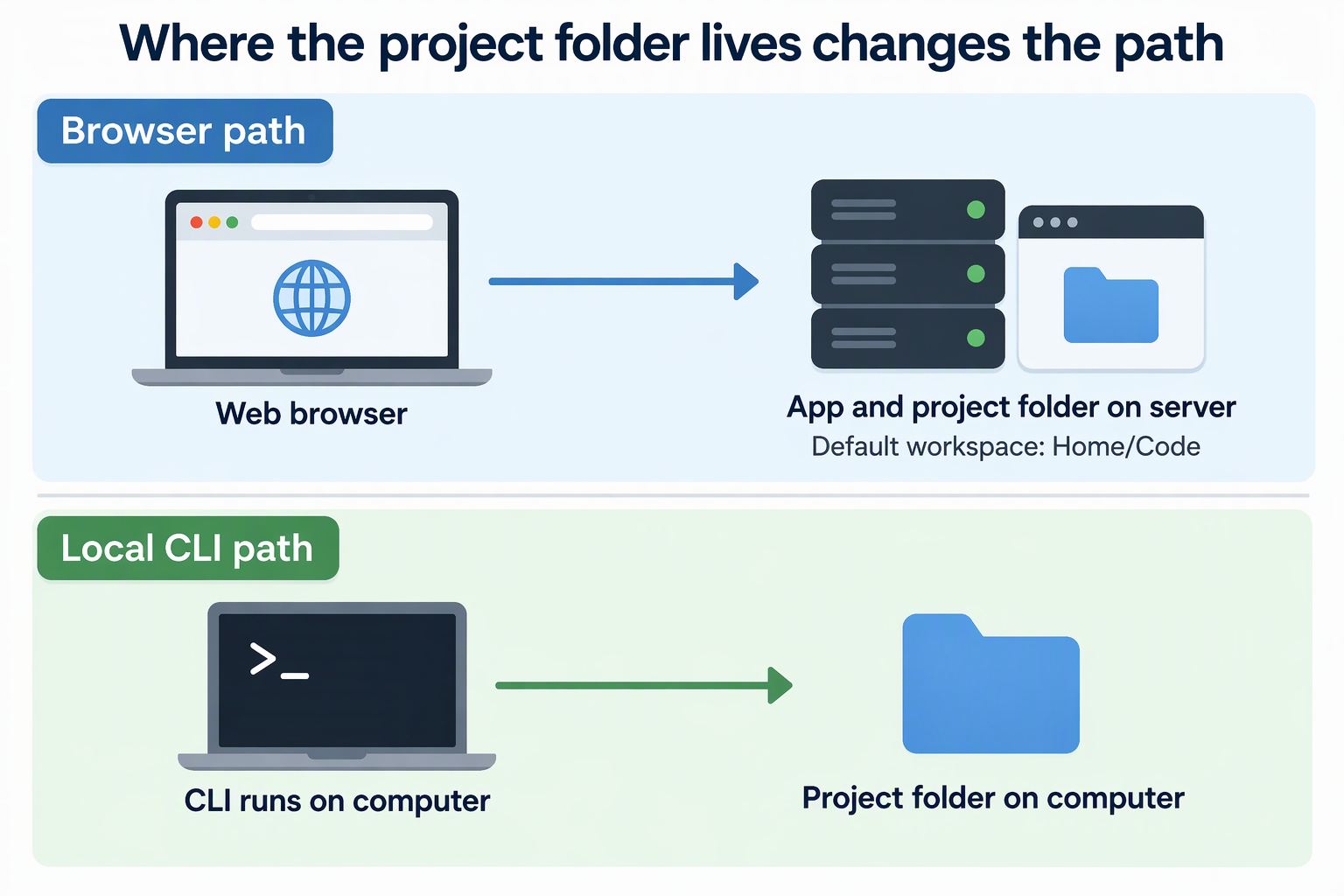
In the browser path, OpenCode is installed as an app on your Olares device, and you reach it through a web browser. The default workspace is Home/Code in Files. For several projects, you create a subfolder for each one under Home/Code and then open it in OpenCode. You review generated files in the app’s file browser and point the agent at specific files to edit them. The project folder stays on the server.
The CLI path is different. You install OpenCode on your computer and run it from a project directory there, for example from a terminal in VS Code. It can connect to a model on Olares, but the code it works on sits on the computer. The CLI does not automatically use the browser workspace’s Home/Code project.
Mounted or synced folders form a third arrangement. Do not assume they behave like a remote workspace. Syncing usually means a copy lands on the laptop, so check where your files actually live. If you want a terminal agent instead, our Codex CLI on Olares guide covers a separate setup with its own requirements.
When Does a Home-Server Workspace Stop Being Practical?
It stops being practical whenever the laptop cannot reach the server. A remote-only session has nothing to open while its host or network route is down. This differs from a project and toolchain installed on the laptop, which keep working without the server.
Olares shows this clearly. LarePass, our client app, displays the current route: Intranet for the local network, P2P for a direct VPN tunnel, DERP when the VPN uses a relay, and FRP or Internet for public routes. In Offline mode, it cannot connect to Olares at all. A DERP status means the direct P2P path did not form, and connection quality may suffer. So a VPN does not promise a direct link or constant uptime.
Use one rule to decide. If keeping files near your server data matters more than working through an outage, accept the dependency. If you must keep coding on a plane or during a home internet outage, keep a separate local workflow for those times.
Does Server-Side Mean Private?
No. Where the project lives, how you reach the server, and which model provider and tools you choose are three separate parts of the data path. Hosting the editor at home settles only the first one.
The access route decides how your session travels. A VPN tunnel, a relay, and a public internet route are different paths, and none of them alone makes a setup secure or compliant.
The provider decides where prompts go. Our OpenCode guide documents a browser path with a local model installed from Market, and another with OpenAI through a ChatGPT Plus/Pro sign-in or an API key. If you pick OpenAI, model requests go to that service even though the interface runs on Olares. Agents can also run shell commands and install tools, and those actions may reach outside networks.
Before calling a setup private, write down three things: the route you actually use, the provider you selected, and the tools your agent can call. Then judge privacy from that list.
What Happens if the Server or Its Storage Fails?
If the server copy is your only copy, a failed disk or server can leave you with no usable project. A working copy is for daily editing. A recovery copy is for getting back after a failure. They serve different jobs.
As general practice, keep important projects in a second place that does not depend on the same server or storage. A pushed Git remote or a backup on separate hardware are typical choices. Then test it: restore a project to another location and confirm it opens and builds. A Git remote contains only the work you commit and push, plus any separately configured large-file storage. Back up required untracked files, ignored data, and other dependencies separately.
Do not treat the server as your only working path until that restore succeeds. Verifying the restore confirms your recovery path works, though it does not remove the need for ongoing backups.
FAQs
Can I reach the same server project from more than one device?
Yes, with the VS Code path. Microsoft lists access to an existing development environment from multiple machines or locations as one of its uses. Each device connects to the same server-side workspace instead of holding its own copy.
Does the laptop store any project data at all?
The VS Code documentation says source code does not need to be local. It does not describe every cache, log, or temporary file the client may keep. If that matters for your project, check your editor’s own documentation and inspect the laptop’s app data.
Do I need Olares One to run this on Olares?
No. Olares OS can run on your own hardware if it meets the requirements. The OpenCode browser path needs Olares 1.12.7 or later, enough disk space and memory, and admin rights to install apps from Market.
What should I check if a remote session feels slow?
Check the connection status in LarePass first. A DERP status means traffic goes through a relay instead of a direct P2P tunnel, which may reduce connection quality. If you see it all the time, contact Olares support.