
How to Keep a Family Home Server Useful When Its Admin Is Away


Your family can keep using a home server while you’re away if each person relies only on access they have already confirmed. That means their own account, for a specific service and a specific everyday action. Anything outside that, such as new access, account changes, configuration, or recovery, should follow that platform’s instructions or wait for an administrator.
Good home server continuity comes from three things you set up ahead of time. First, a map of who can do what. Second, a clear line between routine use and admin work. Third, a handoff your family can find and has tried once before you leave. None of this guarantees the server stays up, but it means fewer surprises.
Map Each Everyday Service to Existing Access
Write down the services your household actually uses. Then record who uses each one, with which account, and what they confirmed they can do. Having a server account doesn’t mean someone can use every app on it, so check each service one at a time.
| Service or routine use | Family member and own account | Normal action confirmed |
|---|---|---|
| (your service) | (name, their account) | (action they tried and completed) |
| (your service) | (name, their account) | (action they tried and completed) |
Fill in only what you have verified. Have the family member try the action with their own account. If it works, write it down. Don’t put the administrator’s login in place of theirs. If they’d have to borrow your account, they don’t really have that access.
Add a note about home versus away access only when your household has remote access set up and that service depends on it. If nobody has used a remote route, don’t list one. The map shows what access exists today. It can’t keep a service running through a server, network, or app outage.
Separate Routine Use From Account Changes and Recovery
A confirmed routine task is fine to keep doing, but any change means stopping to check first. Creating access, modifying permissions, adjusting settings, or recovering a login count as administrative changes. For those actions, check the instructions for that exact platform and app or wait for the administrator.
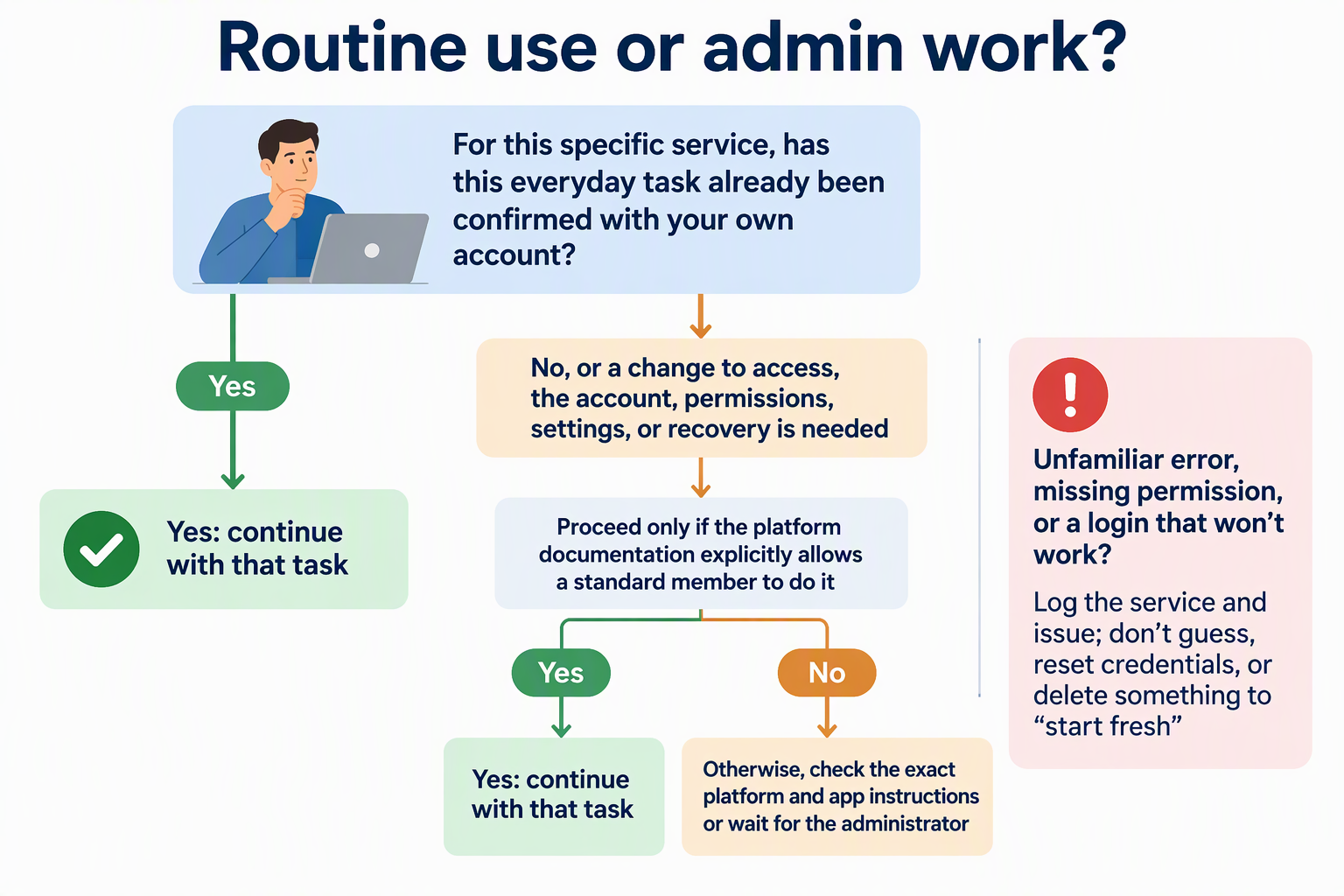
Only proceed without them if that platform’s documentation explicitly confirms a standard member can perform the task.
Olares shows why this line matters. In Olares, account management depends on roles. Only a Super Admin can assign the Admin role, and only a Super Admin or Admin can create a Member account. App permissions are a separate layer. In an Olares shared Vault, the owner has to add each member and choose Editable or Read-only. Being on the same Olares team doesn’t give anyone access to that Vault by itself. These rules apply to Olares accounts and shared Vaults only. Don’t assume Files, other apps, or other platforms work the same way.
So treat an unfamiliar error, a missing permission, or a login that won’t work as a stopping point. Write down what happened and which service it was. Then check the right instructions instead of guessing, resetting credentials, or deleting something to “start fresh.”
Make the Handoff Findable, Safe, and Testable
A practical handoff tells your household where to look rather than storing secrets directly. Keep this summary concise, shared in a known location, and limited to pointers.
Make sure the note covers:
- Each service and a link or pointer to its instructions
- Tasks known to need an administrator
- Where an authorized person can securely get recovery material, without copying it into the note
- A named next contact and how to reach them
- A spot to log problems that come up
Keep passwords and recovery phrases out of the handoff itself. CISA warns that plaintext password notes in physical or digital form can be compromised if someone gets into the device, and recommends storing passwords securely, for example in a password manager. Recovery phrases need at least the same care, so point to their protected location instead of writing them out. If your household runs Olares, link the official Olares access recovery guide in the handoff so the right steps are easy to find.
Before you leave, do one rehearsal. Have a family member sign in with their own account and complete one normal task from the map. Then ask them to find the instructions and name the next contact, without help. Anything they can’t find or don’t understand goes on a fix list for you to sort out before you go. The rehearsal catches gaps. It doesn’t promise uptime or recovery.
FAQs
Should I just give a family member my admin account?
No. Sharing your login hides who has real access and puts every setting at risk. If someone needs more permissions, set them up on their own account through the platform’s normal process before you leave.
What if a service stops working while I’m away?
Have them check whether the service is listed in the handoff and whether it’s a routine task they’ve already confirmed. If it isn’t, or the error is unfamiliar, they should log it and reach the named contact rather than change any settings.
How often should we update the handoff?
Update it whenever you add a service, change who has access, or change where recovery material is kept. Running the short rehearsal again before a long trip shows whether it still matches your setup.
Can a written note be part of a safe handoff?
Yes, as long as it points to where things are stored and doesn’t list the secrets themselves. Keep passwords in protected storage, not in the note.