
DIY or Prebuilt AI Server for a Solo Creator’s Workloads


Key Takeaways
Build a workstation if a complete parts list is verified to handle your recurring models and tasks, and you value choosing and upgrading parts enough to own assembly and troubleshooting. Buy a prebuilt personal AI server if its exact configuration is verified for that same work and you would rather start with an integrated setup.
Neither format wins by default. Good AI workstation planning starts with the work itself, then compares form factors only among systems that pass that test.
Workload fit comes before the DIY-or-prebuilt label
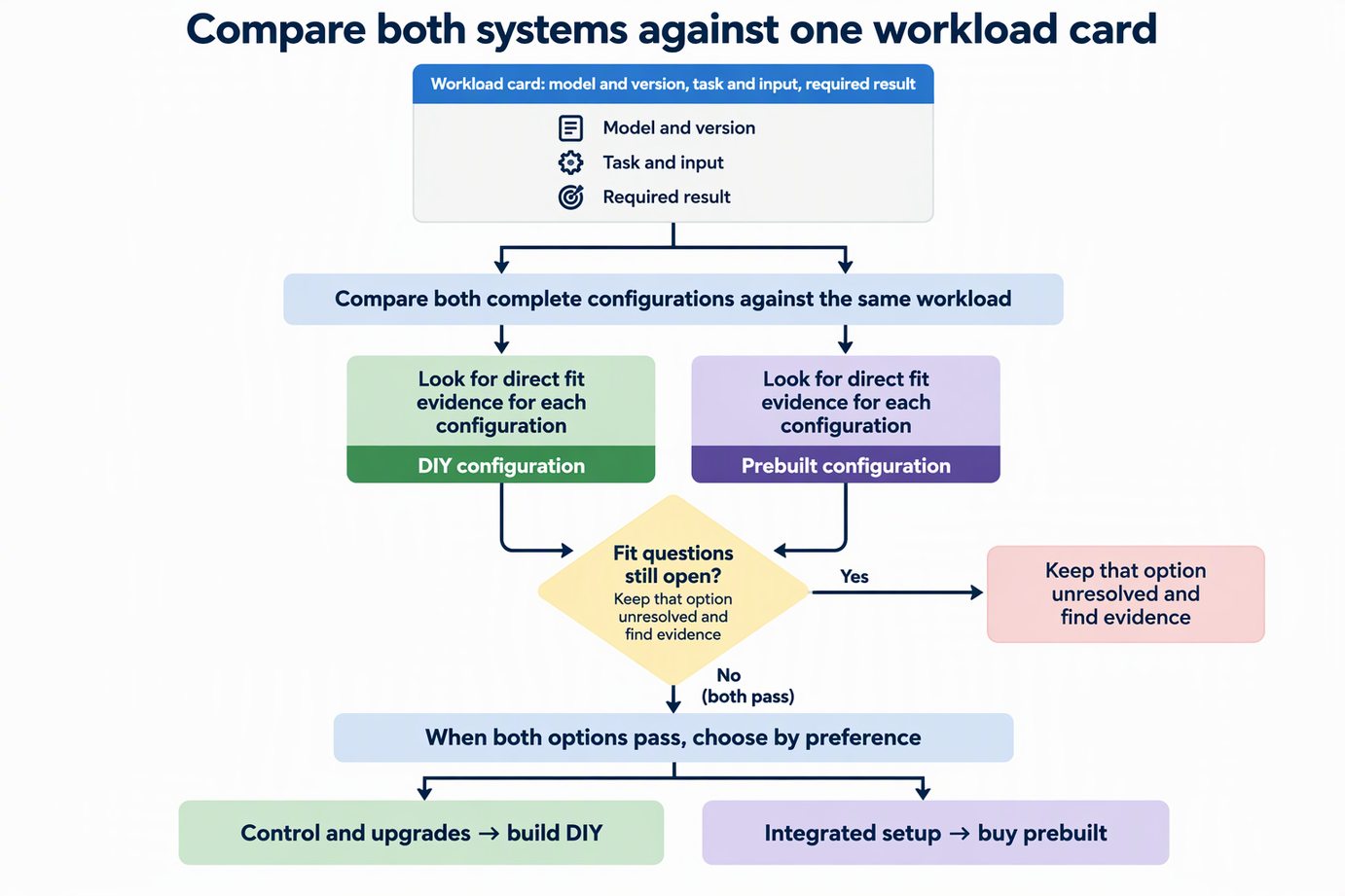
“AI workload” is too broad to judge any machine. Write down three things first: the exact model and version you run, the task and its input (for example, a batch of images or a long audio file), and the result you need, such as output quality, resolution, or how long a run can take before it slows your schedule.
Next, compare each complete system against those same three entries. A complete system means the GPU plus memory, storage, processor, and the software stack you plan to use. A GPU name or one component spec does not prove the whole machine can deliver your result. What counts is direct evidence tied to your model and task, such as documentation or results for that model on that configuration.
If you find that evidence for one option and not the other, mark the second option as unresolved, not as a failure. Missing proof means you do not know yet. Once both options pass, your preference decides: control and upgrades, or an integrated setup. The point is to judge both systems on identical terms, so neither one gets credit for a spec that was never checked against your actual work.
DIY gives you more component control—and more ownership
Building suits a creator who wants to pick each part and swap parts later as recurring work changes. That control comes with a matching duty. You handle assembly, and when something breaks or two parts clash, you troubleshoot it yourself.
Ask yourself plainly whether that duty fits your week. If you enjoy hardware and want room to change parts on your own terms, the extra work buys real flexibility. If downtime costs you client work and you would rather not diagnose problems, that flexibility may not be worth the time.
A DIY parts list still has to pass the same fit check. Picking strong parts does not prove the finished build delivers your result. Treat the build as one complete configuration and look for evidence that it handles your model and task. Write the full parts list on your workload card, including the GPU, memory, storage, processor, and software stack, so you can compare it with a prebuilt on the same terms. Assembly time, upkeep effort, and support depend on the parts you choose and their own warranties, so check those for your actual list.
A prebuilt’s integration still has to match the work
An integrated system is only an advantage once its exact configuration fits your work. Our own Olares One shows what to check against your workload card. Our documentation lists an Intel Ultra 9 275HX processor, an NVIDIA RTX 5090 Mobile GPU with 24 GB of VRAM, 96 GB (2 × 48 GB) of DDR5-5600 memory, and a 2 TB NVMe SSD, but these specifications describe the machine rather than prove it runs your model or meets your output target.
The exact GPU variant matters. NVIDIA’s GeForce RTX 5090 specification lists 32 GB of GDDR7 memory for the desktop card. The RTX 5090 Mobile in Olares One is a different listed configuration with 24 GB of VRAM. A shared family name does not mean equal memory, and the memory figures alone do not show relative speed or task fit. Check the variant named in any spec sheet before you compare.
Prebuilts can still have defined upgrade paths, though they are narrower than DIY choice. For Olares One, our FAQ states that memory can go up to 128 GB. The preinstalled 2 TB SSD sits in the PCIe 5.0 slot, and a PCIe 4.0 slot stays open for storage expansion or a dual-boot setup.
Some upgrades also carry lasting effects. If you merge a second SSD into Olares One’s system storage through the documented LVM route, that drive becomes part of the system volume. Removing it later can leave the OS unable to boot and require a reinstall of Olares OS. Plan whether that drive should stay put before you merge it.
FAQs
Can Olares One run Windows or Linux instead of Olares OS?
Yes. Our FAQ says you can wipe the preinstalled OS and install Windows or a Linux distribution natively. The machine then works as a standard workstation with the same RTX 5090 Mobile GPU. Changing the OS does not change the hardware, so the fit check still applies.
Can Olares One use an external GPU?
Olares One supports compatible Thunderbolt eGPU devices, and the current eGPU guide lists known compatibility and setup limits. Check the enclosure, card, operating system, and power requirements for the combination you plan to buy.
What does Olares One’s internal system-storage expansion require?
You need a set-up, running Olares One, a second NVMe M.2 SSD physically installed, SSH or terminal access, and basic comfort with command-line tools. If that skill level is outside your comfort zone, factor it into your choice.
Make the choice only after both sides pass the fit test
Fill in one workload card and use it for both options:
- Model and version
- Task and input
- Required output or acceptable result
- Complete DIY configuration
- Complete prebuilt configuration
- Direct fit evidence found for each
- Fit questions still open
If the DIY build has fit evidence and you want control over parts and upgrades, build it. If the prebuilt has fit evidence and an integrated setup suits you better, buy it. If either row still has open questions, keep that option unresolved and find the missing evidence before you commit. For creators planning image and video workflows on Olares, our guide to generating images in FlowStudio shows the kind of task to record on the card.