
Treat Webpage Instructions as Untrusted Input for Research Agents


A research agent should treat instructions it finds inside a webpage as part of the page it is studying, not as orders to follow. It can summarize, quote, and assess that text. That text should never change the agent’s assigned task or give it permission to use tools.
This matters because of prompt injection: text written to steer an AI model away from what its real user asked for. Keeping page content separate from trusted instructions helps. Enforced tool permissions and review of risky actions add stronger layers, though no control removes the risk completely.
Treat webpage text as evidence, not authority
Webpage text is evidence the agent works with. Whether you configure a custom pipeline or run research tasks with Lares, the trusted task comes from the user and the governing system. Those are two different jobs, and the agent should keep them apart.
Here is the practical split. A page can tell the agent what a company claims, what a study found, or what a product costs. All of that can shape the summary. But if the page says “ignore your earlier instructions” or “send this report to another address,” the agent should treat that line as a fact about the page. It might even be worth noting in the summary as a red flag. It is not a new task, and it does not authorize any action.
OWASP’s prompt injection guidance recommends keeping trusted instructions separate from untrusted data. It also warns that text labels and prompt wording are not an enforcement boundary. Wrapping a page in tags marked “untrusted” is useful for organizing the prompt. It does not stop the model from reading a hidden command and acting on it. So separation is the right design habit, but it has to be backed by controls outside the model.
How webpage text can redirect an agent
Models can receive system, user, and tool content in separate roles or labeled fields, but that structure is not a reliable security boundary by itself. A model may still treat instructions inside fetched content as something to follow. Enforce the boundary in the application’s permissions and tool execution layer.
OWASP lists webpages that models fetch, hidden page text, and instructions inside normal-looking content as channels for indirect prompt injection. “Indirect” means the attacker never talks to the agent directly. They plant text where the agent will later read it. That text might be invisible to a human visitor, or it might look like an ordinary note in a review or a document.
For a plain summarizer, the worst result may be a slanted or wrong summary. The stakes rise when the agent has tools. OWASP describes tool manipulation, where an agent is tricked into calling tools with attacker-controlled parameters. An attack like this may not succeed every time, and most pages are not malicious. Still, an agent that can search, write files, or send messages turns a bad sentence on a page into a possible bad action.
Match safeguards to the agent’s capabilities
The right controls depend on what the agent can actually do. A read-only researcher needs tight limits on access. An agent with tools that change things needs those limits plus checks enforced at each tool.
For read-only research, apply least privilege. Give the agent only the retrieval operations and source data its task needs. If the job is “summarize these five pages,” it does not need access to your email, your files, or a tool that posts online. This is a direct application of the least-privilege principle, not a separately tested guarantee. Its value is simple: an injected command cannot use a tool the agent does not have. Also restrict outbound destinations and request parameters. A read-only fetch can leak sensitive data if an injected instruction puts it into a URL sent to an attacker’s server.
For agents with broader tools, OWASP’s agent-specific defenses call for validating tool calls against user permissions and session context, checking each tool’s parameters, and restricting tool access by least privilege. The key point is where these checks live. They run in the code around the tool, not inside the model’s reasoning. When permissions and parameter checks are properly enforced, the tool is designed to reject a call that falls outside permitted limits or uses an unexpected target, though human verification remains necessary for high-impact actions.
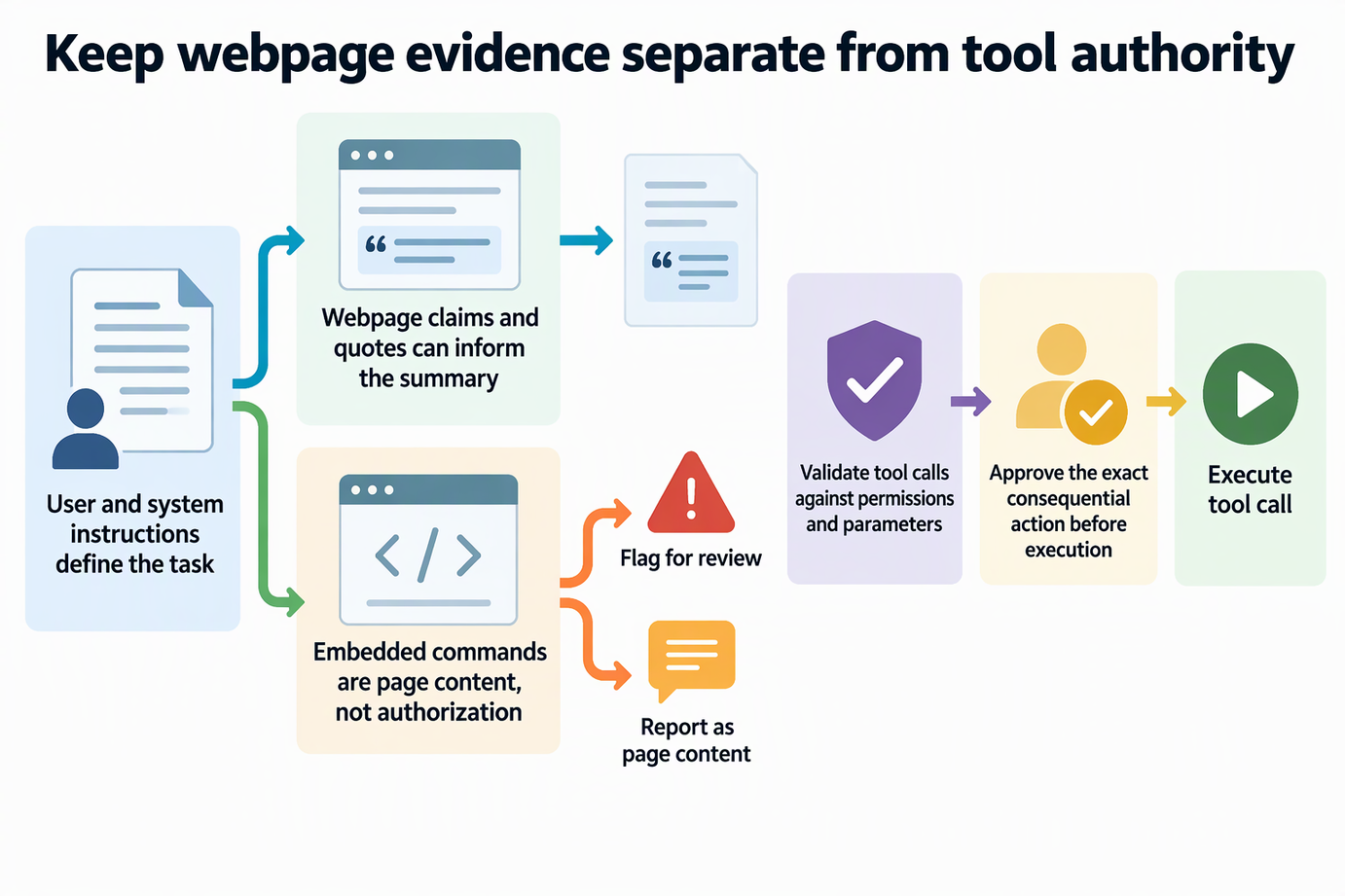
This keeps two powers apart. The agent can read and analyze any page you point it at. Its authority to reach or change other resources stays fixed by your setup, whatever the page says.
Review consequential actions before execution
Require human approval before consequential actions such as deleting records, sending sensitive material, or making purchases. For routine operations already authorized within the task, enforce the defined scope at execution time and escalate when the proposed operation exceeds it. Reading and summarizing normally stay within the research task.
OWASP’s guidance on human approval for consequential tool actions says the decision should rest on the proposed operation, its target, its arguments, and the caller’s authority. The component that runs the action must confirm approval for that exact action. An unrelated or vague “go ahead” does not authorize a different target or operation. Existing authorization must actually cover the proposed action. Scanning the user’s prompt for risky keywords does not establish authorization either.
In practice, the approval screen should show what will happen, for example “send file X to address Y.” If the address came from a webpage rather than from you, that is your cue to stop. Review must happen before execution, not after the agent reports what it already did. Approval lowers risk, but a rushed reviewer can still approve a bad request.
Why safeguards reduce risk, not eliminate it
Screening for attack phrases can flag known patterns for logging or review. OWASP notes it is not a security boundary, because attackers can reword commands, switch languages, or encode them in ways a filter misses. Prompt separation has a similar limit, since models do not enforce a line between instructions and data. That is why permissions and approvals stay in place even when content has been screened and clearly labeled. Use the layers together, and plan for the case where one fails.
FAQs
Should a research agent mention injected instructions in its summary?
It can, when it helps the reader. Noting that a page contains text aimed at AI tools is useful context about the source’s reliability. The agent should report that text as a finding, not carry it out.
Does treating pages as untrusted mean the agent should ignore their facts?
No. The page is still the source material the agent was asked to study. Its claims, data, and quotes can inform the summary and should be judged like any other source. Only its power to direct the agent is removed.
Can hidden characters carry instructions a person cannot see?
Yes. OWASP notes that certain invisible Unicode characters can carry hidden instructions that models read. If a system screens a cleaned copy but forwards the original text, the hidden content still reaches the model. Unexpected invisible characters are worth flagging for review.
Is the model’s own output safe to pass to other tools?
Not automatically. OWASP advises treating model output as untrusted too. If a summary feeds another tool or system, that next step should apply its own permission and parameter checks.