
Self-Hosted Documents or Cloud Office Suite for a Solo Business?


A self-hosted document workspace fits a solo business when its sharing and file support meet your needs and you can cover its ongoing maintenance and recovery. A managed platform or support provider can handle part of that work. A cloud office suite may be simpler when you prefer the provider to operate the service, but account settings, exports, and recovery options still need attention.
Treat either choice as provisional until you check three things in the specific tools you are considering.
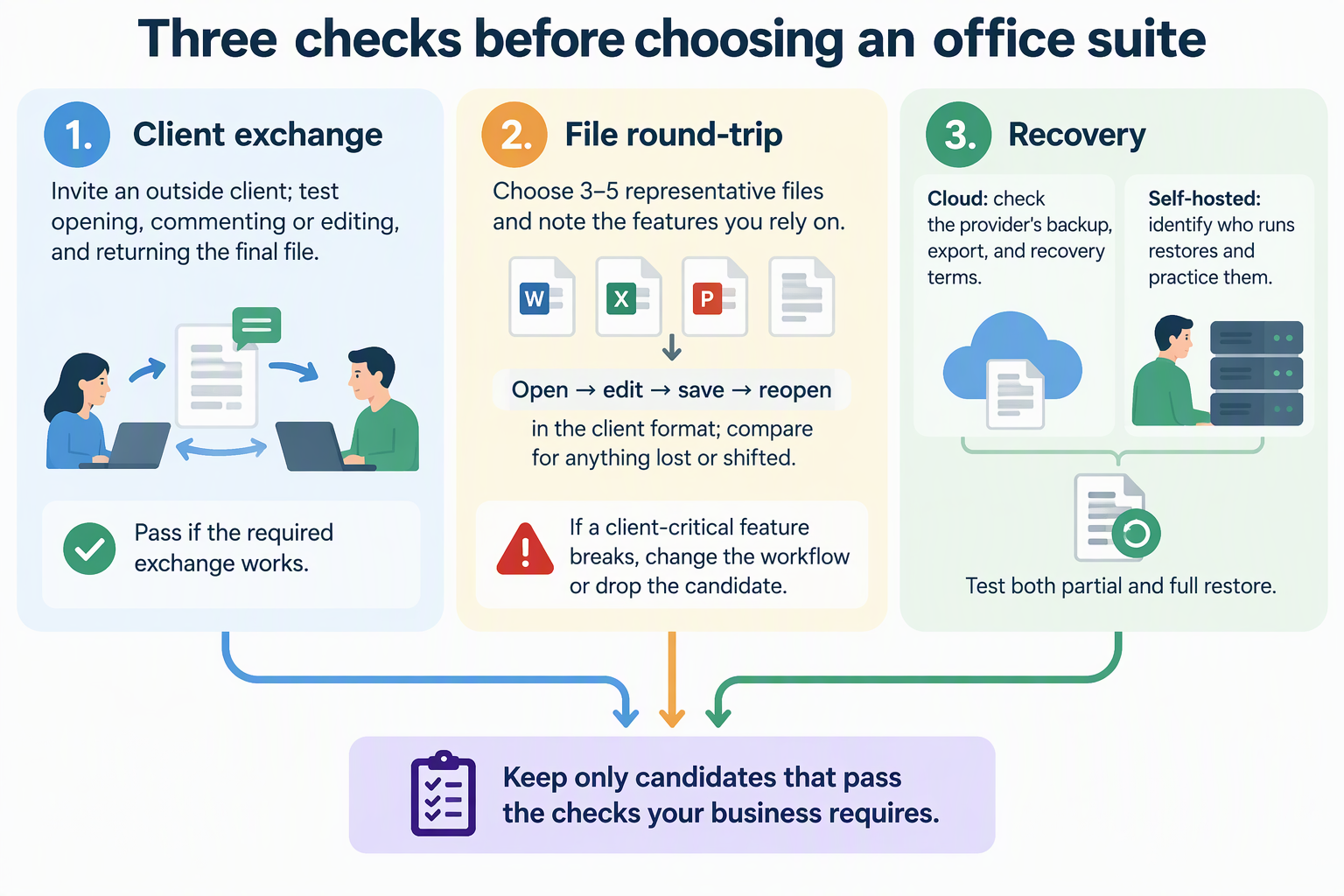
Can your clients work with your documents the way you need? Do your real files survive editing? And who actually restores your data when something goes wrong?
The Short Answer: Match Control to Operating Capacity
Pick a setup whose responsibilities are explicit and manageable: who installs updates, monitors failures, controls sharing, and restores files? Include any management platform or support agreement in that answer.
A platform can reduce the number of steps you manage yourself. For example, Olares Market documents app installation and updates. Those controls do not, by themselves, verify your document permissions, backup coverage, or ability to restore a client file.
With a hosted office service, the provider runs the service infrastructure. Read the specific plan’s terms for support, retention, backup, and recovery. Do not assume a provider’s disaster-recovery backup is an export you can download or a guarantee that any deleted file can be recovered.
Control needs a definition before it can guide the choice. Write down what it means for your business: where files are stored, who can reach them, and how you would export everything if you left. Then confirm those points for each candidate. Hosting a self-hosted document workspace yourself does not, by itself, make documents private, secure, or available offline. Those results depend on how the system is configured and where the data actually travels.
Can Clients Work With the Documents?
No hosting category wins on client collaboration by default. The practical answer comes from the tool rather than the label “cloud” or “self-hosted.”
Check the sharing workflow itself: whether an outside client needs an account, whether you can limit them to viewing or commenting, and whether you can revoke access after the project.
Nextcloud’s official Office page describes collaborative document editing as a self-hosted option. That feature claim is not proof that an outside client can use your installation. Test external access and the chosen editor with the client’s actual account requirements, just as you would for a cloud suite.
Test with one real exchange. As an illustrative example, take a consultant who sends a proposal that a client must read and comment on, and then returns a final file. Run that exact path in each candidate: invite someone outside your account, have them comment or edit, and send the final version back. If the outside person can’t open, comment, or return the file the way your work requires, that candidate fails for your business, whatever else it does well.
Can It Handle Your Files and Daily Workflow?
File fit can only be judged with your own documents in the tools you are actually considering. A format name on a feature list is not proof that your layouts, comments, or styles will survive a round trip.
Treat the features in your own files as the test cases: a styled proposal, a contract with tracked changes, a spreadsheet with formulas, or a presentation with custom fonts. Open and save copies through the complete exchange, then compare them in the application your client uses. Record the editor version and any differences; a generic claim of Office-format support cannot establish fidelity for your documents.
Build a small test set before you commit:
- Pick three to five representative files, such as your contract template, a styled proposal, and a working spreadsheet.
- Note the features you rely on, like styles, tracked changes, comments, or hidden text.
- Open, edit, and save each file in the candidate, then reopen it in the format your clients use.
- Compare the result with the original and record anything lost or shifted.
If a feature your clients depend on breaks, either change that workflow or drop the candidate.
Who Owns Backup and Recovery?
Someone has to make the backups and run the restore, and you should know who that is before a file goes missing.
Identify the business records you cannot afford to lose. Keep an independent recovery copy with a clear retention policy, and verify both a single-file restore and recovery of the workspace. An actively synchronized folder can propagate deletion or corruption, so synchronization alone does not establish recoverability.
For a cloud suite, check the provider’s deletion window, version history, export options, and restore process. Find out which actions you can perform yourself and which require support. Test a representative export before relying on it as an independent copy.
For a self-hosted suite, assign the backup and restore work to yourself or a provider. Include document files, application data, and configuration as required by its backup guide. In an isolated test environment, restore a test folder and then a complete backup; keep production data untouched during the exercise.
FAQs
Is a hybrid setup worth considering for a solo business?
It can be, if each part passes the same checks on its own. For example, you might keep internal records on a system you run and handle client-facing files in a cloud tool. Hybrid setups add a second place to secure and back up, though. Confirm that both sides meet the client-access, file-fidelity, and restore tests before you split your work.
Does self-hosting mean my documents are private or work offline?
Not automatically. Privacy, security, and offline access depend on how the server is configured, how it is reached from outside, and where copies of the data end up. Map those data paths for your actual setup instead of assuming the hosting choice settles them.
How much technical skill does a self-hosted office suite take to set up?
The effort depends on the deployment. Installing an editor manually, using a managed app platform, and paying for a supported service involve different responsibilities. Check the candidate’s installation and upgrade guides, then list what remains yours: accounts, sharing, updates, storage capacity, and recovery.
What should I confirm in a cloud office suite’s terms before I commit?
Look for three things in the provider’s current documentation. First, how you can share with people outside your account. Second, what backup and recovery the provider actually commits to. Third, how you can export all of your files if you leave. Those answers matter more than general claims about the cloud model.