
Jellyfin Direct Play or Transcoding: Which One Does Your Setup Need?


Direct Play is the right choice when the device you’re watching on can handle the whole file as it sits on the server. That means the container, video, audio, and subtitles all work on that device, and the device’s delivery limits allow it.
If one of those pieces doesn’t match, Jellyfin changes only what it has to, so a conversion means the file and device didn’t fit. It is not a grade for your server. Your setup doesn’t need one mode for everything. It needs the right answer for each file on each device. The same movie can play unchanged on a TV app and still get converted in a browser.
Key Takeaways
- Direct Play applies when the client supports the file’s container, video, audio, and subtitles, and delivery limits allow direct streaming.
- Jellyfin changes only what is incompatible: Remux changes the container, Direct Stream converts audio, and Transcode converts video.
- Video transcoding can occur with unsupported video codecs or burned-in subtitles, while client profile constraints inform the chosen settings and output.
- Check the dashboard during active playback to see which mode is reported for each specific session.
Choose by the file-and-client match
Make the decision for one file on one playback client. Jellyfin Direct Play fits when that client supports every part of the file—including container, video, audio, and subtitles—and Jellyfin moves to conversion when any component is unsupported.
Delivery limits count too. Each client sends Jellyfin a profile that lists the codecs, resolutions, and bitrate it can handle, plus other constraints. According to Jellyfin’s transcoding documentation, the server reads that profile and picks the best-quality settings that stay within those limits. A file can use formats the device understands and still get adjusted because of the profile. Bitrate is one input to that choice. It is not a single number that always triggers a transcode.
In practice, a well-matched file on a capable client should Direct Play. The same file on a client with a different profile may be remuxed, Direct Streamed, or transcoded. Neither outcome tells you anything about other files or other devices, so judge each pairing on its own.
What Jellyfin changes in each playback mode
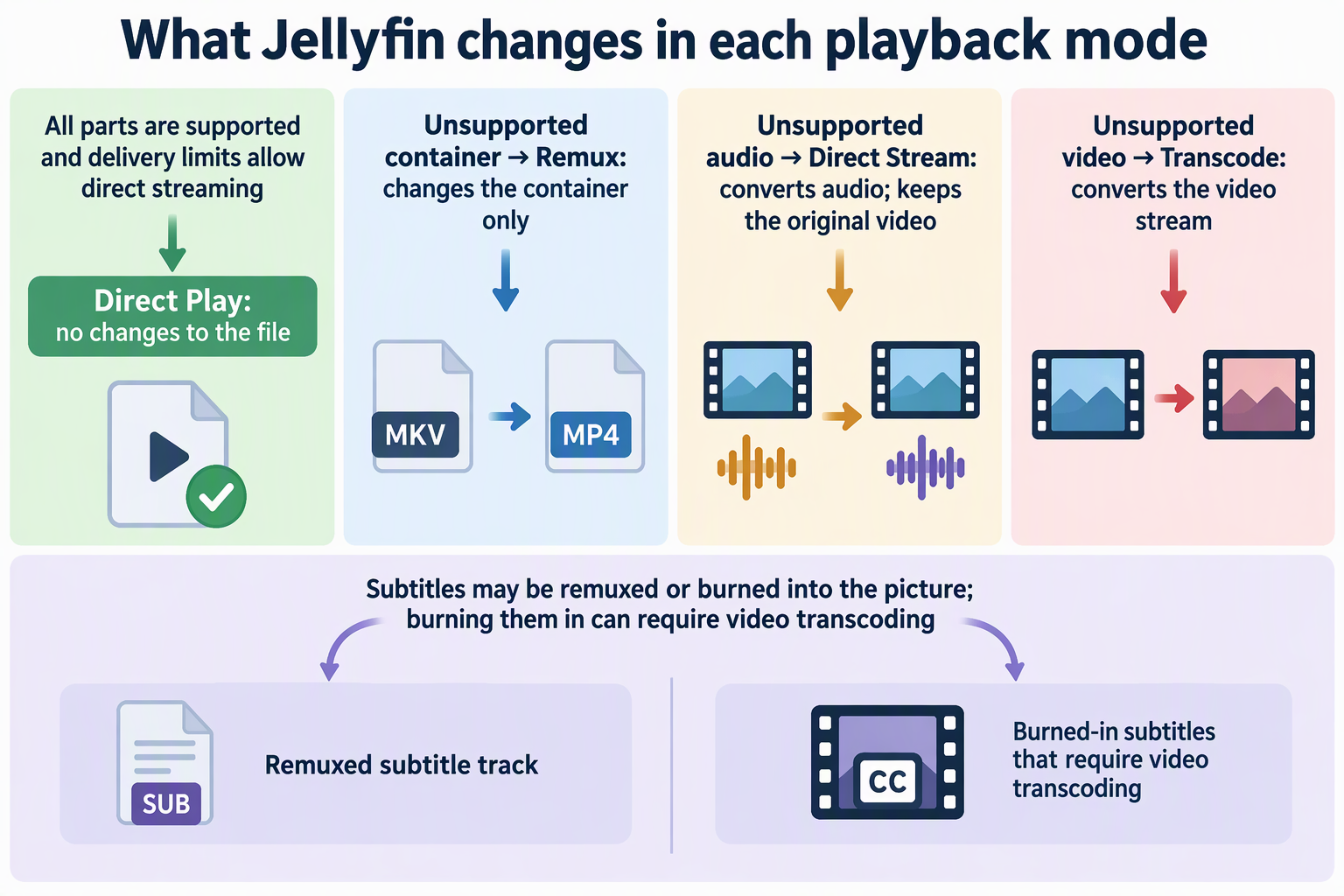
Each mode is defined by which part of the media Jellyfin touches before sending it. Jellyfin’s documented playback modes separate them like this.
Direct Play sends the file with no changes at all. The device gets exactly what is stored on the server.
Remux changes only the container. A container is the file “wrapper” that holds the video, audio, and subtitle streams together. With a remux, the audio and video streams inside stay untouched. They’re just repackaged into a wrapper the client accepts.
Direct Stream converts the audio and keeps the original video. This happens when the picture works on the device but the sound format doesn’t.
Transcode converts the video stream itself. That’s the biggest change of the four, because Jellyfin has to re-encode the picture rather than repackage it or swap out the audio.
This distinction matters for how you read a session. Direct Play leaves the entire file untouched, Remux modifies the container wrapper, Direct Stream transcodes audio while keeping video intact, and Transcode converts the video stream itself. When a session is not Direct Play, the reported mode identifies which component required conversion.
Which file and delivery factors change the result
A video codec match alone doesn’t get you Direct Play. Jellyfin’s codec support guide states the goal plainly: Direct Play means the container, video, audio, and subtitles are all compatible with the client. Each of those factors leads to a different result when it fails.
An unsupported video codec can lead to full video transcoding. If the client cannot decode the video format, or if subtitles must be burned in, Jellyfin transcodes the video stream. An unsupported container triggers a remux instead, while an unsupported audio format prompts Direct Stream, keeping the original video stream untouched.
Subtitles can go either way. Jellyfin notes they can cause a Direct Stream, where the subtitles are remuxed, or a video transcode, where the subtitles are burned into the picture. So one subtitle track can be the only difference between a light repackage and a full video conversion of the same file.
Delivery limits sit on top of format support. The client profile’s resolution, bitrate, and other constraints inform which settings and output resolution Jellyfin selects. That’s why a device that supports a file’s formats can still receive an adjusted version.
Keep the compatibility tables in context when you use them. Jellyfin says its tables show support for recent client software and OS versions, and legacy versions may differ. Check the row for the exact app on the exact device. If you watch in a browser, MDN’s media formats guide explains how containers and codecs differ and where browser support varies.
Read the mode reported for the session
Start with the playback type Jellyfin shows for the session. Jellyfin lists the type in use in the dashboard while a file is playing, so check it during the session you care about.
Then let the mode point you to the part of the file to look at. Remux sends you to the container: compare the file’s container with what that client accepts. Direct Stream points to audio, or to subtitle handling if the file carries a subtitle track that might be remuxed. Transcode points to the video codec first, then to any burned-in subtitles, then to the client’s profile limits such as resolution and bitrate. Compare that one component with the client’s documented support.
What you find decides the next step. If the component is unsupported on that client, the conversion is doing its job. A different file version or a different client is the way to get Direct Play there. If the component looks supported, the client profile’s delivery limits are the next thing to examine. Either way, the mode describes this session for this file on this device.
FAQs
Do I need a GPU for Jellyfin playback?
Not for every session. Direct Play sends the file unchanged, Remux only repackages it, and Direct Stream converts audio while leaving the video alone. None of those re-encode the picture. Video conversion work only comes up when a session actually transcodes the video stream. That is where hardware acceleration can play a role, depending on what your hardware and its drivers support.
Does the file extension tell me whether a file will Direct Play?
No. The extension usually names the container, which is only the wrapper. Two files with the same extension can hold different video codecs, audio codecs, and subtitle formats. To predict Direct Play, you need to know what’s inside the file and whether the specific client supports each of those streams.
Why might an older TV app or phone behave differently from Jellyfin’s compatibility tables?
Jellyfin describes its codec tables as covering recent client software and OS versions, and it notes that legacy versions may differ. An older app build or operating system can support fewer formats than the table shows. If an older device converts a file the table marks as supported, checking for differences in legacy client or OS support is a sensible place to inspect before altering the file.
Does Direct Stream lower the picture quality?
Jellyfin defines Direct Stream as converting the audio while leaving the original video untouched. The picture you see is the same video stream stored on the server. Only the sound track is converted. A session that changes the video itself is reported as Transcode, not Direct Stream.