
Game Streaming or a Dedicated Game Server: Which Do You Need?

You may not need either one. Game streaming fits when you want to control a game that is already running on another device, such as your home PC. A dedicated game server fits when your group wants a shared world that runs on its own and that friends join from their own copies of the game, but only if that game supports dedicated hosting.
If the game’s built-in online mode or player-hosted session already gives your group what it wants, you can skip both. The rest of this guide explains game server vs streaming in plain terms, then covers the game and setup details that can change your answer.
Match the Setup to the Play Experience
Start with what your group wants to happen when everyone sits down to play. The word “server” shows up in both setups, so it won’t settle the question. The table below maps each play goal to the setup that fits it and to the condition that decides whether it works.
| What your group wants | Candidate setup | Condition that matters |
|---|---|---|
| One player controls a game running on another device | Game streaming | Streaming carries one session; it adds no multiplayer |
| Friends join a shared world that stays up on its own | Dedicated game server | The specific game must offer dedicated hosting |
| Friends play together through the game’s own online or hosted mode | Built-in multiplayer | That mode must cover your players and how they want to join |
Read the first row carefully. A stream sends one running session to another screen. It does not turn a single-player game into a multiplayer one. If friends will play together inside a streamed session, the game itself has to support that, for example through local co-op on the host machine.
The second row is for groups who want the world to stay available after any one player logs off. That only works if the game’s developer offers a dedicated server option. Not every multiplayer game does.
The third row is a real choice, not a last resort. Plenty of groups simply use the game’s own online mode or let one friend host a session. If that already works for your schedule and devices, adding streaming or a separate server just gives you more to maintain. In the game server vs streaming debate, “neither” is often a valid answer.
What Gets Streamed—and What a Dedicated Server Hosts
The two setups move different things. A stream moves the picture and the controls of one game session. A dedicated server hosts the game world itself, and each player runs their own copy of the game to connect to it.
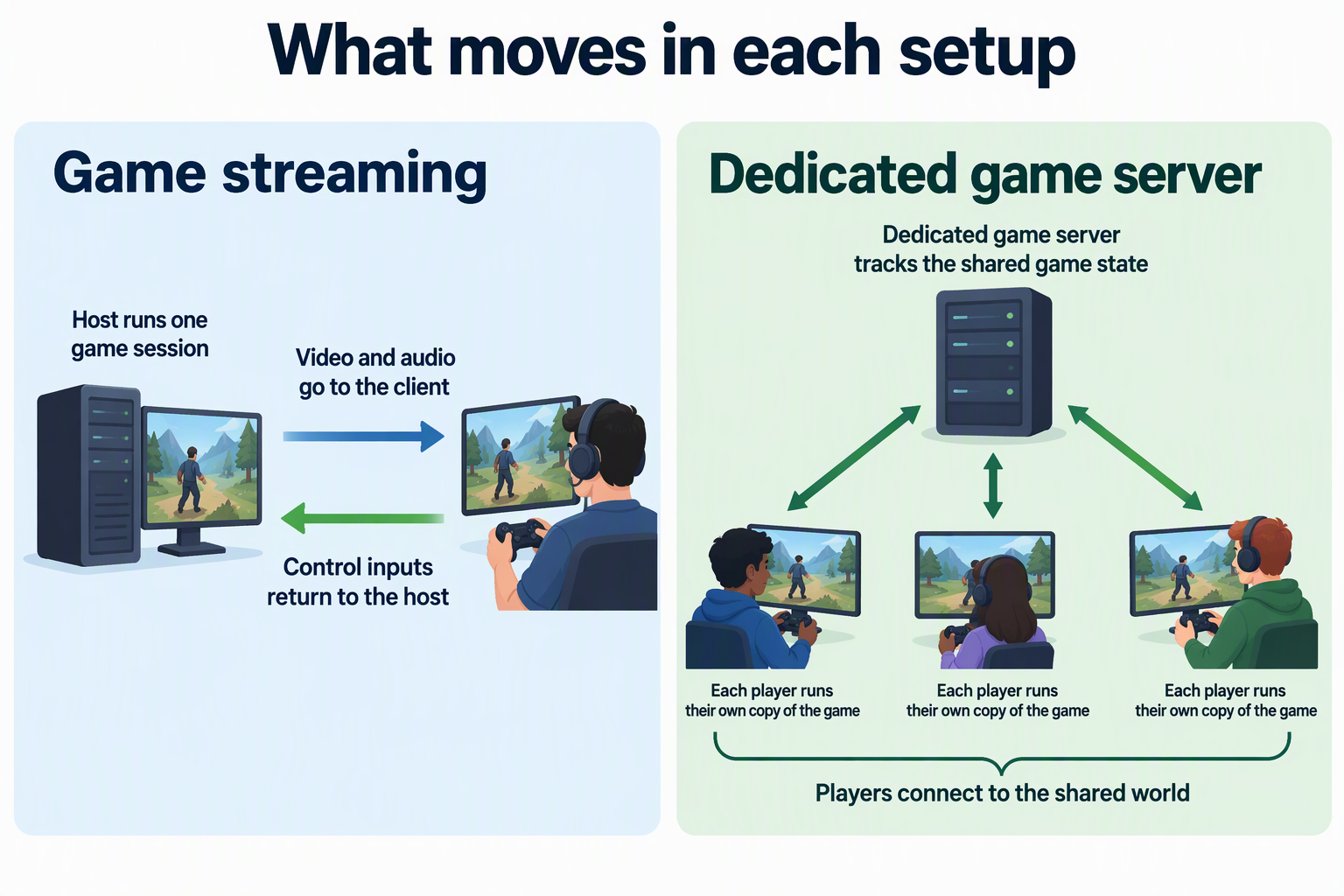
With streaming, there are two parts. The streaming host, sometimes called the streaming server, is the device that actually runs the game. It captures the video and audio and sends them out. The streaming client is the app on the device you hold or sit in front of, like a laptop, phone, or TV box. It shows you the stream and sends your button presses, mouse, or controller input back to the host. The game never runs on the client. You are remotely driving the host’s session.
A dedicated game server works differently. It is a separate program that keeps track of the shared game state: the map, the players’ positions, the items, and the rules. Each friend launches the game on their own device and connects to that server. Every player sees the world through their own copy of the game, not through a video feed of someone else’s screen.
That is why the two are not interchangeable, even though both get called a “server.” A streaming server shares one person’s session. A dedicated game server hosts a world that many people can enter at once. You can even combine them: a player could stream their own game from a home PC to a laptop while that game is connected to a dedicated server.
Which Game and Setup Details Can Change the Answer?
Your choice from the table only holds if the specific game and your group’s devices can follow that path. Four details can move you from one setup to another, so check each one against the game’s current official support pages before committing.
Game and mode support. Look up whether the exact game, and the mode you want to play, offers online play, player-hosted sessions, or dedicated servers. Being “multiplayer” does not mean a game offers every option. If a dedicated server isn’t offered, that row drops out, and your choice comes down to built-in multiplayer or streaming a co-op session.
Platforms, editions, and versions. Friends on different devices or different editions of the same game may not be able to share a world. Some dedicated servers also expect every player’s game to match the server’s version. If one friend’s platform or edition can’t join, a shared server won’t help that person. Streaming from a compatible machine might, but only if the game also supports that friend playing inside the streamed session.
Input needs. Decide who needs to control what. Streaming sends one session’s input back to the host, so ask whether the game and your streaming tool can handle more than one remote player’s controller. With a dedicated server or online mode, each player uses their own device’s controls, which avoids this question.
Network and access path. Playing in the same house and playing across town are different setups. On a home network, devices can often find each other directly. For friends outside your home, you need a route that reaches the host or server, such as the game’s online service, a VPN, or a network setting the game’s documentation describes. If a remote friend can’t reach the host, change the access path before you give up on the setup.
FAQs
Can my friends play a single-player game with me through streaming?
Not in the sense of each friend playing their own character. Streaming sends one session to one viewer at the controls, so a single-player game stays single-player. Friends could pass control or watch, but shared play needs a game with a co-op or multiplayer mode.
Is a player-hosted session the same as a dedicated server?
No. In a player-hosted session, one player’s own copy of the game hosts the world while they play. When they quit, the session may end for everyone, depending on the game. A dedicated server runs separately, so the world can stay available without a specific player in the game.
Does a dedicated server have to stay on for friends to play?
Yes. The shared world exists only while the server program is running and reachable. If the machine running it shuts down, sleeps, or loses its network connection, friends can’t join until it comes back. Plan where it will run and who keeps it on before you set one up.
Can I use streaming and a dedicated server at the same time?
Yes, because they do separate jobs. For example, you could host a shared world on a dedicated server and also stream your own copy of the game from a desktop to a laptop in another room. The server holds the world, and the stream only changes which screen you play on.