
Close Out Client Access: Revoke or Rotate Shared Credentials


When a client project ends, do three separate things. Disable each named account you or a collaborator used. Reset or replace any shared password, API key, or token that should stop working. Then agree on the handoff records and any retention obligations before returning or disposing of other copies.
These steps don’t stand in for each other. Resetting a shared password leaves a named account active. Disabling an account may leave separately issued API keys, tokens, or sessions active, depending on the service. Good client credential offboarding treats each type of access as its own item, with its own owner and its own way to confirm it’s done.
Agree on the client’s closeout owner and acceptance check
Client closeout needs a handoff between two organizations. You may know which tools the project used while the client controls the accounts. Before access changes, agree on who can authorize each action, who will perform it, and who will confirm that the client can still work afterward.
Use a short closeout record for the engagement. The following is a suggested working format, not a provider requirement:
| Record | What to capture |
|---|---|
| Client decision owner | The person who approves the scope and handles unresolved access |
| Service owner | The administrator who can disable accounts or replace credentials |
| Change window | Agreed date, time, and time zone, including any final delivery or running job that must finish first |
| Acceptance check | A client-owned login, integration, or scheduled job that must still work after the change |
| Evidence and open items | Confirmation time, result, responsible person, and follow-up date, without secret values |
For example, a consultant may deliver the final report while the client’s administrator replaces the reporting integration’s key. The client’s service owner then runs a small check using the replacement. Record those as separate completion events. Sending the report does not prove the integration changed, and replacing the key does not prove the client accepted the handoff.
Revoke individual account access
Start by listing every client account the departing collaborator could reach, including your own login if you’re the one leaving. For each one, note whether it’s a named-user account (tied to one person) or a shared login that several people use. The two need different actions, so sorting them first keeps the rest of the closeout clean.
Named accounts should be disabled. CISA’s account-transition guidance recommends disabling user accounts when personnel transition. It also tells customers to disable provider accounts that no longer manage their infrastructure, and it notes this step is easy to miss when a contract ends. That advice is written for managed service providers and their customers, but the same logic fits a consultant and a client.
Who does the disabling depends on who controls the account. If you administer it yourself, disable it through that service’s account controls. If the client owns or administers it, assign the action to the client’s account owner or administrator, and name the specific accounts so nothing gets skipped.
Next, confirm the result. Ask the client administrator to verify the disabled status, or check it in the client’s access review. CISA also recommends that customers verify through audits that provider accounts are used appropriately and are disabled when they aren’t in active use. If a named account still shows as active, it’s still open, no matter how many shared passwords you changed.
Rotate shared credentials and revoke individual tokens
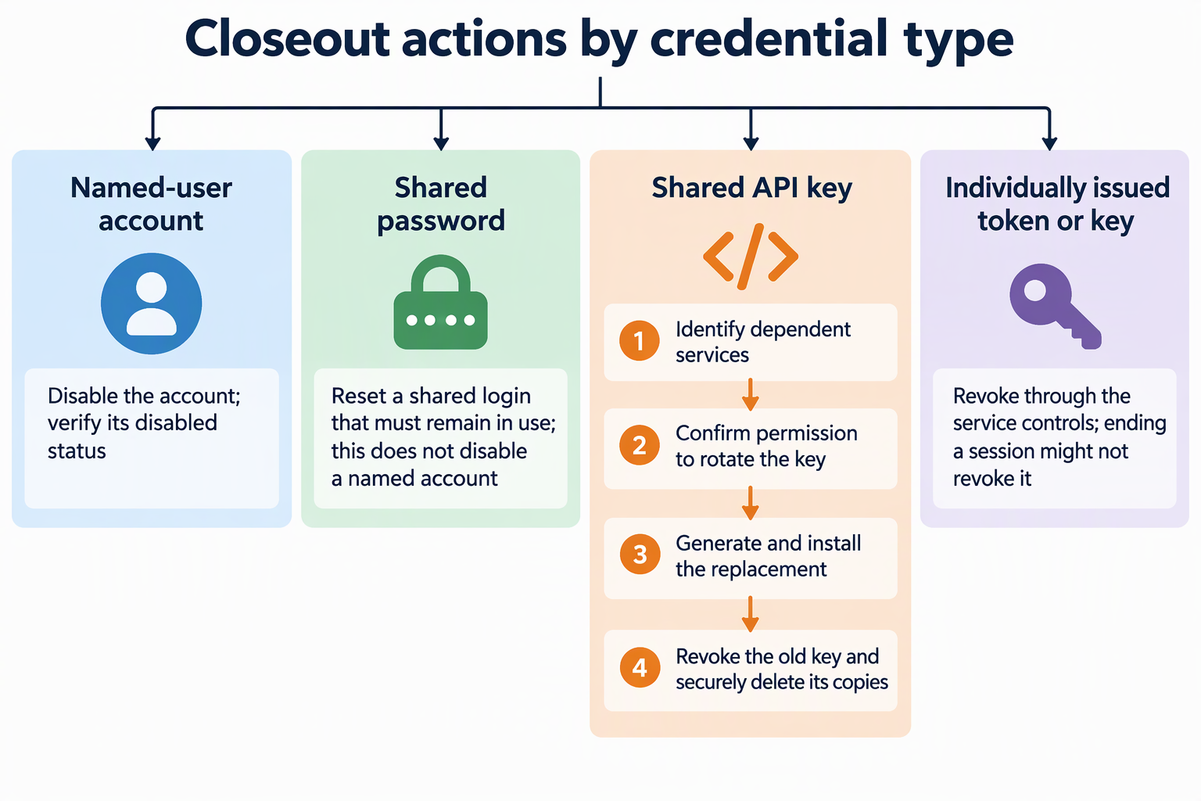
What you change depends on the type of credential. Shared passwords get reset, shared API keys get replaced before the old one is revoked, and individually issued tokens get revoked through the service’s own controls.
Shared passwords
If a shared login has to stay in use, reset its password once the collaborator leaves. CISA advises against shared accounts, but where an organization needs them, its shared-account guidance says to reset their passwords when personnel transition. This reset applies only to the shared login. Disabling the collaborator’s named account is still a separate task.
Shared API keys
Assign each production key to the client’s service owner. During routine offboarding, follow the provider’s process to prepare a replacement, update dependent services, and verify the client’s acceptance check before retiring the old key. Some providers do not allow overlapping keys, and suspected compromise may require immediate revocation. Agree on that service’s sequence and any interruption with the client.
For the service-by-service credential inventory and rotation checks, use our small-business credential offboarding plan. Here, keep the focus on which client owner will perform and confirm each action.
Individually issued tokens or keys
Tokens or keys issued to one person need their own review, apart from any shared password. Logging out or ending a session might not shut them off. NIST’s token-session guidance states that access tokens and their refresh tokens could stay valid long after the authentication session has ended. Check each service’s token or key management controls, and revoke anything the collaborator was issued that shouldn’t keep working.
Keep only client-approved handoff records
Keep handoff records that the client authorizes and the handoff needs, while honoring applicable retention obligations. Return or securely dispose of other copies when your agreement and those obligations permit it.
A short access inventory usually covers what the client needs. This is our suggested format, not a legal rule or a CISA template. For each account or integration, record:
- The account or integration name or identifier
- Who owns any remaining action, the client or you
- The closeout status, such as disabled, password reset, or key replaced
- Any operational pointer the client needs, such as where the new key is installed
Leave reusable secrets out of this record. Passwords, token values, and key copies don’t belong in ordinary handoff notes. If the client specifically needs a secret transferred, use the handling method the client approves, then delete any copies that weren’t approved or aren’t needed.
Clear ownership is the point of the record. CISA’s responsibility guidance encourages arrangements that spell out whether the provider or the customer owns specific responsibilities. Close the project by having the client approve the inventory and confirm who will finish each open item.
Get sign-off without hiding open access
Send the client the closeout record through the agreed project channel. Ask the client owner to confirm which access has ended, which service checks passed, and which records you may retain under the agreement. Keep account closure, service continuity, and record retention as separate results.
If the client has not acted or replied, record the item as pending with its owner and follow-up date. Do not mark it revoked simply because you sent a request, and do not use a client administrator’s account to make changes outside your authority. When the engagement resumes later, request fresh access instead of relying on old credentials.
FAQs
Should I delete a disabled client account or just leave it disabled?
That’s the client’s call. Disabling ends access. Deleting is a separate step. Follow the client’s own de-provisioning practice and note the final state in the inventory.
What if I don’t have admin rights to disable my own account in a client system?
Send the client administrator a written list of the exact accounts to disable. Ask them to reply once each account is disabled. Mark those items as client-owned in the inventory until they confirm.
Is it worth watching for login activity after a password reset?
Yes, if the client can review its logs. CISA notes that failed login attempts right after a password change could mean the account had been compromised. Ask the client to check sensitive accounts for unexplained failures after the reset. Failures can also come from legitimate integrations still using an old credential, so investigate their source rather than treating them as proof of compromise.
Can I keep a copy of credentials in case the client calls me back?
Not as a default. If the client brings you back later, it can issue new access then. Keeping old secrets “just in case” leaves exactly the kind of leftover access that closeout is supposed to remove.