
Choose an Always-On Agent or Scheduled Research Check


Use a scheduled research check when a planned cadence finds new sources soon enough for the task. Choose an always-on or event-triggered setup only when faster reaction actually changes the outcome. Even then, you need to watch it for failures and keep its permissions tightly scoped.
For most research monitoring, the deciding question is simple: how late can a new item arrive and still be useful? If the answer is “by tomorrow morning,” a daily check before that deadline may be enough, provided you leave time for source update lag, processing, and recovery from a failed run. If the answer is “before someone acts on it in the next few minutes,” look at event-driven delivery. Accept that path only if you can supervise it.
Choose by Acceptable Discovery Delay
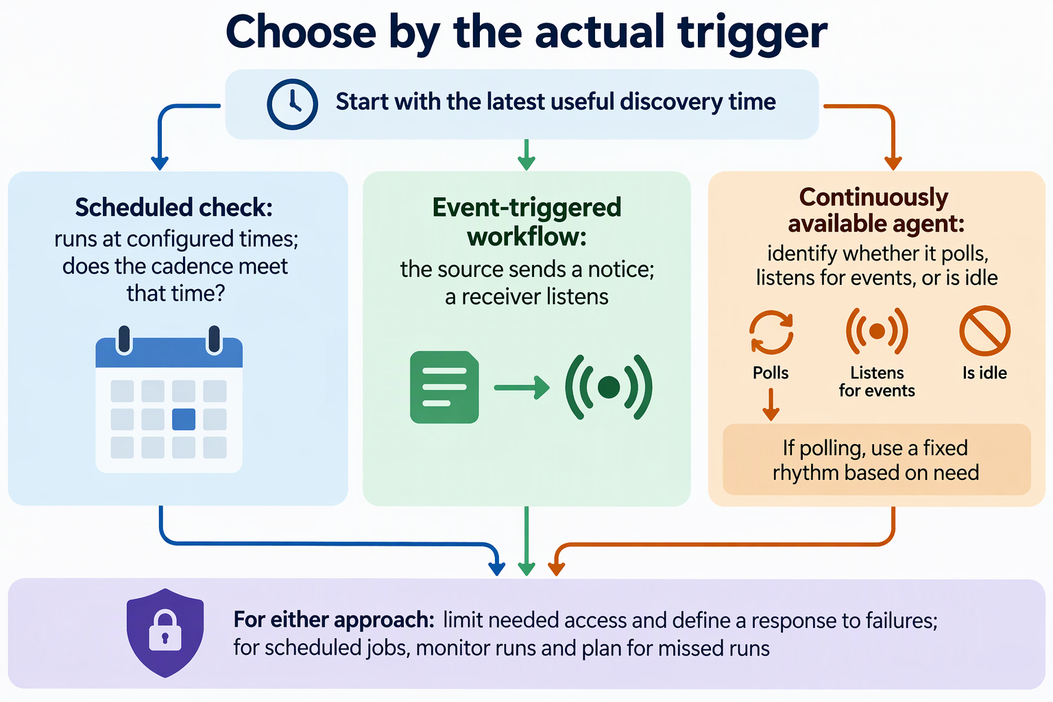
Start by writing down the latest useful discovery time for the task. That timeframe tells you whether a planned schedule can do the job before considering an always-on service such as Lares.
“Always-on” is merely an availability label rather than a guarantee of continuous inspection. A process can stay running all day and still look for new material only on a timer or when an event reaches it.
| Operating pattern | How discovery starts | Decision check |
|---|---|---|
| Scheduled check | Runs at configured times | Does the cadence meet your latest useful time? |
| Event-triggered workflow | Source sends a notice when an event occurs | Does the source offer the event, and is a receiver listening? |
| Continuously available agent | Depends on its real trigger | Is it polling, listening for events, or idle? |
The trigger matters more than the label. GitHub gives a clear example. It describes GitHub webhook timing as event-triggered delivery of data to your server, unlike polling, where you call an API intermittently to see if data is available. GitHub says webhooks allow near-real-time updates. That means faster notice for GitHub events. It does not mean every always-on agent reacts instantly.
If you poll, choose a fixed rhythm based on your need instead of checking as often as possible. GitHub’s polling cadence guidance for its REST API says to poll only as often as you need to, on a fixed schedule. If a response includes an x-poll-interval header, wait at least that many seconds before polling the same endpoint again. The same guidance recommends authenticated conditional requests. When the data has not changed, a correctly authorized request that returns 304 Not Modified does not count against your primary rate limit, so routine checks of unchanged sources cost less. Here is a practical example. If new releases are only reviewed in a Monday planning meeting, a check before that meeting meets the need. Checking every few minutes adds requests without changing any decision.
Do not assume that the always-on option costs more or less. Resource use depends on the mechanism. In GitHub’s own webhook resource comparison, webhooks require less effort and fewer resources than polling its API. That finding covers GitHub webhooks versus GitHub API polling. It is not a ranking of every continuous agent against every schedule. GitHub also notes that webhooks scale better when you monitor many resources, because calling the API for each resource can use up your rate limit quota quickly. Compare the actual work each setup does: the requests, the running processes, and the compute it uses.
Permissions are the next gate. Find out exactly which sources and actions the workflow can reach before you turn it on. Both patterns need this check. A GitHub webhook can access only resources in the repository, organization, account, or app where it is installed, so the GitHub webhook scope follows from where you install it. Schedules are permissioned automation too. With AWS EventBridge Scheduler, the policy attached to the schedule’s execution role defines the AWS scheduled-task permissions needed for its target operation. If a monitoring job only needs to read one source, any broader access is a reason to fix the setup before you rely on it.
Finally, decide how you will notice a missed run and what you will do about it. A schedule that fails silently can feel safe while it misses new sources. Google SRE missed-run guidance says owners of periodic jobs should monitor their jobs. When a launch is skipped, the owner should respond in a way that fits that job. The same discussion notes that a periodic job may be delayed when the needed resources are not available, so a run can arrive late rather than never. For research monitoring, pick one success signal, such as a completed run with its last successfully checked source position and a count of processed items, including zero when nothing changed. Then decide whether a missed run waits for the next cycle or needs a manual catch-up.
The resulting decision path is short:
- If your cadence meets the latest useful discovery time, schedule it and add a success signal.
- If faster notice changes the outcome, confirm that the source supports the right event and that a receiver is listening.
- In either case, approve only the access the job needs, and define a response to failures before you depend on the workflow.
FAQs
What can stop an event-triggered check from noticing a change?
The event has to be subscribed, and something has to receive it. For a GitHub webhook receiver, you specify a URL and subscribe to events. When one of those events occurs, GitHub sends an HTTP request to that URL, and your server can act on it only if it is set up to listen there. If nothing arrives, check the event subscription and the listening endpoint first.
Can you automatically retry every missed check?
No. Check whether a run is safe to repeat. Google SRE retry safety guidance separates jobs that can safely launch multiple times from jobs that should not run more than once, such as sending a newsletter. A read-only source check is usually easier to repeat. A run that writes records or sends alerts may create duplicates, so confirm how it handles repeat runs before you turn on automatic retries.
What failure signals can a scheduler expose?
It depends on the platform, so find the equivalents in your own tool. As one example, AWS documents AWS Scheduler failure metrics for invocation attempts, target errors, throttling, and invocations dropped after the retry policy is exhausted. Together, these tell you whether a schedule tried to run, whether delivery failed, and whether it gave up.