
Local Files or Cloud Notes for a Personal Knowledge Base?

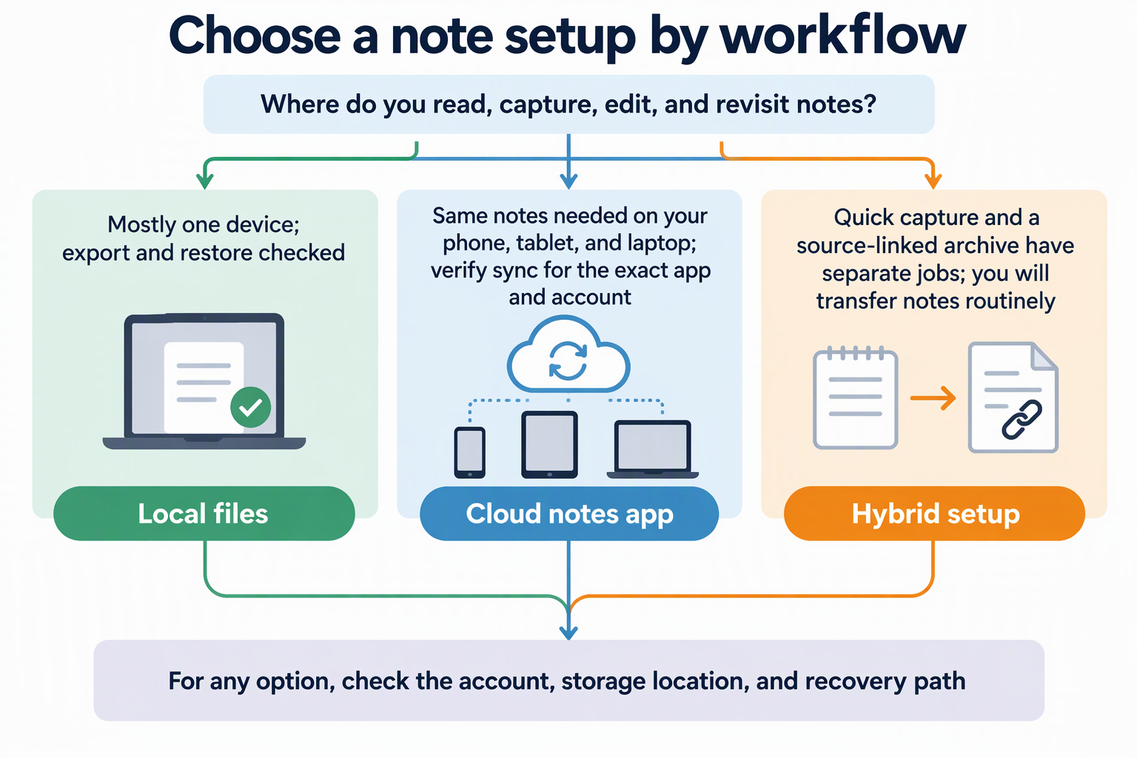
Keep your personal knowledge base in local files when you want direct control over the files and have checked export and recovery. If you use several devices, choose either a notes service with sync or local files with a sync system you manage. Test your exact app, account, and devices before relying on either route.
A hybrid setup makes sense when quick capture and a lasting, source-linked archive do different jobs, and you’ll actually move notes from one to the other. Neither option is private or unsafe by default. What matters is the account, the storage location, and the recovery path you set up.
Choose a storage setup around your reading workflow
Start by mapping the actual path a note takes across the devices where you read, edit, and retrieve information. Testing your own notes across those specific hardware and account combinations will reveal constraints faster than generic claims about search speed.
Trace that path concretely: where do you read when an idea hits you, and where do you return later to search, edit, or quote it? List those primary devices first before comparing local folders or cloud notebooks.
One primary device favors local files
If nearly all your reading and writing happens on one computer, local storage keeps things simple. Just know what “local” means in practice. For example, Apple Notes in the On My Mac account is stored on that Mac and can’t be opened on your other Apple devices or iCloud.com. That works fine for a desk-bound reader. If you later expect a highlight to show up on your phone, it won’t. Local storage also doesn’t give you a backup on its own, so the recovery check in the next section still applies.
Several devices call for verified sync
If you capture on your phone and edit on your laptop, you need a synced setup. Apple says that when you use iCloud for Notes, your notes sync and stay up to date across your devices. That describes one service with one account setup. It doesn’t promise that every cloud notes app behaves the same way, so test the exact app, account, and devices you plan to use. Local files can also sync across devices. For example, our Obsidian LiveSync guide describes synchronizing an Obsidian vault through a database hosted on Olares. That adds a sync service to manage rather than turning local files into a single-device-only choice.
Also check what happens when edits overlap. Microsoft says some OneNote sync conflicts create page copies to avoid data loss and show an error message on the yellow Information bar. You may then need to copy changes back into the main page yourself. If you often edit the same reading note on two devices, try one overlapping edit early. That way you’ll know whether you get a clean merge or a cleanup job.
Hybrid fits split jobs, with a routine
A hybrid pairs a fast capture inbox with a separate archive for notes worth keeping. It only works if the handoff is clear. For example, you might move or export finished notes once a week, with their source attached. If you don’t stick to a routine like that, a hybrid just spreads your notes across two places you’ll have to search. Choose it only if you’ll keep up the transfer.
Privacy works the same way across all three options. The words “local,” “cloud,” and “synced” don’t tell you where your data goes. Check the account each note is saved under and where that account stores it.
Build a source-linked archive with a recovery path
A reading archive is only useful if you can trace each note to its source and get it back after a problem. Before you trust any setup for the long term, put these pieces in place:
- Attach the source. Keep the original URL or citation next to your own comment, so you can tell what came from the text and what came from you.
- Export a sample note. Use the app’s supported route. Apple’s Notes guide for macOS 26 documents exporting a note as PDF or Markdown. Check the export options in your installed version. Don’t assume every attachment or format carries over unchanged. Apple also lists the formats Notes can import, including Markdown, TXT, RTF, RTFD, HTML, and Evernote ENEX files, which helps if you later need to move an archive back in.
- Open the export elsewhere. Check that the text, the source reference, and anything else you’d need later are still there and readable.
- Find out what your backup covers. Apple separates data already synced to iCloud from data included in an iCloud backup. App data stored in iCloud Drive stays in iCloud instead of going into that device backup.
- Confirm your platform’s route. Microsoft’s OneNote recovery table by platform shows backup and export options that differ by device. It also limits notebook export through the web to personal OneDrive notebooks. The same table lists automatic and manual backups on Windows (daily by default, kept for two weeks) and on Mac (weekly, keeping the two most recent copies). It shows no backup for Android or the web, and export on phones and tablets is limited to individual pages saved as PDF. If you capture mostly on a phone, check this before you rely on that device’s copy.
- Restore a copy. Before you move the full archive, make sure you can actually bring a separate copy back.
If any step fails, fix it or change your setup before you commit years of notes to it.
FAQs
Does syncing count as backing up my notes?
Not by itself. Syncing keeps your devices showing the same current version, so a deletion or bad edit can show up everywhere too. A backup is a copy you can restore later. Look up your app’s actual backup and restore path, and treat it as a separate check.
What should I test before moving my reading archive?
Pick one representative note that has a source link, formatting, and an attachment. Export it, open it outside the original app, and confirm that what you need is still there. Then restore a copy before you move everything.
What belongs in a source-linked reading note?
At minimum, include the original URL or citation, the passage or highlight, and your own thoughts, kept clearly separate. Links can break over time, so a full citation (author, title, date) helps you find the source again even if the URL stops working.