
CGNAT and Home Servers: Why Port Forwarding May Not Work

A port-forwarding rule on your home router only works on traffic that actually reaches the router. With carrier-grade NAT (CGNAT), your internet provider adds another address-translation layer upstream, and that layer belongs to the ISP, not to you. If the ISP’s layer has no inbound mapping for your server, outside connections stop there, and no setting on your router can create one.
The useful next step is to check whether an upstream layer exists, then pick an access path based on who needs to connect. Your options are a public address from your ISP, working IPv6, a private overlay network for a few known people, or a relay for apps built to use one.
Why a router rule may not reach a server behind CGNAT
An inbound connection under CGNAT can stop at the ISP’s translation device before it ever gets to your home. To see why, follow the path a connection takes from the internet to your server.
NAT (network address translation) rewrites addresses so many devices can share one public IP address. Your home router already does this for your household. With carrier-grade NAT, the provider does the same thing one level up. Under the model in RFC 6888, an ISP-side CGN shares IPv4 addresses: many subscribers share one public IPv4 address, each subscriber gets a private address, and a NAT inside the ISP’s network translates between them. When your own router also does NAT, traffic crosses two layers. The RFC is direct about the control boundary: a CGN is not managed by subscribers.
Here is the inbound route in short form: public internet → ISP’s CGN (shared public IPv4) → your home router (your NAT and your forwarding rule) → your server.
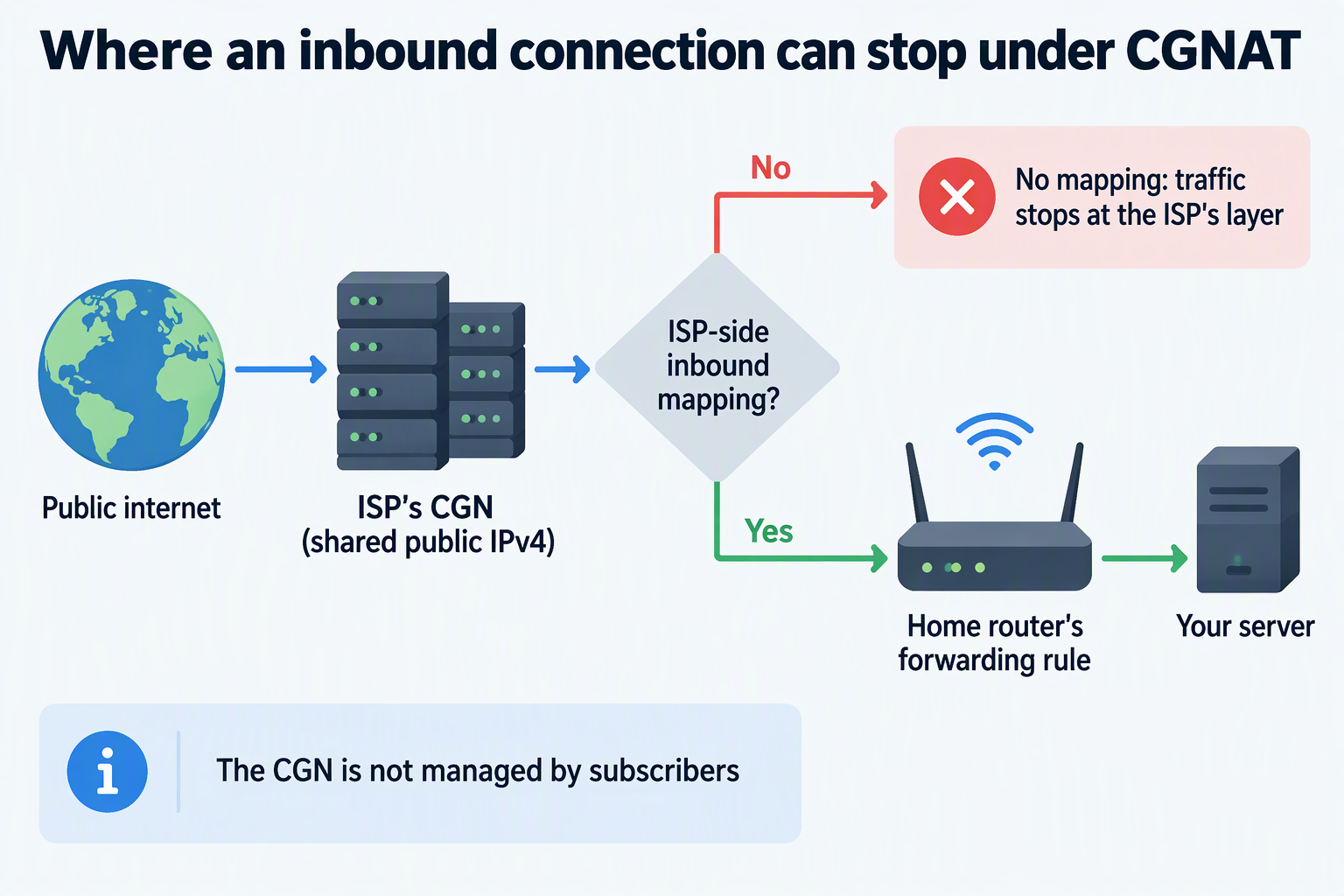
A forwarding rule tells your router, “Send traffic that arrives on this port to this local device.” It acts only on packets that arrive at the router’s WAN side, which is the side facing the internet. RFC 6269 notes that when CGN is present, an upstream CGN port mapping must also be opened in the CGN for port forwarding to work.
What you’ll notice is that the router rule can be set up correctly and still never see a single inbound connection. Changing ports, rebooting, or rewriting the rule again won’t fix it, because the missing piece sits in equipment you can’t log in to. That doesn’t make port forwarding impossible under every CGN deployment. It means the ISP decides whether an inbound mapping or another inbound option exists for your connection.
How to assess whether CGNAT is involved
Your router’s WAN address gives you the first clue. It can show that another layer sits upstream, but it can’t tell you who runs that layer.
Start by writing down the WAN IPv4 address on your router’s status page. Then, from a device on the same home connection at about the same time, check which IPv4 address an outside website sees. Turn off any VPN or proxy first, and compare IPv4 with IPv4, not with an IPv6 address. If the two match, your router seems to hold the address the internet sees. In that case, look at the forwarding rule, the server, and any firewall next, not the ISP.
If the addresses differ, something upstream is translating your traffic. That fits the two-layer setup described for ISP-side CGN, but a mismatch is a clue, not proof. It doesn’t tell you which device or provider layer does the translating.
The WAN address itself can narrow things down. RFC 6598 sets aside the 100.64.0.0/10 shared range, meaning 100.64.0.0 through 100.127.255.255, as Shared Address Space for service providers running CGN. A router WAN address in that range strongly suggests provider-side shared addressing. Even so, it’s one clue and not a complete test in either direction.
Before blaming the ISP, check your own setup for a second router. A modem-router gateway from your ISP plus your own router can create two-router double NAT, and the result can look a lot like CGNAT. If the ISP’s box is also routing, your router’s WAN address comes from that gateway’s local network. Repeat the same address check on the gateway itself. If you still can’t tell which layer is responsible, ask your ISP two questions: “Is my connection behind CGN?” and “Can I get an IPv4 address that accepts inbound connections?”
Which access path fits the people connecting?
Start with who needs to connect. Is it you and a few known people who can install a client, or anyone on the public internet who opens a link?
| Path | Who it fits | Key condition |
|---|---|---|
| Public IPv4 from your ISP | Public visitors or known users | ISP offers it for your connection |
| IPv6 | Visitors and users who also have IPv6 | Full provisioning, plus gateway filtering allows the service |
| Private overlay VPN | You and a small group of known users | Every user’s device joins the private network |
| Relay or outbound tunnel | Users of apps built for a relay or tunnel service | App support and a documented service path |
A public IPv4 address is the most direct fix when the service has to be open to the wider internet. RFC 6888 lists possible ISP address services that can run alongside CGN, such as regular public IPv4 or IPv6. It doesn’t tell you what your provider, plan, or location offers, so ask your ISP directly. Request an address that accepts inbound connections, or another supported inbound mapping, and ask about any cost. With a reachable public address, your router’s forwarding rule matters again.
IPv6 avoids the shared-IPv4 problem only when it works end to end. Guidance on residential IPv6 provisioning checks covers three points: IPv6 on the router’s WAN, a delegated prefix assigned to your LAN, and device settings that match the router. The server needs IPv6, and so does every device connecting to it. After that, IPv6 gateway filtering still matters. RFC 6092 describes gateway filter state as generally being created when an inside device sends traffic out. So a server with an IPv6 address may still not accept unsolicited inbound connections. Check your router’s IPv6 firewall settings for that specific service.
A private overlay VPN fits when you know every person who needs access and each of them can add a client and join. It doesn’t serve strangers who can’t join your network. The details depend on the software you use. For example, WireGuard documentation notes that a peer behind NAT may need persistent keepalives to keep its mapping open if it has to receive traffic after sitting idle. Overlays also don’t always get a direct path. Our LarePass client, for instance, connects to Olares over a Tailscale-based network. Its status shows P2P for a direct VPN connection and DERP when traffic goes through a relay because a direct P2P path couldn’t be set up. If remote video or file transfers feel slow, check which route is active before blaming the server app.
Plain WireGuard does not supply a relay or peer-coordination service by itself. Persistent keepalives preserve an existing NAT mapping; they do not guarantee a route through every CGNAT setup. For Olares, LarePass connection statuses distinguish a direct P2P path from a DERP relay.
Relays solve a narrower problem than many people expect. TURN, a standard relay protocol, can carry traffic between NATed devices when no direct path is available. However, TURN requires application support and separate signaling to exchange relay and peer addresses, and a TURN server typically needs a high-bandwidth connection. That makes it a fallback for apps designed to use it, not a general way to publish any home service. Before relying on an outbound tunnel service to reach public visitors, confirm that both the service and your specific app document the path you need.
Your decision comes down to two facts you can now check. The first is who connects. The second is which address options your ISP and devices actually support.
FAQs
Will a new router get around my ISP’s CGNAT?
No. A new router can only change your household’s NAT layer. The CGN sits inside the provider’s network and subscribers don’t manage it, so replacing your router leaves that upstream layer in place. A new router can help only if your problem turns out to be household double NAT.
Is a 100.64.x.x WAN address the same as a home address like 192.168.x.x?
They are different ranges set aside for different jobs. The 100.64.0.0/10 block is reserved as Shared Address Space for service providers running CGN. If you see it on your router’s WAN, that points toward shared addressing on the provider side, though it does not rule out having another router in your home. Ask your ISP to confirm.
Can a TCP port test confirm that a UDP game server is reachable?
No. A TCP-only check, such as Windows Test-NetConnection, can’t show whether a UDP port is reachable. Some game servers use UDP. For example, official setup notes for a Palworld dedicated server specify UDP port 8211. For those servers, the real test is whether a player outside your network can actually join using the game client.