
Webhooks or Scheduled Polling for a Small Business Update Log

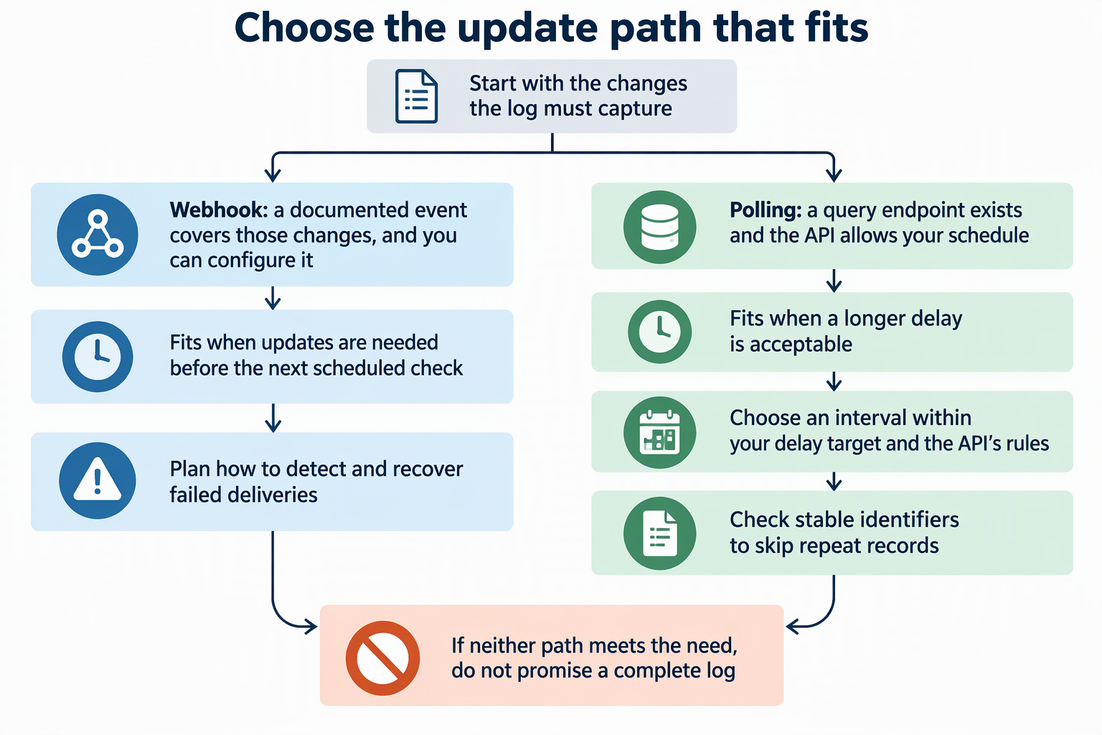
Use a webhook when the public API documents an event that covers the changes your update log needs, you can configure it, and the log should not wait for the next scheduled check. Use scheduled polling when no suitable event exists or a longer delay is fine, as long as the API has a query path and its rules allow your schedule.
Each choice brings its own work. Polling needs a freshness target and a way to spot repeat results. Webhooks still need a plan for deliveries that fail.
Choose by event coverage and acceptable delay
Start with the log, not the method. Write down exactly which changes it must capture, such as new releases, price changes, or status updates. Then check the API’s documentation for two separate things: an event subscription that fires on those changes, and a query endpoint you can call on a schedule.
These are different capabilities. An event lets the API push a notice to your receiver. A query path lets you pull the current state yourself. Some APIs offer both, some offer only one, and the docs for that specific API are the only reliable place to find out.
Compare the event names and actions with your list of changes. A broad event name can still miss the action you care about, or include actions you do not want. Also confirm you can actually set the event up. Permissions and a receiver that the provider can reach from the internet are typical prerequisites to check. For example, you usually cannot add a webhook to a repository or account you do not manage, so polling becomes the path by default.
GitHub repository releases show both paths for one task. On the event side, GitHub’s documented release event covers release activity. Its created action applies when a draft is saved, or when a release or prerelease is published without first being saved as a draft. On the query side, GitHub’s latest-release endpoint returns the latest published full release for a repository. That endpoint gives one release, not a full release history. Its rules are GitHub’s own and do not describe other APIs.
Now apply your delay tolerance. If the log can be a few hours behind and a query path exists, polling is simple and fully under your control. If entries must appear before the next check would run, a configurable event is the better fit. If the docs leave coverage unclear for both paths, do not promise a complete log yet.
Scheduled polling: set a freshness target and recognize repeats
Your polling interval sets the planned wait until the next check, not a guaranteed upper bound on end-to-end delay. API update lag, request time, processing time, and failed runs add delay. Choose an interval with room inside the freshness target and alert when successful checks fall behind.
Those rules vary by API. GitHub’s polling guidance says to poll only as often as you need, on a fixed schedule. If a response includes an x-poll-interval header, wait at least that many seconds before polling the same endpoint again. Not every endpoint returns that header, so honor it when it appears. GitHub also describes authenticated conditional requests, so unchanged data does not count against your primary rate limit. GitHub itself recommends webhooks over polling when you can use them.
Repeated polls often return the same record. Use a stable source identifier as the destination’s unique key and update the existing row when its contents change. Where supported, enforce uniqueness and use an atomic upsert. A separate lookup followed by an insert can still create duplicates when runs overlap.
For GitHub releases, the repository identity plus the release id is a better record key than a mutable display label or tag name alone. Decide whether the log tracks each release’s current state or every revision. The latter needs a revision-aware event key. The latest-release endpoint returns only one full release, so use a paginated release-history query when every release between polls matters.
Webhooks still need a failure plan
Subscribing to an event does not prove every change reaches your log. Deliveries can fail, and you need a way to notice and fix that. Validate the sender before processing a delivery. GitHub recommends a webhook secret and signature validation, HTTPS, and checks on the event type and action. Keep delivery IDs for deduplicating retries, while using the same business-record key as polling for the final write.
GitHub is a clear example. According to GitHub’s failed-delivery guidance, GitHub does not automatically redeliver failed webhook deliveries. A delivery is recorded as failed if your server is down or takes longer than 10 seconds to respond. You can redeliver failures manually, or run a scheduled script that fetches recent deliveries, finds any whose status is not OK, and redelivers them through the REST API.
That last option means a reliable GitHub webhook setup often includes a small scheduled job anyway. For a small business, the practical choice is between checking delivery history by hand after an outage or automating that check.
Other providers may retry, may not, or may expose no delivery history at all. Before you rely on a webhook for any API, find out how it reports failures and how you can recover a missed event. If you cannot see failures, a change can go missing while the log looks complete.
FAQs
Can I use webhooks and polling together?
Yes. Use a webhook for prompt updates and a less frequent reconciliation poll as a backstop. Query a complete, paginated range where the API offers one, rather than only its latest item. Use the same destination key and update rules for both paths. A current-state endpoint cannot reconstruct every intermediate change.
What should I do if the API documents neither events nor a suitable query endpoint?
You cannot build a dependable automated log from that API yet. Record what the docs do offer and contact the provider, or treat the log as partial rather than complete.
Does a webhook need a public URL?
Usually the provider must reach your receiver over the internet, so a connection that only works on your own network or VPN is not enough. For GitHub, the receiver must also reply within 10 seconds, or the delivery counts as failed.
How do I pick a first polling interval?
Start from the delay your log can tolerate, then check rate limits and any server-provided polling interval. Leave room for request and processing time, and monitor the age of the last successful check. If the API’s limits prevent the freshness you need, choose another supported method or state the limitation.