
What Should a Solo Business Automate—and What Should Stay Human?


Automate recurring work that is predictable, low-risk, and easy to check, like internal reminders or tasks created from a form you already approved. Keep a human approval step for work that requires interpretation, makes a promise to a client, issues a refund, or carries significant consequences if errors are hard to spot and undo quickly. For everything in between, let automation handle the capture, sorting, and drafting while you make the final call.
The safest way to start with solo business automation is small. Pick one internal task, write down what goes in and what a correct result looks like, and watch the output before you give the workflow more freedom.
A practical split: automate routine work, approve consequential actions
Sort each recurring task by how predictable it is and what happens when it goes wrong. A useful editorial starting point is three lanes: run routinely, prepare for your approval, or keep the decision with you. Adjust the boundary to the consequences and controls of the actual workflow.
The consultancy Sysiphany’s automation screening guide considers frequency, stability, risk, ownership, and monitoring. These are useful prompts, not an industry standard or evidence that a particular automation is safe. Apply them to a task you can describe and inspect.
Compare the failure modes before choosing a lane. A duplicated internal reminder is usually easy to correct. An incorrect delivery commitment can create work you never agreed to do. Use the table as a starting point and write down any exception rules.
| Task pattern | Default lane | Example or approval point |
|---|---|---|
| Stable, internal, easy to check | Run routinely | Internal deadline reminder; task from an approved form |
| Needs interpretation or a draft | Automate prep, you approve | Inquiry summary you review before replying |
| Client commitment or refund | You decide | Quote, delivery date, or refund you sign off on |
The middle row is where automation can save time on work you could never hand off completely. The third row is not a ban on automation. A workflow can still gather the details for a refund request or a quote, as long as you approve the outcome before it reaches the client.
Spending money and other hard-to-reverse actions need a closer look rather than an automatic label. Ask three things: how much a wrong result would cost, how quickly you would notice it, and whether you could undo it. If the answers are “a lot,” “too late,” or “not easily,” keep the approval step.
For mixed workflows, automate preparation—not the final judgment
When a task mixes routine handling with judgment, split it at the point where interpretation begins. Automate the repeatable steps before that point. Keep the decision and the action that follows it with you.
Use four stages: capture the input, prepare a draft, review it, then execute the approved action. Keep the original input visible during review and separate approval from execution so an unchecked draft cannot accidentally become a client message or transaction.
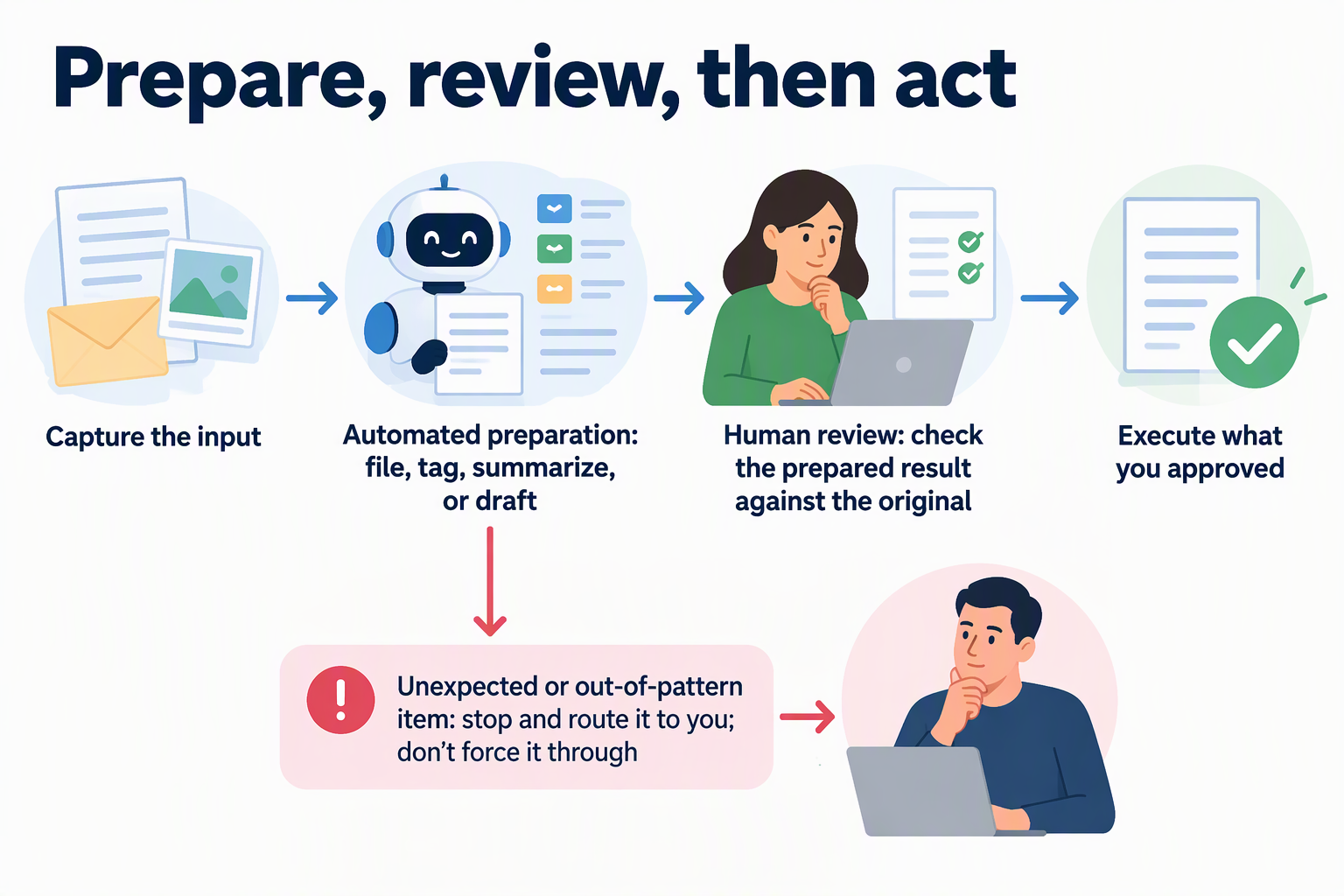
Here is an illustrative example. A freelance consultant gets new-client inquiries through a website form. Automation files each inquiry, tags it by service type, and drafts a short summary plus a suggested reply. The consultant reads the original message next to the summary, fixes anything the draft got wrong, and only then sends a reply. If the draft mentions a price, a start date, or a scope, those lines get the hardest look, because they become commitments the moment they go out.
A draft is not the same as a correct answer. Classification can put an unusual request in the wrong bucket, and a summary can drop the one detail that matters. So build the handoff to send anything that does not fit the expected pattern straight to you instead of forcing it through. The automated steps save you the retyping, sorting, and blank-page writing. Your review is what keeps the business’s name on work you actually stand behind.
Choose one low-stakes workflow to assess first
Start with one recurring internal task, not a business-wide rollout. A small test shows whether the task is truly predictable before anything client-facing depends on it.
- Pick one internal, low-stakes task. Good candidates are reminders or tasks created from an approved form. Choose whatever repeats in your own week with the same inputs each time.
- Write down the input and the expected result. Note what triggers the task, what information it uses, and what a correct output looks like. If you can’t describe a correct result in a sentence or two, the task likely belongs in the prep-and-approve lane.
- List exceptions and the cost of a wrong result. Write down the cases that don’t fit the usual pattern and what would happen if the output were wrong. Frequent exceptions or a costly error mean the task should stay with you or move to the middle lane.
- Watch the output before expanding it. Check the results for a while and confirm that mistakes are visible and easy to fix. Only then add a second step, a new input source, or less oversight.
Once one workflow passes this check, repeat the same four steps for the next task on your list.
FAQs
Is doing a task often enough reason to automate it?
No. Frequency is one signal, but a task also needs stable inputs, low risk, a clear owner, and results you can easily monitor. A frequent task that keeps changing shape, or one whose errors are hard to spot, is a better fit for automated prep with your review than for running unattended.
What should happen when an automated workflow hits an exception?
It should stop and route the item to you rather than guess. An exception is a sign that judgment is needed. If exceptions show up regularly, treat the whole task as mixed work: let automation handle the routine cases and the sorting, and keep the unusual ones on your desk.
Does every payment-related task need my approval?
Not as a blanket rule, but money raises the stakes. Judge each task by what a wrong result would cost, how quickly you would catch it, and whether you could reverse it. Refunds are a clear case for review, because an unauthorized refund carries far more consequence than a mislabeled internal note.
What does “clearly owned” mean when I’m the only person in the business?
You own every workflow, so the question becomes practical: do you know where it runs, what it touches, and how you will hear about a failure? Write those down for each automation. If a workflow could quietly break without you noticing, it isn’t easy to monitor yet, and it shouldn’t run without a check.