
Make Scheduled Automations Safe to Run More Than Once


A scheduled automation is safe to run more than once when two things are true. Every run maps the same source item to the same destination key, and the write step updates or skips the record that already has that key instead of creating a new one. That pairing is what automation idempotency means in practice: a retry or repeat run should leave your records the way a single run would have.
None of this makes the workflow run exactly once. Retries, manual reruns, and overlapping schedules can still happen. So the protection has to come from how you identify items, how the destination handles a match, and what you see when you look at the stored data.
Make the same source item resolve to the same record
The core rule is simple: the same source item must produce the same key on every run, and that key must not depend on fields you expect to change. Get this wrong and a later run will see an old item as new and insert it again.
It helps to separate an item’s identity from its current state. Think of a ticket, a release, or an order pulled from an API. Its identity is whatever tells the source “this is that item.” Its state is the title, status, description, and other fields that can be edited. As an illustration, if you keyed records on the title, renaming the item would make the next run treat it as a new one, and you would get a second row.
A source-provided identifier is the best candidate, but only when it stays fixed for the life of the item and is unique within the scope you pull from. If an ID is unique only inside one project or account, and your workflow reads from several, two different items could share the same value.
The destination then has to treat that key as the record’s identity. In a PostgreSQL table, for example, primary keys require unique, non-null values and can span more than one column. That rule enforces identity on the destination side. It cannot tell you whether the source field you mapped into it stays stable across runs, so the source half of the rule is still your job.
A consistent key is necessary, but it is not enough by itself. The write step still has to use that key to find the existing record. That is covered in the next sections.
If the source has no stable ID, set a proof boundary
Without a dependable source ID, do not guess a replacement key and call the workflow safe. A composite of several fields, or a key derived from the item’s content, is a candidate you still need to prove.
Content-derived keys carry a specific risk. When the content changes, the key changes too, so an edited item can look like a brand-new one. Two separate items that happen to share the same content can also collide into one record. Whether either outcome is acceptable depends on what you decided counts as “the same item.”
A fallback key is usable only after you can show three things:
- The source documents that the chosen fields stay fixed for the same item across updates and runs.
- Those fields, taken together, tell apart every separate item within the scope your workflow reads.
- The destination enforces uniqueness on that key for the exact write operation you use.
If any of the three is missing, the workflow is not yet repeat-safe. Hold off on relying on scheduled retries until it is.
Choose what a matching record should do
Once a run finds an existing match, the right action depends on what the destination is for. Skip the match if the record should keep the first version you captured. Update the match if the record should reflect the source’s latest state.
A first-seen archive, such as a log of when each release first appeared, usually wants skip. A current-state view, such as a table that should show each ticket’s present status, usually wants update. Decide this before you configure the write, because the same repeat run produces different correct results in each case.
Treat unchanged items and changed items as separate cases. When an item comes back unchanged, both choices should end in the same place: one record, no new row. When an item comes back with edited fields, skip keeps the original values, while update refreshes them on the same record. With update, also decide which fields it may overwrite. The identity key itself should never change.
In PostgreSQL, these two choices map to leaving a conflict unchanged or updating it: ON CONFLICT DO NOTHING leaves the conflicting row as it was, and ON CONFLICT DO UPDATE updates it. Your workflow’s purpose still decides which one fits. Picking a policy is only half the job until the destination operation actually carries it out.
Verify the destination write is repeat-safe
Before you trust the schedule, the exact write operation must turn a repeated key into the existing record, not a new one. If an overlapping run could write the same key at the same moment, that case also needs documented handling for the operation you use.
A plain “create” or “insert” step does not count as evidence of matching, skipping, updating, or uniqueness enforcement. For your specific destination and connector or API version, look for documentation that answers three questions. What happens when the key already exists? What does a retry of the same write produce? What happens when two writes with the same key arrive together? Keep the retry and overlap questions separate. An operation that handles a sequential retry well may say nothing about concurrent writes, and neither answer amounts to exactly-once execution.
PostgreSQL gives a concrete example of an operation that documents these answers. Per PostgreSQL documentation on ON CONFLICT, DO NOTHING avoids inserting a row when the specified conflict applies, and DO UPDATE updates the existing conflicting row. DO UPDATE requires a conflict target, and only unique indexes or NOT DEFERRABLE constraints can serve as that arbiter. PostgreSQL also states that DO UPDATE guarantees an atomic insert-or-update outcome even under high concurrency, provided no independent error occurs.
To use that pattern, put a unique constraint or index on a source key whose stability and scope you have already confirmed, then target it in the statement. The guarantee belongs to that SQL statement. An automation connector that writes to PostgreSQL gets it only if the connector actually issues that statement against that constraint, so check what your connector sends before you count on it.
Check the stored result, not just the run status
A successful run status tells you the workflow finished. It does not tell you whether the destination holds the records you intended. Confirm automation idempotency by repeating a controlled input and inspecting the stored data:
- Pick one known source item and run the workflow once. Note the destination record’s key and field values.
- Run again with the item unchanged. Exactly one record should exist for that key, with no extra row.
- Change a mutable field on the item at the source, if you can, and run again. Under an update policy, the same record should show the new value. Under a skip policy, it should still show the original.
- If any step leaves two records for one key, or the wrong field values, stop and fix the key or the write operation before you turn the schedule back on.
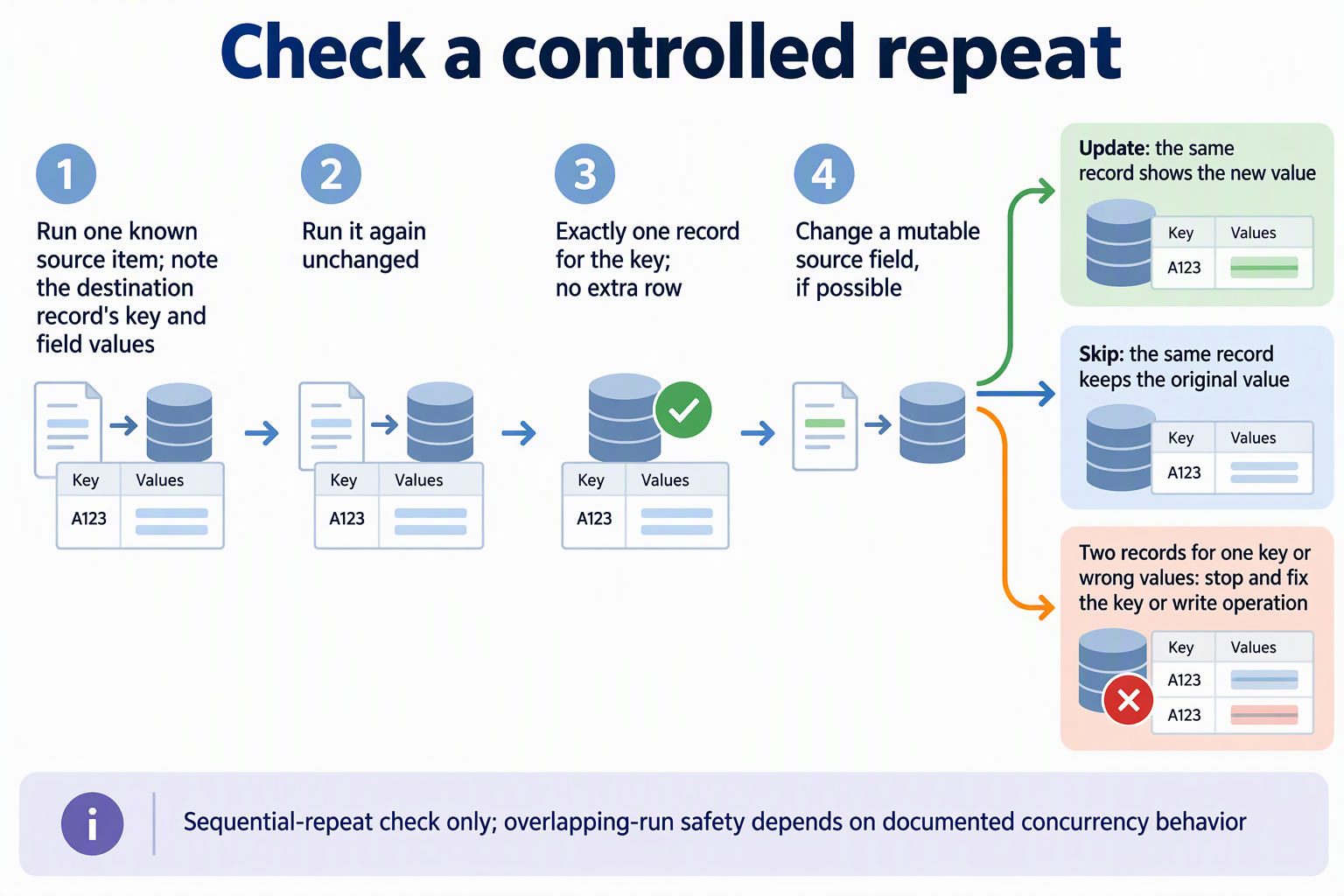
This check covers sequential repeats only. Passing it does not show that overlapping runs are safe. That depends on the concurrency behavior documented for your write operation, as described above.
FAQs
Does an idempotent automation mean the workflow only runs once?
No. Automation idempotency is about the effect of a run, not how many times it happens. The scheduler, a retry policy, or a person can still trigger the same work more than once. The goal is that those extra runs leave the destination in the same state as a single run: one record per source item, updated or left alone according to your match policy.
What does idempotency mean for an HTTP request?
RFC 9110 defines HTTP method idempotency as multiple identical requests having the same intended effect on the server as one request. That definition is about HTTP request methods. A workflow can use an idempotent HTTP method to fetch data and still insert duplicate rows downstream, so the destination write needs its own repeat-safe behavior.
Is it safe to rerun after a run ends with an unclear result?
It is safe when the write step is already proven repeat-safe for that key, because the rerun will match the existing record. If the write is create-only or unverified, look in the destination for the affected items first. Otherwise a rerun can add a second copy of anything the first run already saved.
Why would an ID need a source name or scope next to it?
Some identifiers are unique only inside one account, project, or feed. If one table collects items from several of those, the same ID value can refer to different items. Storing the scope alongside the ID, and keying on both, keeps them apart. In PostgreSQL, a primary key spanning both columns enforces that combined uniqueness.