
Is Self-Hosting Worth It for This Task? A Practical Fit Test


Self-hosting is worth it for a task when the control or access it gives you changes the result enough to justify running and maintaining it yourself. If a hosted service already delivers what the task needs and a short outage would barely matter, the hosted option is often the simpler choice.
The test below helps you judge self-hosting fit one task at a time. Your answer for a photo library may differ from your answer for a to-do list, and that is expected.
Use the Fit Test on One Task
Pick a single task and run it through four questions in order. Each answer narrows the choice before you think about software or hardware.
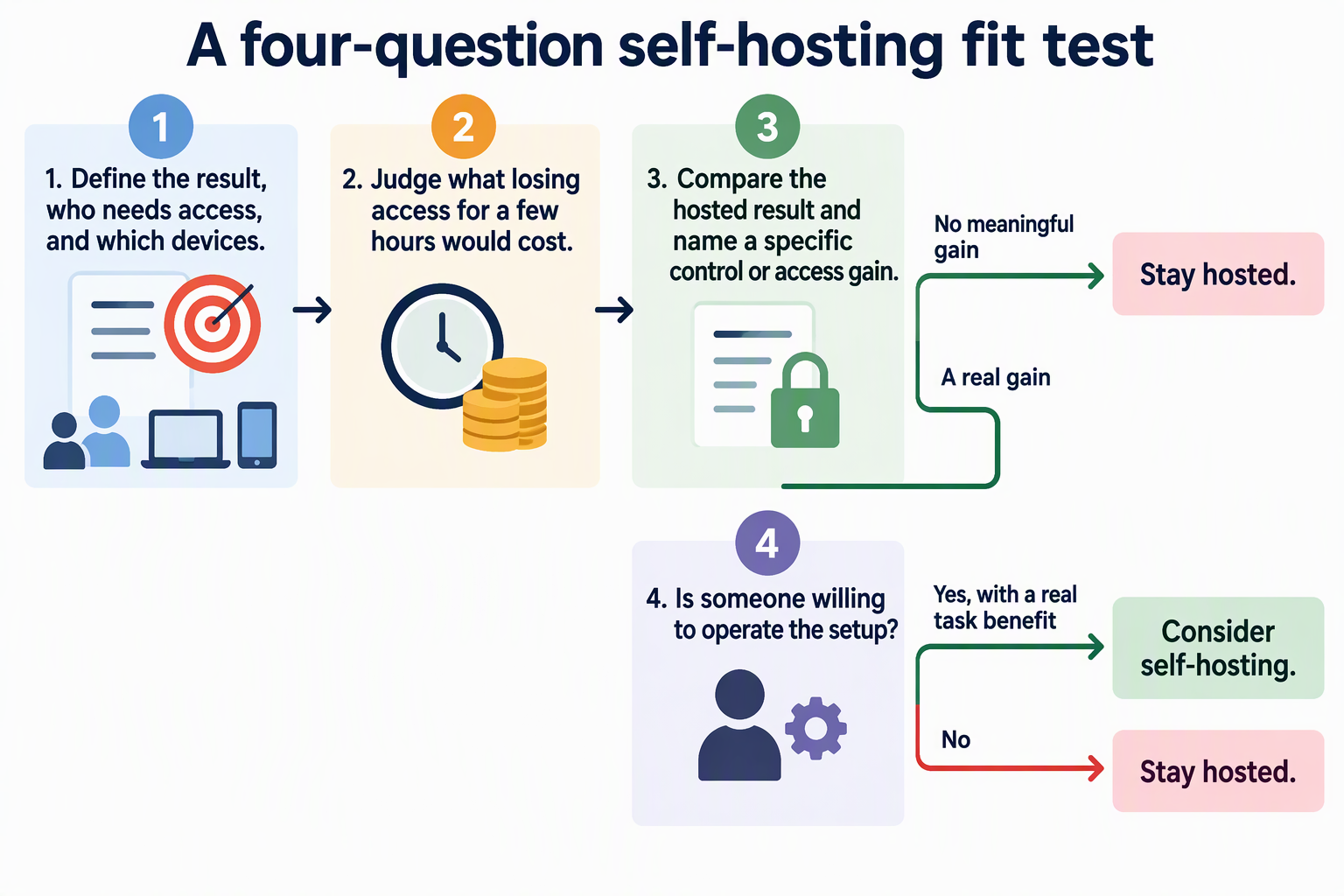
- Name the result you need. Write down what success looks like for this task, who needs access, and which devices they use. “My notes on my laptop” is a different need from “shared files for three people on phones and computers.”
- Judge what an interruption costs. Ask whether losing access for a few hours would be a minor annoyance or would change the outcome, such as a missed deadline or a family member locked out of something they need.
- Compare the hosted result with what self-hosting adds. Check whether the hosted option already meets steps 1 and 2. Then name the specific control or access you would gain by running it yourself. If you cannot name one that matters to this task, that is your answer.
- Decide whether the difference is worth operating. Self-hosting turns you into the operator. If the gain from step 3 is real and someone is willing to keep the setup running, self-hosting is worth considering. If not, stay hosted.
Notice that control and continuous access are treated as questions, not automatic benefits. A self-hosted setup only gives you what it is actually built and maintained to give.
Compare the Hosted and Self-Hosted Outcomes
The same test can lead to opposite answers depending on how much extra control matters to the task. Take an illustrative low-stakes case: a personal reading list used on one laptop. If a hosted app keeps that list in order and a brief outage only means checking it later, running your own server adds work without changing the result.
Hosted services have a real advantage here. Large providers often handle hosted cross-device access well, letting even novice users reach and share their data across devices and platforms with little technical skill and at little cost. That is a description of what many large providers do, not a promise from every service. So check that your specific hosted option actually covers your devices.
Now picture a task where control changes the result. Maybe it matters to you who can see the data, how it is used, or when it can be reached. The same source describes self-hosting’s control tradeoff: it gives you greater control over how, when, and by whom your data is used. For some people that is a vital requirement worth the extra effort. For others it is a nice idea that never affects the outcome.
The dividing line is the task, not the technology. If you can point to a specific way control or access improves this task’s result, self-hosting earns a closer look. If the hosted version already gives you the result you need, its convenience usually wins.
Let the Maintenance Plan Decide the Close Call
When the benefit is real but the choice still feels close, look at who will run the setup and how. Self-hosting does not promise continuous access. It moves the job of keeping things available onto you.
A photo library on one computer depends on that computer and the required network path being available when you need it. Backups answer a separate question: whether you can recover the library after a failure. A backup does not keep the live service online. Plan both availability and recovery for the task.
Check your actual setup against each one. Will the machine stay powered during the hours people need it? Does a backup exist, and does someone know how to restore from it? Will it be available from the places and devices named in step 1 of the fit test? If any answer is “not really,” the access you wanted may not show up in practice.
Then name the person responsible. If that is you, decide whether you are willing to handle updates, backups, and the occasional fix for this task. The same source notes there is still a considerable learning curve for non-technical users, so be honest about your time.
Here is the resulting choice. Consider self-hosting when the task benefit matters and someone is prepared to operate a setup that can meet the access need. Choose hosted when its result is enough and the added control does not justify taking on that responsibility.
FAQs
Can I self-host some tasks and keep others hosted?
Yes. The fit test works per task, so a mixed approach is a normal outcome. You might keep a low-stakes list on a hosted app while self-hosting files where control over who sees them matters to you.
Does running something at home make it private or secure by default?
No. Where software runs does not by itself decide who can reach the data or how well it is protected. Those depend on how the setup is configured and maintained, which is part of the operating responsibility you take on.
What should I do if my self-hosted setup is not reliable enough?
Go back to the interruption question in the fit test. If outages now affect the task’s result, either improve the power, backup, and availability plan or move that task back to a hosted service until you can.
Is self-hosting a good fit for a beginner?
It can be, if the task’s benefit is clear and you have time to learn. Starting with a low-stakes task lets you build skills before you rely on a self-hosted setup for something important.