
How to Size a Home Server for Apps Running at the Same Time


Size a home server for the busiest stretch of time when your apps actually run together, not for how many apps you have installed. Idle readings tell you very little, because a dozen quiet apps can use less than two busy ones.
The method has four steps. First, define that peak overlap. Next, watch the real demand on CPU, memory, and storage while it runs. Then size storage space separately. Last, call the server a fit only when your own tasks still work well.
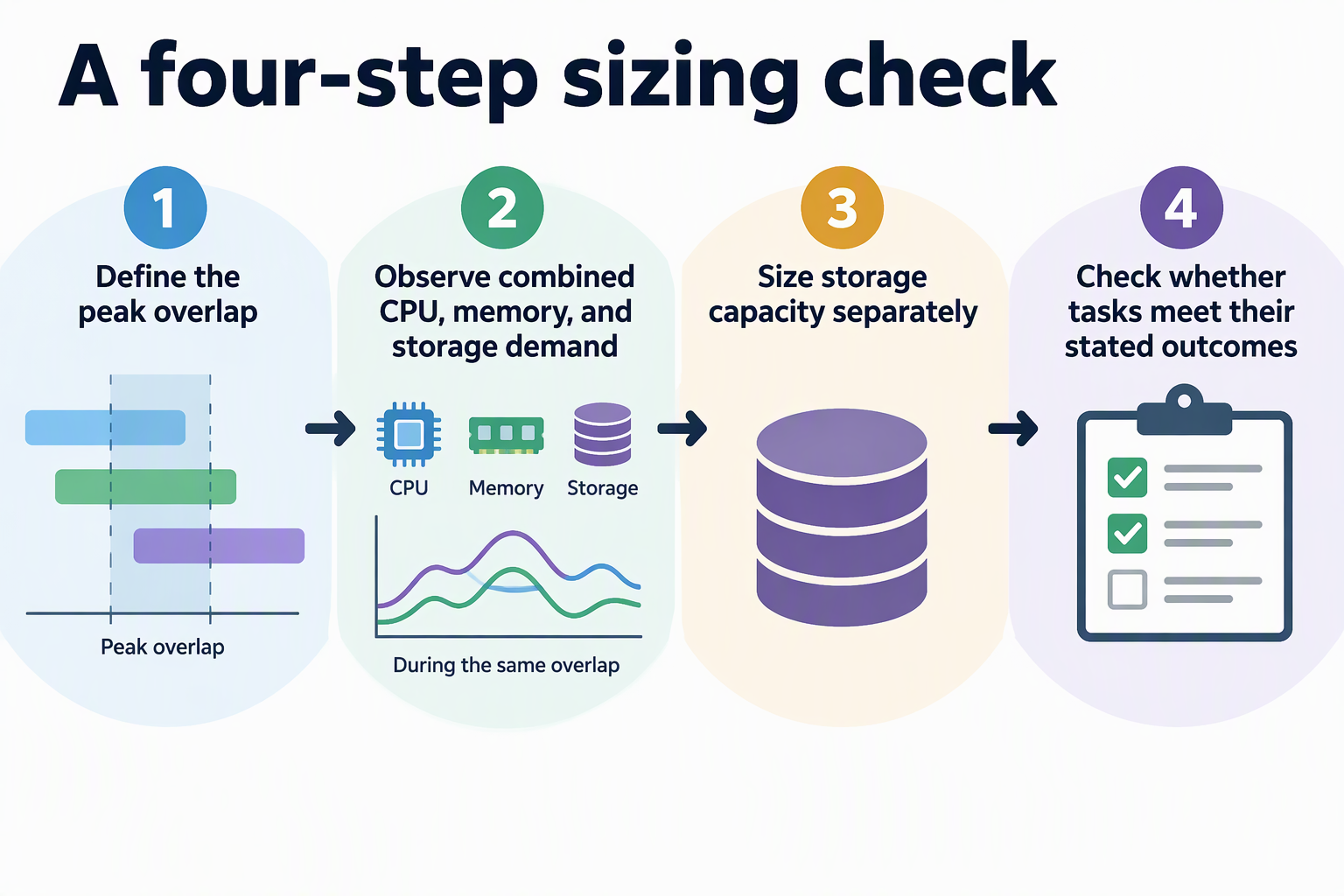
Size for the peak overlap you actually need
Base your sizing on a real busy window and on what each task in it must get done. Ask yourself which interactive jobs and which background jobs truly run at the same time in your home.
Here is an illustrative example, not a typical or tested workload. On a weekday evening, someone streams a movie. At the same time, a phone uploads the day’s photos and the server indexes them. A scheduled backup is also still running. If these never overlap in your house, leave this example out and use your own.
For each task in the window, write down three things:
- Timing: when it starts and how long it usually runs.
- Acceptable outcome: for example, the stream plays without stalling, or the backup finishes before morning.
- Resources it touches: CPU, memory, disk space, disk activity, and a GPU only if that task is set up to use one.
These outcomes are your pass mark. A server is big enough when it meets them during this window. Owning enough hardware for every app to run at full speed at once is not the goal unless your household really works that way.
Observe the combined resource demand
Run the overlapping tasks together on the candidate server and watch it during that same window. Adding up separate idle readings or unsynchronized peaks will not reflect true usage. Both approaches yield totals that distort how the system actually runs under load.
If your apps run in Docker, docker stats gives you a live stream for each running container. It reports CPU, memory use and limit, network I/O, and block I/O, as shown in Docker’s documented container metrics. Keep in mind that this covers containers only. Check host-level memory as well, because the operating system and anything running outside containers also take a share.
Usage numbers show activity; Linux PSI readings help identify time lost to contention. Read /proc/pressure/cpu, /proc/pressure/memory, and /proc/pressure/io. The some line measures time when at least some tasks stall. For memory and I/O, full measures time when all non-idle tasks stall together; sustained full pressure can indicate thrashing. System-level CPU full is undefined and reported as zero for compatibility, so use CPU some instead. The averages cover 10, 60, and 300 seconds.
Treat these tools as clues, not as pass/fail rules. Put the readings side by side with your outcomes. Did the stream stay smooth, and did the backup finish on time? Rising memory pressure while the photo app slows down tells you far more than one high CPU percentage. Check the GPU only when a task in your window is actually set up to use it. Running several apps doesn’t by itself mean you need an accelerator.
Separate storage capacity from storage performance
Storage raises two separate questions. Capacity is how much data you keep over time. Performance is how well the disks handle several jobs reading and writing at once.
Work out capacity from simple inputs you write down:
- How much data you already have.
- How much you expect it to grow over a planning period you pick, such as two years.
- How many extra copies or snapshots you plan to keep.
Write each assumption down so you can revise it later. Don’t rely on a generic storage allowance.
Performance belongs to the overlap test. Photo indexing and a backup running together can strain the disks even when plenty of space is free. Judge it by whether each task finishes on time or responds quickly, and compare that with the I/O readings from the previous step.
A synthetic test can help before your apps are fully set up. With fio’s configurable I/O workload, a job can describe the I/O pattern, block size, total I/O size, and I/O engine. Shape that test to look like your real activity. Afterward, still confirm the result with the real apps during the overlap, because a benchmark only approximates them.
Use a disposable test file or test volume for a write benchmark. Do not point a fio write job at a disk or file containing data you need to keep.
Decide whether the candidate server fits
The server fits when it meets your stated outcomes during the representative overlap. If it misses one, find the resource that was under pressure or ran short while that outcome failed. Then pick one fix:
- Add capacity to that specific resource, such as more memory if memory pressure rose while the apps slowed.
- Lighten or change the workload.
- Move a flexible background job, like the backup, outside the busy window.
After any change, run the same overlap again and check the same outcomes. Extra capacity should trace back to a constraint you observed or to growth you have written down, not to an arbitrary headroom percentage. If you have no measurements yet, label your sizing as an estimate built on stated assumptions, and test it on the intended hardware before you rely on it.
FAQs
Can I size a server before I buy it?
Yes, but only as an estimate. List the overlap window, your outcomes, and your storage assumptions. Then confirm the estimate on the real hardware, or on similar hardware you already own, before you depend on it.
Why is high CPU usage alone not a problem?
A busy CPU can still be getting useful work done. Pressure readings and missed outcomes show when tasks are actually waiting. Those are the signals that call for a change.
Should I re-test when I add a new app?
Re-test when the new app joins a busy window or shifts when other jobs run. An app that runs alone at a quiet time may not change your peak overlap at all.
Do I need a GPU for a home server?
You need one only if a specific task, such as hardware video transcoding or a local AI model, is set up to use it. In that case, check GPU capacity for that task during your overlap test.