
How to Plan Home Server Storage as Your Data Grows


No single number of terabytes is right for every home server. The right target comes from your own measured data and how fast you expect it to grow over a time span you pick. It also has to include the recovery copies you plan to keep in the same place.
Plan home server storage in four separate buckets: active files, app data, generated files, and recovery copies. Project each one forward. Then compare the total with usable capacity, meaning space you can actually write to, not the number printed on the drive labels.
Build a forecast from four separate buckets
Begin with four current amounts, not one combined total. If you only have one big number, you can’t tell which workload will fill your next free terabyte. Separate buckets show you which one is growing fastest.
Record each amount in the same unit, either GB or TB, before you add anything up. Mixing units is an easy way to throw off the whole estimate. Next, pick a planning horizon, such as 18 months or three years, and use it for every bucket. The right length is up to you. A useful horizon usually runs until the next time you expect to review or buy storage.
| Bucket | What to measure now | What belongs here |
|---|---|---|
| Active files | Size of the folders you use and add to | Documents, photos, videos, music, shared family folders |
| App data | The amount your system reports for each app | Databases, libraries, indexes, and settings that apps manage |
| Generated files | Size of output folders, tracked on their own | Transcodes, exports, AI outputs, thumbnails, renders |
| Recovery copies | Space used at each backup destination | Snapshots and backups, labeled by where they are stored |
App data is easy to underestimate when you guess. Use the figure your system reports instead. Track generated files separately even when they come from another workload. A media app’s transcodes or an image tool’s output can grow at a different pace than the files they came from.
For recovery copies, write down where each copy lives. A snapshot in the same storage pool takes space from that pool. A backup on another device or a cloud service needs its own capacity estimate. Counting both as one number can make you overbuy local storage, or forget to plan space for the backup target.
Assign each stored byte to one bucket only. For example, do not count a photo library once as active files and again as app data, or count thumbnails in both app data and generated files. Snapshots in the same pool help with some recovery tasks but do not replace a separate backup if that pool fails.
Project each category over your planning horizon
Use the same horizon for every bucket, but give each bucket its own growth assumption. The rates are your estimates, based on your own history and plans. They aren’t industry averages, and they don’t guarantee anything.
Pick the formula that matches how you expect a bucket to grow. If you expect a percentage increase each year, use compound growth: future amount = current amount × (1 + annual rate)^years. If you expect to add about the same amount each month, use linear growth: future amount = current amount + monthly increase × months. Keep the time units matched. Use an annual rate with years and a monthly increase with months.
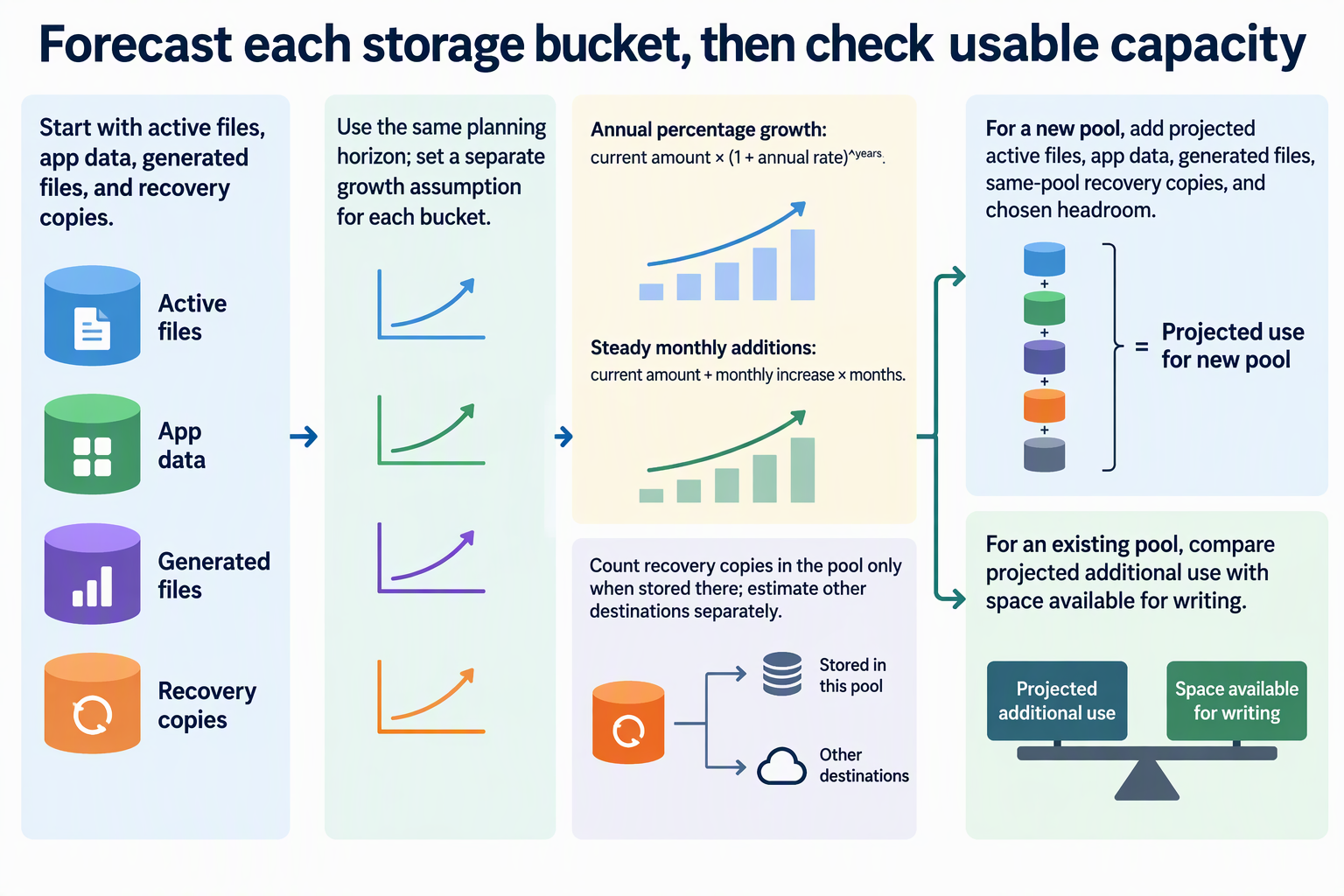
Here is an illustrative example with assumed inputs, not a benchmark. Say your active files are 2 TB and you assume 20% annual growth over 2 years. That gives 2 × 1.2² = 2.88 TB. Now say your generated files are 0.3 TB and you assume they grow by 0.05 TB per month for 24 months. That gives 0.3 + 0.05 × 24 = 1.5 TB. Do not reuse the active-file rate for app data or generated files. Give each one its own explicit assumption.
Project recovery copies on their own. When possible, start from the space the backup destination currently reports. If you don’t have that number yet, write down the backup method and how long you keep copies, then estimate the footprint from those choices. Changing how long you keep copies changes this bucket, even if your primary files stay the same size.
Translate the forecast into usable capacity
How you set the target depends on whether you are building a new pool or checking an existing one. A pool is a group of drives that the system treats as one storage space. For a new pool, add up the projected active files, app data, and generated files. Then add recovery copies stored in that same pool, plus any extra headroom you choose. Copies stored somewhere else get their own target.
For an existing pool, don’t count your current data twice. Estimate only the additional use expected over your horizon, including growth in recovery copies stored in that pool. Compare that number with the space the system reports as available for writing. If the projected additional use will be larger than that space before your next planned review, it’s time to plan an expansion or move your review date earlier.
Make the comparison in usable-capacity terms. Adding up drive labels overstates what you can store. On OpenZFS, the zfs available property shows how much new data can be written. The pool-level zpool free figure can be much higher because of factors such as RAIDZ parity and reservations, so use zfs available for this check.
If you are sizing an OpenZFS RAIDZ group, the documentation gives a rough formula. A group of N drives, each of size X, with P parity drives holds approximately (N−P)×X bytes. For example, five 8 TB drives with one parity drive hold about 32 TB, not 40 TB. This is only an estimate for that RAIDZ layout. Actual space use varies with how the data is laid out, so confirm the number your system reports after you build the pool.
FAQs
Should I add a fixed free-space buffer on top of my estimate?
Choose headroom using your filesystem or storage platform’s guidance, expected write bursts, and the time needed to expand storage. Keep it separate from the growth forecast. Very little free space can affect writes, snapshots, and performance, so the buffer is not only about how often you want to review capacity.
How often should I review my storage forecast?
Review measured use regularly during the planning horizon, well before it ends. Choose an interval short enough to catch unexpected growth while you still have time to expand. Recheck sooner after adding an app or camera, changing backup retention, or seeing a low-space alert.
Do backups on an external drive or cloud service count toward my server’s capacity?
No, not for the server pool. Copies stored elsewhere use the destination’s capacity, so give that destination its own estimate based on your backup method and how long you keep copies.
Why is my usable space smaller than the total of my drive labels?
Some raw space goes to redundancy, reservations, and internal accounting. On OpenZFS, RAIDZ parity is one documented reason pool-level free space can be much higher than the space available for writing.