
Choose Local or Cloud Image Generation by Creative Stage


Use local image generation for drafts when the exact model you need runs on a setup you already have. Use a hosted generator when its model, account allowance, workflow, and delivery options fit the campaign better. Creative stage is a good place to start, but it is not the rule.
The real deciding factors are the required model, how many variations you plan, the deadline, the final output requirements, and the usage terms for the exact model or feature. If any one of those fails for your first choice, switch candidates, even in the middle of a stage.
Choose the Workflow That Fits the Campaign—Not Just Its Stage
Draft work usually means many prompt changes and quick comparisons. A local workflow can handle that when your model and hardware setup are ready. For hosted generation, choose a service when its specific model, account volume, or managed pipeline fits the campaign requirements better.
The local ComfyUI tutorial demonstrates one starting point: run ComfyUI on your computer, load a Stable Diffusion 1.5 checkpoint, supply positive and negative prompts, and save a 512 × 512 image. Its connected nodes handle model loading, text encoding, sampling, decoding, and saving. That example establishes a working draft pipeline, not the quality, resolution, or speed your campaign will need.
Local generation requires a compatible model, runtime, and machine. Install the model in the location documented for your ComfyUI edition, then test the style and output settings you intend to use. A working starter workflow does not establish capacity or turnaround time for another model or a larger final image.
A hosted service makes sense when it offers the model or managed workflow you need and your account covers the planned volume. Adobe says Firefly parallel generations let you run several generations at once and compare prompts, styles, or variations side by side. That helps with exploration in either stage. It is a feature description, though, not a promised turnaround time. Volume is tied to your account: Adobe’s Firefly credit allocation depends on your Creative Cloud plan, and how many credits each generation uses depends on the feature. Adobe also says one type of generative credit covers both Standard and Premium features, and those credits work across Creative Cloud, Adobe Express, and Adobe Substance 3D apps. Check both your plan allocation and your features’ credit use against your planned number of variations before committing.
Here is how each factor can change the choice:
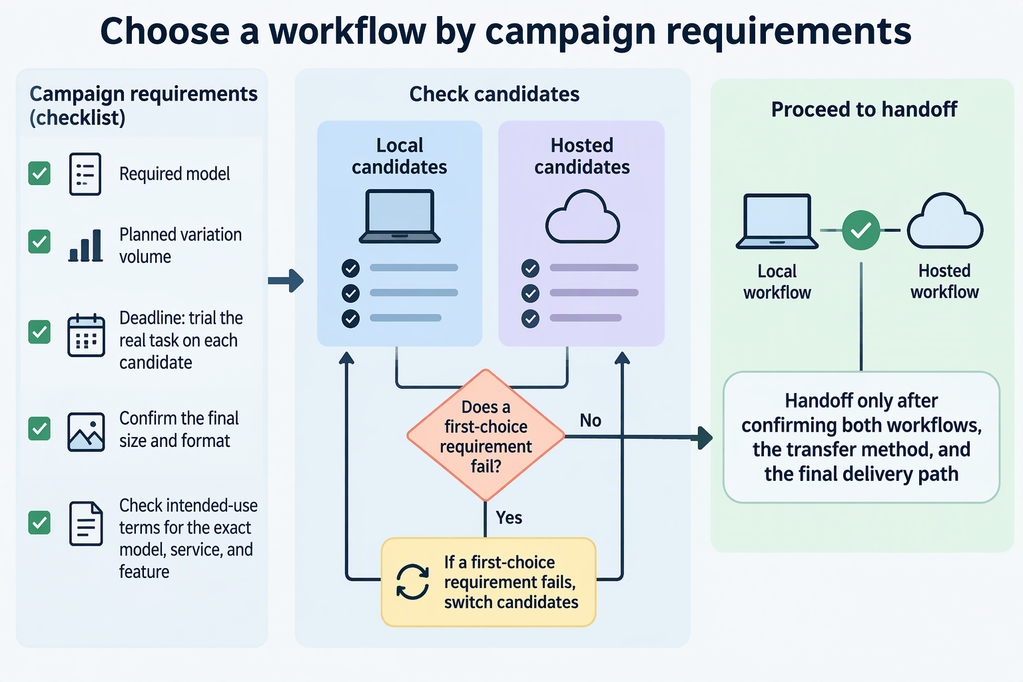
- Model availability. If the campaign look depends on a model you can only run locally, keep production local. If it depends on a model only one service provides, use that service for every stage where the look matters.
- Volume. Compare your planned iterations with what your local setup can handle and what your hosted plan and feature allow.
- Deadline. Run a short trial of the real task on each candidate. The available documentation does not compare turnaround times across platforms.
- Delivery. Confirm that the final workflow can produce the size and format the campaign requires. The ComfyUI example outputs 512 × 512, which may not match a campaign spec without more steps.
A handoff, with local drafts followed by hosted finals, is reasonable only after you confirm both workflows, how drafts will transfer (for example as prompts or reference images), and that the final path meets delivery needs. Two tools that can each make images do not automatically form one pipeline.
Check Rights and Data Terms Before Campaign Delivery
Before a final asset goes out, check the current intended-use terms for the exact model, service, and feature that produced it. Terms differ between providers and can even differ between features in one product.
This applies to local work too. The ComfyUI tutorial names its Stable Diffusion 1.5 file but says nothing about commercial use. Find that model’s own license before treating any output as cleared for a paid campaign. Adobe’s Firefly terms cover Firefly features only. They do not apply to a local model or another provider.
Data handling needs the same care. Running locally does not automatically make a workflow offline, private, secure, or compliant. That depends on where your files, model downloads, and outputs actually go. For a hosted service, read that provider’s current policy. A statement about model training alone does not describe storage, retention, or access.
FAQs
Can Firefly-generated images be used in commercial projects?
According to Firefly commercial-use conditions, outputs from features without a beta label can be used in commercial projects. Outputs from beta features can also be used commercially unless the product explicitly says otherwise. Check the label and current terms for the exact feature and model, including any third-party model. Commercial-use permission does not by itself clear third-party trademarks, likenesses, or other rights in the asset.
How should I account for Firefly generative credits when planning campaign volume?
Start with your Creative Cloud plan, since it sets your monthly credit allocation. Then check which features your workflow uses, because consumption varies by feature. Premium features also require a plan that includes them. There is no single image-per-credit conversion that covers every feature, model, and plan. Use Adobe’s current feature-specific consumption figures and any applicable plan allowances for your actual workflow.
Does Adobe train Firefly on Creative Cloud subscribers’ personal content?
Adobe says no. It states it does not train Firefly on Creative Cloud subscribers’ personal content, while Adobe Stock contributor content is part of the training dataset under contributor agreements. This covers training only. It does not describe storage, retention, access, or other providers’ practices.
Does a working local draft setup mean final assets will work locally too?
Not necessarily. A setup that produces drafts may still fall short of final size, format, volume, or deadline needs. Before you rely on it for finals, test the exact final output requirements on the same model and machine.