
Choose Local Model Quantization for Document Extraction Tasks


For document extraction quantization, pick the smallest quantized model that passes your own field-level extraction checks. It also has to run your real workload within the memory you have. File size alone won’t tell you that, so screen each candidate for fit first, then compare their outputs on representative documents.
No single quantization level works best for every model, runtime and document set. If none of the candidates you tested passes, the honest result is that you haven’t found a suitable choice yet.
Why File Size Is Only a Starting Point
Quantization stores model weights at lower precision, such as dropping from 32-bit floats to 4-bit integers. The llama.cpp quantizer documentation explains that this shrinks model size and can speed up inference, but it may also introduce accuracy loss. That general trade-off does not predict how a specific model will handle your invoices, forms, or contracts.
That matters for extraction because a field is either right or wrong. A slightly weaker model may still summarize a page well while it drops a decimal from a total, swaps two dates or leaves out a required field. A smaller file is easier to fit and store, but how compact it is says nothing about whether those fields come out right.
So use file size as a footprint comparison, and only after you’ve defined two things. The first is the quality bar your task needs. The second is the memory your setup can spare. Once both are set, size becomes a useful tiebreaker among candidates that already qualify. It can’t stand in for quality.
Run a Controlled Test and Choose Only Among Passers
Screen Each Candidate for Compatibility and Memory Fit
- Record the exact setup. Note the model and its revision, the quantized file and its format, the runtime and its version, your hardware and backend, the context length you plan to use, and how many requests will run at once. If any of these change, the result can change too.
- Check compatibility for that exact combination. Read the documentation for your model and runtime mode.
- Load the model and run a real request. Use representative long inputs, the intended output length, and the concurrency you actually plan to run. Measure both system RAM and VRAM where applicable, leaving operating headroom rather than filling memory to the limit. Longer context and more parallel requests take more memory beyond the model file itself.
- Drop anything that fails. If a candidate can’t finish this representative request within your memory limit, leave it out of the quality comparison. There’s no point scoring the output of a model you can’t actually run on your real workload.
Compare the Same Documents Against Reviewed Field Values
Build a small test set that looks like your real work. Include the layouts you’ll actually see: scanned and digital copies, single-page and multi-page files, and the less common formats that show up now and then. Cover each field type you need, such as dates, currency totals, IDs and names.
For every document, write down the correct value for each required field, and have a person check it. Those reviewed values are what you score against, so do this before you look at any model output. If two reviewers disagree on a value, settle it before scoring. Include examples where a requested field is absent, and require the output to mark it missing rather than invent a value. Keep a few unseen documents for a final check after choosing the quantization. An unclear reference makes every candidate’s score unclear too.
Then keep everything else identical across candidates. Use the same document-processing path, the same prompt, the same output schema and the same generation settings. Use quantizations of the same base-model revision and record their conversion and calibration settings. Comparing different model families or revisions tests more than quantization. Say you’re extracting invoice fields. Decide in advance whether “03/15/2024” and “2024-03-15” count as the same date, and whether “$1,200” matches “1200.00”. Also make sure your test set includes every invoice layout the real workload has to handle.
Set the Pass Threshold First, Then Select
Write your pass rule before you run any comparison. It should say:
- which fields are required
- how missing fields and extra fields count
- where a value has to match exactly and where a normalized match is fine
Choose the bar based on what an error costs you. A wrong payment amount may call for a stricter rule than a wrong reference note. Writing the rule down first stops you from loosening it after you see which candidate you were hoping would win.
Next, score every eligible candidate against that rule. Among the ones that pass, keep the smallest tested file whose observed peak memory during the representative workload stays inside your limit. Record file size and runtime memory separately. They measure different things, and a small file can still need a lot of memory once it’s running with a long context.
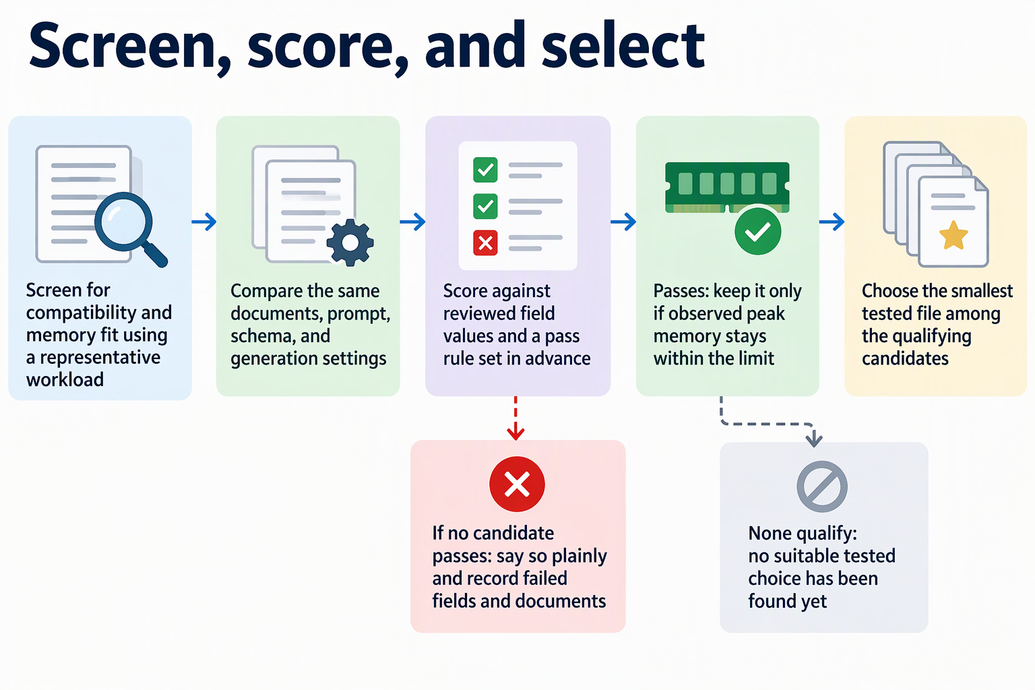
If no candidate passes, say so plainly. Don’t fall back on a popular quantization level, and don’t assume a larger file will fix the problem. A larger candidate is just another thing to test under the same rule. Also write down which fields failed and on which documents. That record shows where the problem is and gives you a starting point for deciding what to test next.
FAQs
Can perplexity tell me whether a quantization will extract my fields accurately?
Not by itself. According to the README on quantization accuracy loss, that loss is usually measured with perplexity and/or KL divergence. These are general measures of how the model behaves. Neither one gives you a pass score for your document fields, so you still need your reviewed reference values and your own threshold.
Will a smaller quantized model always run faster?
No. The llama.cpp quantize README says quantization can speed up inference, not that it always will for every workload. If speed matters, first find out which candidates pass on quality. Then time the same extraction job on each of them separately.
Can I change the prompt for one candidate and still compare the quantizations fairly?
No. If you change the prompt or schema for only one candidate, any difference in results may come from that change and not from the quantization. When you revise the extraction setup, rerun every candidate with the same revised settings and score them again under the same pass rule.