
Which Personal Data Belongs on a Home Server?

A home server is a good primary home for personal data you mostly use at home. Think photo and video archives, finished media, and household documents. That holds when you can control who reaches them and you keep a separate recovery copy. Files you need on one device without a network belong on that device, and active files you use away from home can live on a home server with tested remote access or on a managed service that meets your needs. Either route needs an offline copy for times when you cannot connect.
The deciding factors are access, sensitivity, and recovery, taken together. “Local” alone answers none of them.
Which personal files fit on a home server?
Match each file group to how you actually use it, then check the condition that would change the answer. For sensitive files, pick the place where you can reliably limit access. Keeping a file at home does not make it trustworthy by default.
| File pattern | Plausible primary location | Condition that changes the choice |
|---|---|---|
| Photo/video archives, finished media, household documents used mainly at home | Home server storage | You can’t manage access, or you have no separate recovery copy |
| Files needed on one device without a network | That everyday device | The file isn’t actually stored on the device |
| Active files used across devices or away from home | Home server with tested remote access, or a managed service | The service’s access, privacy, or recovery features don’t fit |
These are practical rules of thumb, not rankings. A family photo archive viewed on the living room TV fits a home server well. A boarding pass or a travel document you need on your phone at the airport does not, because reaching it would depend on the server and a connection. A shared budget spreadsheet edited from work and home may suit a managed service. That’s only true after you confirm who can see it, how sharing works, and whether you can restore older versions. A home server can also support remote work if the application, access route, and sharing controls are tested. These are examples of workable choices, not exclusive assignments.
What “local” does—and doesn’t—tell you
A server at home tells you where the hardware sits. It does not tell you who can reach the data, which network or remote paths are turned on, or whether the files will be there when you need them.
Who can get in depends on settings, not location. The FTC’s home Wi-Fi warning notes that an unprotected network can be used by any device in range. It also says some router features that make adding devices easier can make the network less secure. So check your Wi-Fi password, your router features, the accounts on the server, and any shared folders before trusting a home server with sensitive files.
Remote access is a separate question. If you turn on a way to reach the server from outside your home, that route matters. CISA’s web-exposure guidance, written for organizations, advises against exposing services on the web unless necessary and calls for added controls when exposure is required. Not every home server is internet-facing. Know which remote routes your own setup uses, including any outside service it relies on, and keep only the ones you need.
Availability is conditional too. A file on a home server can be out of reach when the server, its power, your home network, or the needed app is down. If you can’t do without a file during an outage, keep a copy on the device that needs it.
What irreplaceable files need for recovery
Pick a primary location for everyday access, then make a second, separate decision about recovery. A backup is a recovery layer. It does not replace choosing where the file lives.
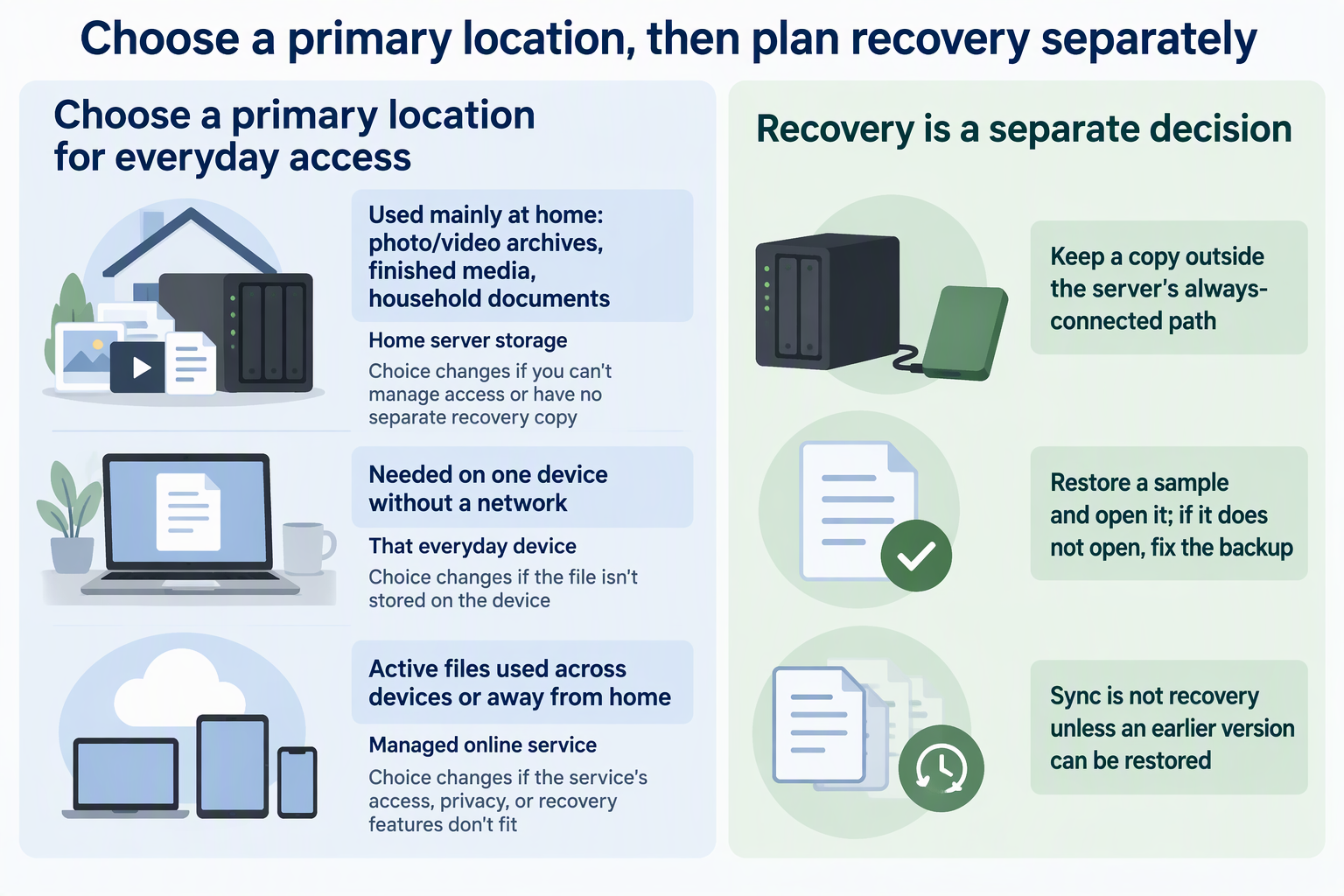
Sync keeps working copies matched across devices. That means a deleted or damaged file can spread to every synced copy. Don’t count sync as recovery unless it keeps an earlier version you can actually restore.
CISA’s tested-backup guidance recommends that organizations keep offline, encrypted backups of critical data and regularly test that the backups are available and intact. CISA explains that some ransomware tries to find and delete or encrypt backups it can reach. For household files, a cautious adaptation looks like this. Keep a copy of irreplaceable photos and documents outside the server’s always-connected path, such as a drive you unplug after updating. Every so often, restore a sample file from it and open it. If the file opens correctly, that sample was recovered successfully. It does not prove that every file or the whole server can be restored. If not, fix the backup before you need it.
Then apply both decisions to each file group. Wedding photos might live on the home server for daily viewing, with an offline copy you have test-restored. Downloaded movies you could get again may need only the primary copy.
FAQs
Should passwords and financial records go on a home server?
Only if you can reliably control access to them. Sensitivity raises the bar for accounts, network settings, and remote routes. It does not point to one location by default. If you can’t keep those controls in place, a more limited location is the safer fit. Keep passwords in a suitable password manager rather than ordinary documents. Protect financial records with their own file-access controls and backups.
Do I need to back up files I can download again?
Usually not with the same care. Replaceable media, installers, and re-downloadable purchases can often be fetched again after a loss. Put your offline copy and restore tests toward unique files like personal photos, scans, and records. Treat a purchase as replaceable only after checking continued access, licenses, and availability. Products can be delisted or accounts lost, so keep copies of anything you could not reliably obtain again.
Can I use a managed online service as my backup?
An independent cloud copy can help after hardware loss. For deleted, overwritten, or corrupted files, check whether it retains a usable earlier version. A live mirror can propagate the same damage, so verify the restore options that match the failure you are planning for.
How often should I test a restore?
No single schedule fits every home. A practical trigger is after any change to your backup setup, plus a regular check you will actually keep up with. The test passes only when a restored sample opens correctly.