
Local or Cloud Transcription for Confidential Client Interviews?


Neither local nor cloud transcription is the right choice just because of its label. For a confidential client interview, use a route only if the client’s authorization and any agreement terms allow it, and only if you know where that workflow sends the audio and transcript. If neither route clearly fits, pause before you process the recording.
Once one or more routes are allowed, compare them on transcript quality, turnaround time, and cleanup effort, using your own interview material. Whichever route you pick, you still need to protect the files and check the final transcript.
Choose only a route the client and applicable terms allow
Start with permission, not with performance. Before picking a tool, find out what the client agreed to regarding the recording and transcript, and review applicable contract terms or NDA clauses. If those terms ban outside transfer, a cloud route is out regardless of performance; if they allow a named provider, its workflow must still match client expectations.
Unknown terms do not count as permission. That applies to the client’s agreement and to a provider’s handling terms alike. For cloud services, FTC provider security guidance advises businesses to set security expectations with service providers that process personal information, put those expectations in contracts, and check that providers meet them. One of its examples involves a company that hired providers to transcribe sensitive audio. That guidance is written for businesses. It does not settle the legal duties of every creator, and rules can differ by state, industry, and contract.
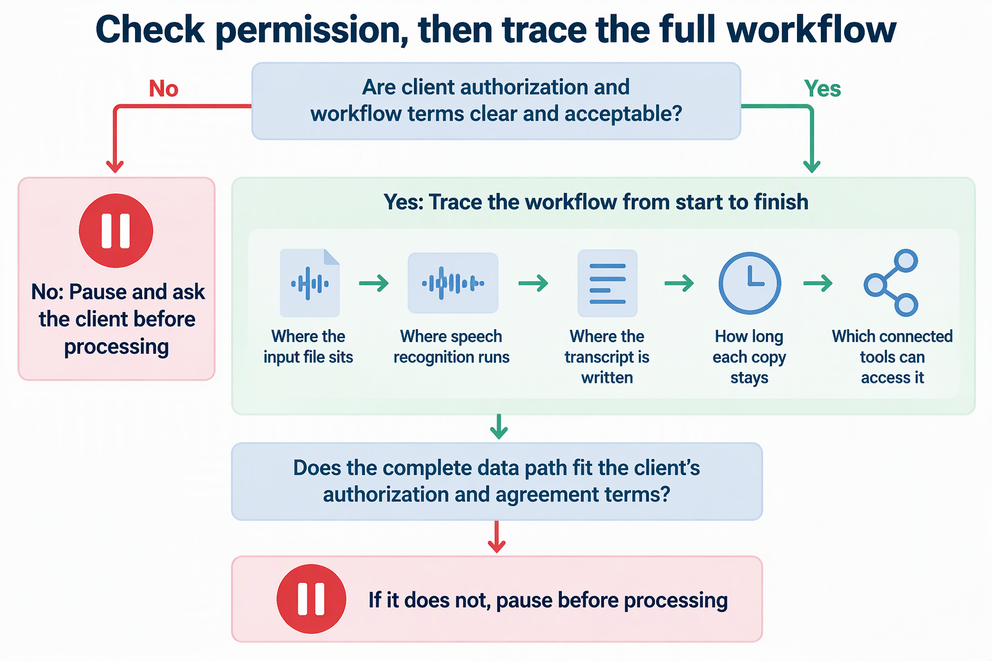
Here is the stop rule. Do not upload or otherwise process the recording until the client’s authorization and the workflow’s terms are both clear and acceptable. If they aren’t, ask the client before you go further.
Check the actual data path, not the route label
“Local” and “cloud” describe where speech recognition runs, not everything that happens to your files. The whisper.cpp local CLI example shows how this works: you download the project and a Whisper model, build the command-line tool, and transcribe audio locally on your machine.
Initial setup requires downloading the software and model. Local inference does not control what your operating system, sync folders, backups, or other connected apps do with the audio and transcript. Review those paths separately.
Amazon Transcribe illustrates why processing mode and retention policy need separate checks:
- Batch transcription reads an audio file from Amazon S3. Check the job’s input and output locations, ownership, permissions, and retention settings.
- Streaming sends audio to AWS for processing during the session. Do not read a description of that processing path as a zero-retention commitment for the whole service.
AWS’s service-improvement documentation says Amazon Transcribe stores and uses processed voice inputs by default to improve the service, and provides an AWS Organizations opt-out policy. Confirm the policy that applies to your account and the client’s material, as well as retention of transcripts, application logs, and copies you keep. Other providers have different terms.
In practice, trace your own setup from start to finish. Note where the input file sits, where the output is written, how long each copy stays there, and which connected tools can reach it. Running speech recognition on your own machine alone doesn’t make a workflow private, secure, offline, or compliant.
Compare permitted workflows on the interview task
If more than one route passes permission checks, test them on your actual interview task rather than assuming one is superior. In its AWS own-content testing guidance, AWS notes that Amazon Transcribe performance varies across audio, workflows, languages, and processing modes. It recommends that customers test the service on their own content, an evaluation recommendation specific to AWS that does not rank cloud against local tools.
Here is a practical way to run the comparison, but only if the client allows its audio to be used for testing. Run the same representative clip through each allowed workflow, using the settings you would actually use for the interview. For each run, record three things:
- Quality: errors found by checking the text against the audio. Sort them into names, figures, speaker labels, omissions, and added words.
- Turnaround: elapsed time from starting or submitting the job to having text ready for review.
- Cleanup: hands-on minutes spent correcting the transcript.
Write down any differences in setup or conditions. That way you won’t treat a rough trial as a controlled benchmark. Pick the route with the best mix for this kind of interview. If you can’t run a trial, choose based on permission and data path, and plan extra review time.
Protect the files and verify the final transcript
Treat the original recording and transcript as equally confidential after processing, regardless of the route chosen. These practical safeguards lower exposure and help satisfy client terms, though they do not guarantee absolute security.
Limit access and unnecessary copies
Give access only to people who need it, and delete working copies you no longer need. For business files that contain personal information, FTC guidance on access, retention, and disposal recommends limiting access, keeping the data only as long as you need it, and disposing of it properly when that need ends. If you must keep files for business or legal reasons, the FTC suggests a written retention policy. Check the storage buckets, sync folders, and backups you set up, and follow the client’s retention and disposal terms.
Check the transcript against the audio
Before you quote or deliver the transcript, play it back against the recording. Fix names, numbers, speaker labels, missing passages, and words the transcript added. Review cuts down on errors, but it can’t promise an error-free result. For high-stakes passages, ask the client to confirm the wording.
FAQs
Should I tell the client which transcription tool I plan to use?
Yes, when their terms limit outside transfer or name approved providers. Naming the tool and mode, such as batch versus streaming, lets the client approve the real data path instead of a vague “cloud” or “local” label.
Does using a local tool mean I can skip client consent?
No. Consent covers how you handle their recording, not just where the speech recognition runs. A local setup can still involve model downloads, synced folders, or backups, so the client’s terms still apply.
Is streaming transcription safer than batch for confidential audio?
Not automatically. Batch and streaming have different processing paths, but neither label settles retention, service-improvement use, or access to copies your application keeps. For Amazon Transcribe, review the service’s data-use terms and AWS Organizations opt-out policy alongside your storage settings. Then compare the permitted modes on your own authorized audio.
What if the client won’t let me test their audio?
Use a clip you’re allowed to use that sounds like the interview, with similar speakers, noise, and vocabulary. If you have no such clip, choose based on permission and data path, then plan extra time to check the final transcript.