
A Version Rule for Client Deliverables That Helps Prevent Sending the Wrong Draft


For final handoff, use three states: Working, Approved, and Delivered. This is a conservative workflow for projects where the client approves the final version before delivery. Drafts sent for review remain Working; follow the approval process and authorized approver agreed for your engagement.
The client approves that exact version, or you send that exact approved copy. A familiar filename or your most recent edit never counts as approval.
This is a practical habit, not a guarantee. It works because it replaces guessing with a check: before anything goes out, you can point to the approval for that specific version.
Use a working → approved → delivered rule
Each state has one entry condition, and the order never changes. Good client document versioning means you never skip a step or move backward without noticing.
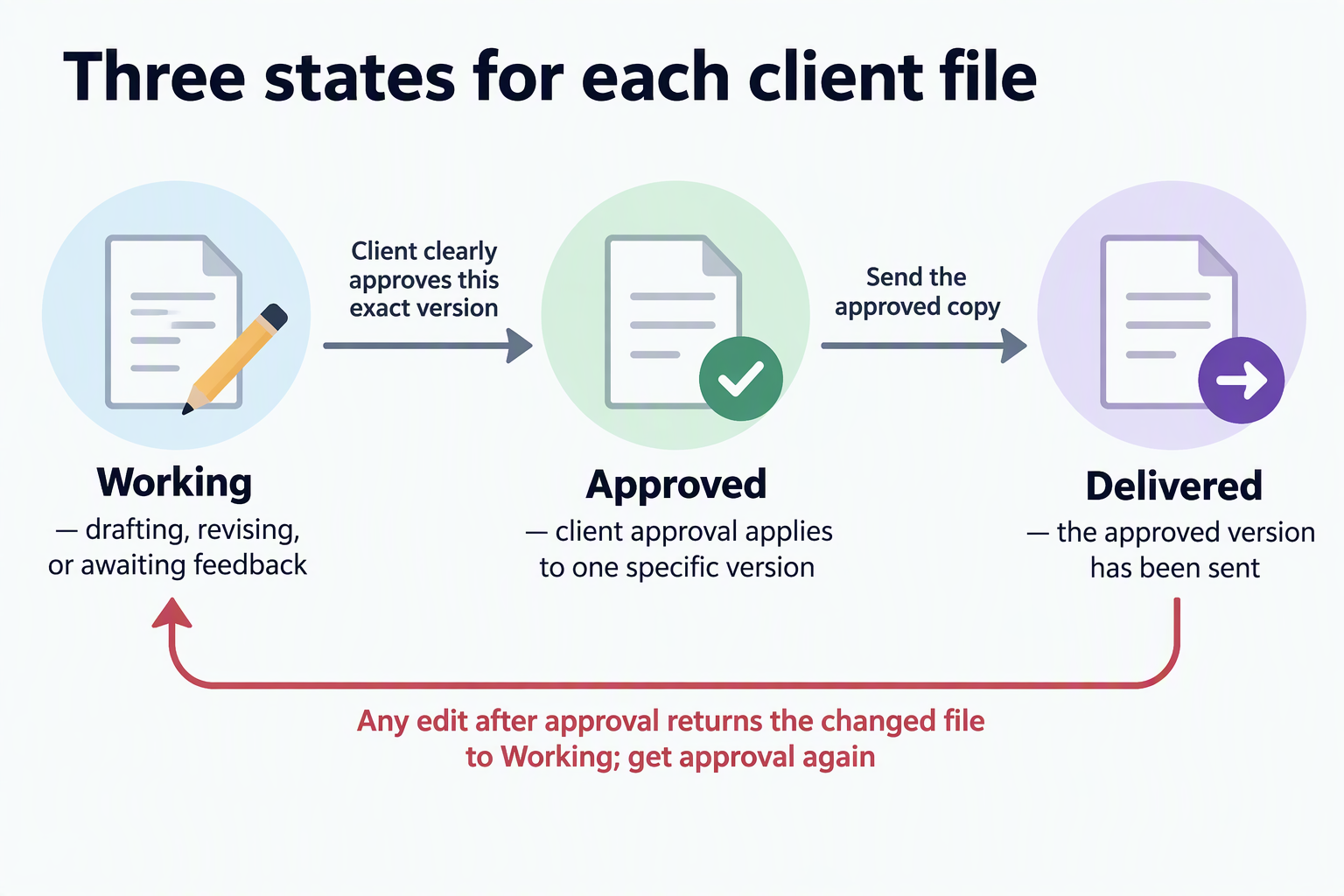
Working covers anything you are drafting, revising, or waiting on. A draft you shared for feedback is still Working. So is a polished file the client hasn’t signed off on. Being finished in your eyes doesn’t change its status.
Approved applies to one specific version, and only after the client clearly says yes to it. Approval belongs to a version, not to the project in general. If the client approved version 3 and you then fix a typo, the file you now have is new. It goes back to Working until the client approves it.
Delivered applies only after you send an approved version to the client. Until it has actually left your outbox, it stays Approved.
Most mix-ups happen between Working and Approved. Names like “Final_v2” or “Proposal_CLEAN” sound settled, and the file you edited last feels like the current one. Neither tells you what the client agreed to. Use filenames and edit dates to find files. Use the client’s approval to decide whether a file can go out.
Approval must identify the version
An approval counts only when you can match it to one exact file. A strong signal is a written reply that names the version, like “v4 dated March 12 is approved.” A direct reply to the email where you attached that file also works. “Looks good, thanks” sent during a long thread is weak, because it doesn’t say which draft the client means.
Before you move a file to Approved, ask one question. Could someone else tell from this message which file the client approved? If the answer is no, reply and confirm the version before you treat it as approved. Then keep the approval with the approved copy. Save the email next to the file, or note the version and date in your project log, so the two never drift apart.
For your own project record, keep the version identifier, approval date, and approver together. Link the approved file to the message that authorizes it. This gives a colleague enough context to check the handoff without guessing from a filename.
Record the exact file you sent
Mark a file Delivered only after you send it. Then keep an unchanged copy of that exact file next to the email or other transmission record. Later, that sent copy is your answer to “what did the client receive?” Your working file can’t answer that, because you may have kept editing it.
For each handoff, write down who received it and the date you sent it. If the email shows both, saving the email with its attachment is enough. If you sent the file through a portal or shared link, add a short note with the recipient, date, and version.
One check before you send: if anything changed after approval, even a small fix, stop. The file is back in Working, so get approval for the changed version first.
Keep the transmission record with the exact delivered version and any acknowledgment you receive. A saved copy helps you investigate a disputed handoff, but it does not by itself prove that the recipient received or approved the correct file.
FAQs
Do I need special software for this?
No. The rule doesn’t depend on any tool. A consistent folder or label for each state, plus saved approval emails, covers the basics. Any system works if it keeps each approval attached to the right file.
What if the client approves verbally on a call?
A verbal yes is hard to tie to one version later. Send a short follow-up after the call that names the version they approved, and keep their reply with the file.
Should I delete old drafts once a version is approved?
Follow the retention terms for your project and any applicable obligations. Keep the versions needed to explain approval and delivery, and remove unnecessary drafts when their retention period ends. Clearly label retained earlier drafts as Working and preserve the actual Approved or Delivered status of past milestones so nobody mistakes them for the current version.
What if the client asks for changes after delivery?
The delivered copy stays as your record of what you sent. Your revisions start a new Working version, which then goes through approval and delivery again.