
Keep a Private Game World Recoverable Through Server Changes

To keep a private game world recoverable, make a copy of the whole server before you change anything. Then label that copy with the server version and configuration it came from. A world save alone is only part of the plan, because settings files and version details decide which copy matches the setup you may need to go back to.
The steps below use a Minecraft Java Edition vanilla dedicated server as the worked example. Other games, Bedrock, and modded servers may need different steps, so follow their own guidance for those.
Make a Pre-Change Copy for Minecraft Java Edition
Stop the server, copy the entire server directory to separate storage, and date the copy. This gives you the world plus the settings that go with it, in one place you won’t touch during the change.
The community-maintained Minecraft Java maintenance guidance on /stop says stopping the server with /stop also saves the world. That matters because copying files while the server is still running can capture a world that hasn’t finished saving.
The same page explains why a world-only copy falls short. You can copy just the world folder, but it recommends backing up the whole directory, because that also captures configuration files such as server.properties, banned-ips.json, and banned-players.json. Those files hold settings and player lists that a bare world folder leaves behind.
Follow this order:
- Run /stop and wait for the server to shut down fully.
- Copy the entire server directory, not only the world folder.
- Put the copy on another drive or storage location, apart from the live server.
- Name the copy with a date or timestamp, as the maintenance guidance recommends.
- Leave this copy alone. Make your changes to the live server only.
- Open the copy and confirm the world folder and the configuration files are there.
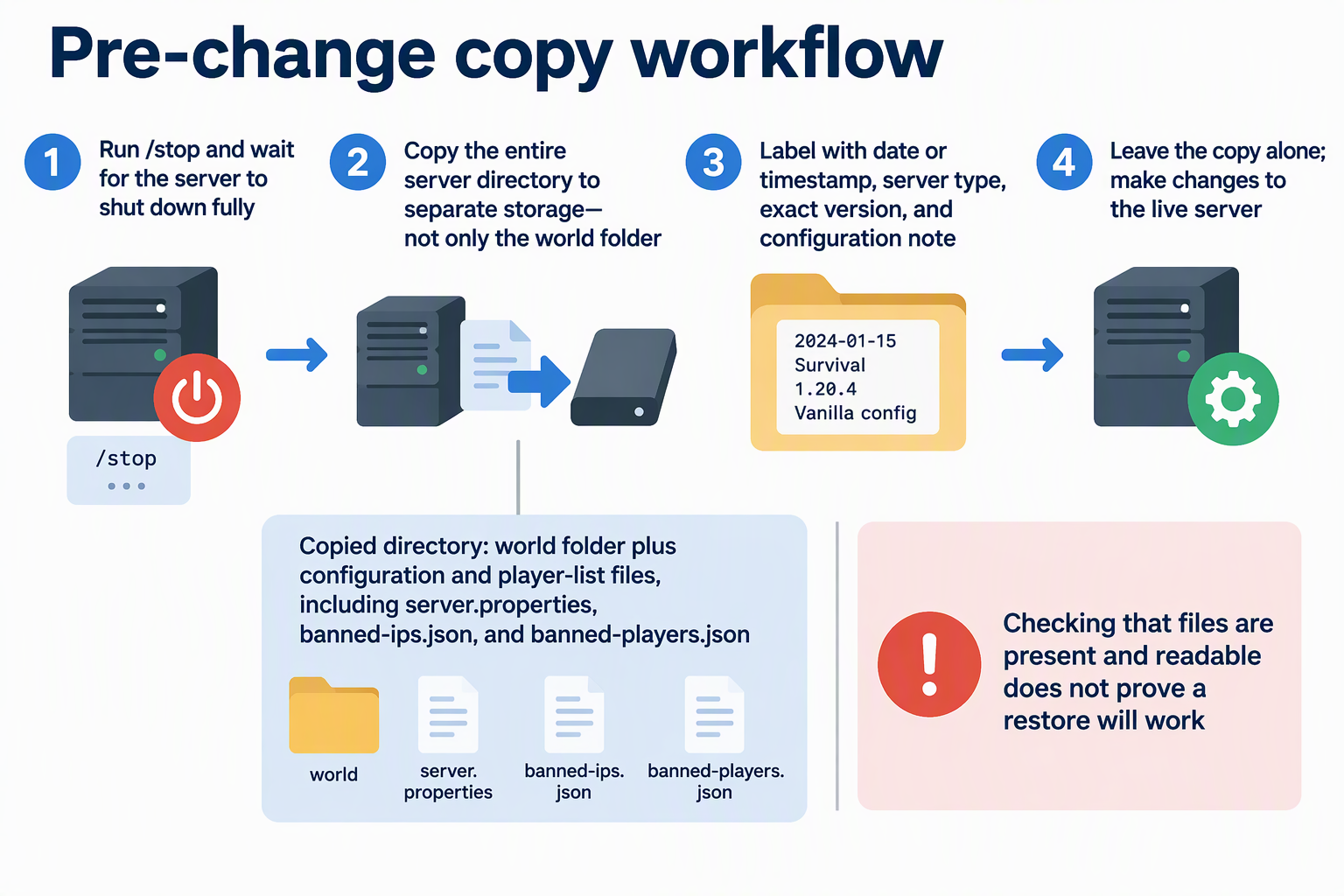
Know what that last step tells you. Seeing the files shows the copy exists and can be read. It does not show the server will load that world after a restore. Until you have actually restored it and watched the server start the intended world, think of it as a copy that looks complete, not a proven recovery point.
Test a duplicate of the backup in a separate directory or isolated test host using the recorded server version and a compatible Java runtime. Keep the original backup untouched, avoid a port conflict with the live server, and confirm that the expected world, player data, and settings load. Record the result before treating that backup as a tested recovery point.
Label the Copy With Its Version and Configuration
A date tells you when a copy was made. It doesn’t tell you which setup it belongs to. Add a short label next to the timestamp so you can match each copy to a server state later.
Record four things: the date or timestamp, the server type (for example, Minecraft Java Edition vanilla), the exact server version running before the change, and a one-line note on the configuration state. A note like “default settings, whitelist on, before version change” is enough. You can keep it in the folder name or in a small text file inside the copy.
This pays off once you have several copies. Say you change the version and later adjust settings. Each copy then points to a different setup. Compare the labels with the setup you want to return to, and pick the copy whose version and configuration note match. Because the whole directory was copied, the matching settings files are already inside it.
The label is only for identification. It doesn’t mean an older copy will work with a newer server version, and it doesn’t promise a restore will succeed.
FAQs
Is a world save enough to recover a server?
No. Saving the world protects your builds and terrain. Your server settings and ban lists live in separate files, though. A world-only copy also doesn’t tell you which server version it came from, so you could end up guessing which setup to rebuild.
Can I make the copy while players are online?
It’s safer to stop the server first. For Minecraft Java, /stop saves the world before shutdown, so the files you copy reflect the latest state. Let players know before you stop it, since stopping ends their session.
Do these steps apply to Bedrock or modded servers?
Not directly. These steps follow Minecraft Java Edition vanilla server guidance. Bedrock, modded servers, and other games may store data in different places or need extra files. Use each one’s own documentation before you rely on a copy.
How many pre-change copies should I keep?
Keep at least the copy made right before your current change, and don’t overwrite it with later copies. A separately labeled copy for each change makes it easier to step back one change at a time.