
How to Retire a Self-Hosted App Without Losing Its Data


Stopping a service and deleting its data are different operations; what uninstalling removes depends on the app, deployment, and selected removal options. Before removing anything, assign each data item a destination: migrate it, retain a readable archive or restorable backup, or delete it deliberately. Verify the preservation path before taking away the working copy.
That order matters because the service and its data may not share a lifecycle. Some data disappears with the app, some stays behind on disk, and some is shared with other services. A careful self-hosted app retirement works through those cases first, then removes the app.
Decide What You Want to Keep Before Stopping the App
Start with outcomes, not commands. Shutting the app down is one action. Deciding the fate of its records, files, and settings is a separate set of choices, and you should make those choices while the app still runs and can still show you what it holds.
Make a short written inventory of the items this particular app uses. Don’t copy a generic template. One app may keep everything in a single database. Another may split user records, uploaded files, configuration, and links to outside storage. Treat categories like “records,” “files,” “configuration,” and “dependencies” as prompts to look, not as a complete list.
Next to each item, write down one of these outcomes:
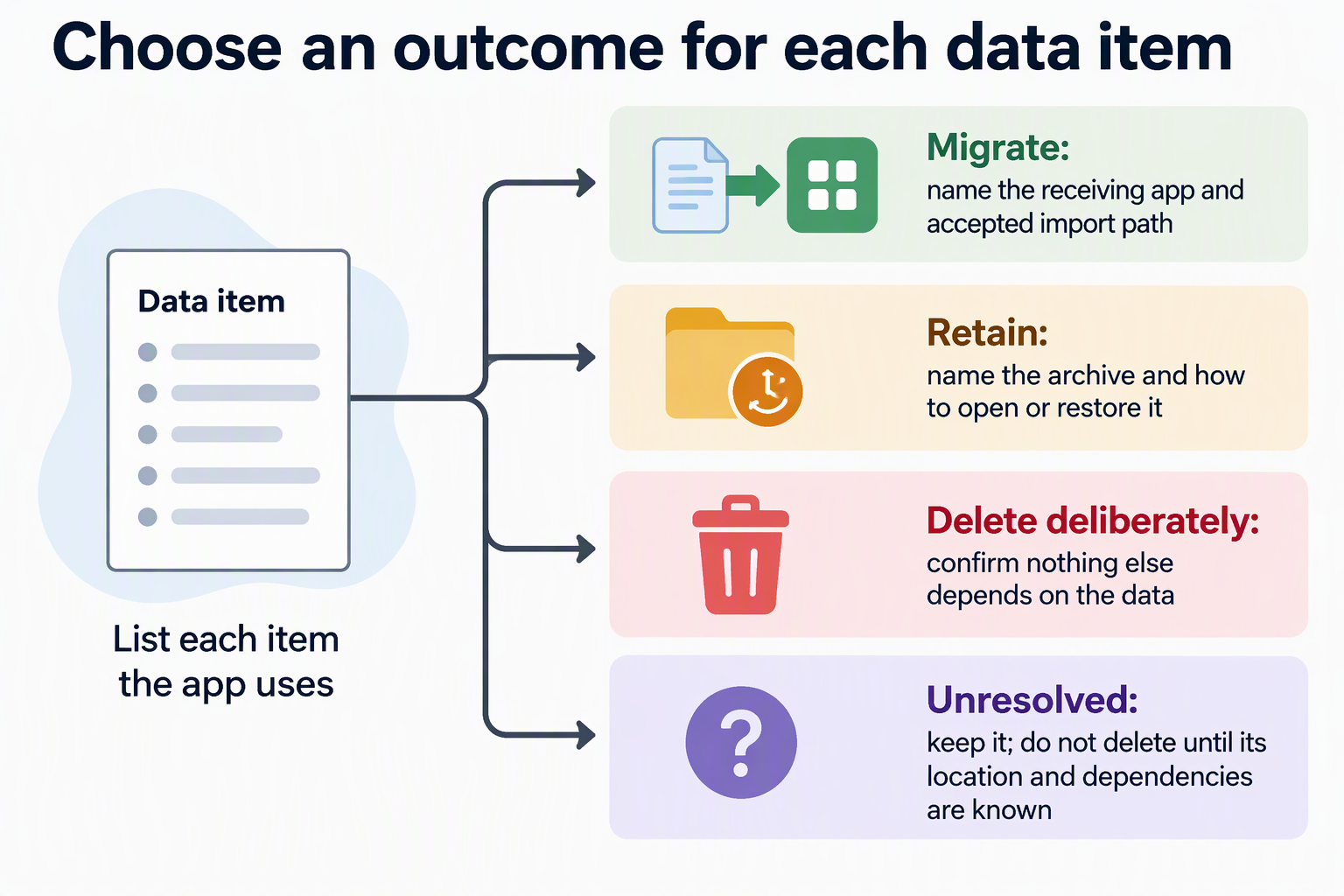
- Migrate: the data moves to a replacement app. Name the receiving app and the import path it accepts.
- Retain: the data stays available for later reference. Name where the archive or backup will live and how you will open or restore it.
- Delete deliberately: you have decided the data is no longer needed. Record that decision so deletion is a choice, not an accident.
Each outcome needs something different. Migration needs a format the new app can import. Retention needs a copy you can still read after the original app is gone. Deletion needs confirmation that nothing else depends on the data.
If you can’t decide on an item yet, mark it unresolved. An unresolved item is not safe to delete. It stays on your list until you know where it lives and whether anything else still relies on it.
Trace Where the Data and Dependencies Live
The app’s service and its data can live in different places and end in different ways. So find the real storage locations for your deployment before you assign outcomes. That means the runtime you use, the databases, the file folders, and any outside or shared storage the app reads or writes.
Docker is a clear example of how this works, though the details apply only to Docker. According to Docker’s documentation on the Docker volume lifecycle, data written to a container’s writable layer is destroyed when that container is removed. Volume contents exist outside any single container’s lifecycle, so they persist after the container that used them is removed. If your app writes anything important to the writable layer instead of a volume, removing the container removes that data.
Volumes have their own catches. Docker notes that anonymous volumes persist after their container is removed, except when the container was created with the –rm flag. Before you count on an anonymous volume surviving, check how its container was created. Docker also documents that removing a service does not remove the volumes it created. Volume removal is a separate step. So removing a Docker service can leave its data behind, which is fine for retention but not for deliberate deletion.
Sharing is the last thing to check. The same Docker page explains that a volume can be mounted into multiple containers at the same time. A volume named after one app may still serve another. Confirm what else uses a store before you mark it disposable.
A volume that persists is also not a backup. It is the same data in the same place, still tied to your server. If you plan to keep that data after retirement, it still needs a retention path you can open on its own.
Choose a Preservation Path That Matches the Data
The right export or backup is the one whose documented scope covers the items on your list. For each item you plan to migrate or keep, compare what it includes against what the chosen tool says it saves. If there is a gap, add a second method or rethink the plan.
The destination also shapes the method. For migration, start from the receiving app. Find out which import format and path it supports for the version you will run, and pick an export that produces that format. For retention, decide how you will reach the archive later. Will you restore it into a fresh copy of the same app, or read it in another tool? A copy you can’t open later doesn’t preserve much.
Database tools show why scope matters. PostgreSQL’s documentation explains that pg_dump only covers one database. To export an entire cluster, including global objects such as roles and tablespaces, PostgreSQL points to pg_dumpall instead. If your app’s database relies on a particular role, a single-database dump may not bring that role along.
Filtered dumps narrow the scope further. The same documentation warns that when you limit pg_dump to certain schemas (-n) or tables (-t), it makes no attempt to dump other objects those selections depend on. PostgreSQL does not guarantee that such a dump can restore by itself into a clean database. Schema filtering also leaves out non-schema objects such as large objects. If you used either filter, check for missing dependencies before you treat the result as your only copy.
Keep the example in proportion. A complete PostgreSQL dump covers the database, not the whole app. Uploaded files, configuration, and outside storage may sit elsewhere and need their own method, which is why your inventory from the first step matters here.
Set a Go/No-Go Decision Before Removal
Use a simple pass-or-pause test before any step that can’t be undone. This is a conservative rule of thumb, not a guaranteed removal order. The exact shutdown and removal sequence comes from your app’s own documentation for the version you run.
Go when all of these are true:
- Every item marked migrate or retain has a named destination.
- You know the documented way to import, open, or restore each copy, and you have checked that it works where possible.
- Shared stores and other consumers are identified.
- You understand what removing this app version leaves behind and what it deletes.
Pause when any of these are still unclear: who owns a store, what an export actually covers, which other services share a store, how a copy will be recovered, or what removal will delete. Fix that one gap, then run the test again.
For a database copy, a meaningful recovery check includes restoring into an isolated test instance and opening the records the app needs. Record the restore procedure and required versions. A checksum or a successful export command cannot show that the restored app will work; avoid importing a test copy over production.
FAQs
Is a Docker volume that survives app removal the same as a backup?
No. A surviving volume means the data is still on the same server, in the same place. It is not a separate copy, and it may be shared with other containers. If you want to keep the data after retirement, give it a retention path you can open or restore without the original app.
What should I do with data I can’t identify?
Keep it and mark it unresolved. Find out which store it lives in and whether another service uses it before you choose an outcome. Deleting an unknown item to tidy up the server is how data you needed gets lost.
How do I make sure data I chose to delete is actually gone?
Treat deletion as its own step for each store, not a side effect of removing the app. In Docker, for example, removing a service does not remove the volumes it created. Confirm that nothing else uses the store, then delete it on purpose.
Does an app’s built-in export cover everything it stores?
Only what its documentation says it covers. Compare the export’s stated scope with your inventory. Then check files, configuration, and outside storage separately. If something on your list falls outside that scope, it needs another preservation method before you remove the app.