
Does a Home Server Need a UPS? Decide What Must Stay Online


A UPS (uninterruptible power supply) can keep a home server running through a short power cut and give it time to shut down cleanly. Decide whether you need one by weighing service interruption, data being written, and the time it would take to recover from an abrupt shutdown. Being able to tolerate downtime does not mean there is no data risk.
Either way, a UPS bridges a short gap. It does not keep a server online indefinitely. The real decision is which devices must stay powered, and for what purpose.
Does a Home Server Need a UPS?
Start with two questions: which interruptions matter, and what could an abrupt shutdown cost you in lost work or recovery time?
First, does a brief interruption cost you anything? Think about what the server actually does in your home. It might hold shared family files, stream a media library to the TV, or run a household service that other people rely on. If a short dropout would cut off something people are using, brief continuity has real value. If the server mostly sits idle or handles tasks that can wait, a short outage may not matter.
Second, what happens to data being written when power disappears? A clean shutdown can reduce the risk of interrupted writes and recovery work. Whether that protection matters depends on the application, storage, and value of the data; it is more than a preference about how the machine stops.
A low-stakes server with replaceable data may justify accepting the risk. A server holding active databases or important files deserves a more careful recovery plan. A UPS supports that plan, but it does not replace independent backups.
Which Equipment Should Stay Powered?
Only the devices your goal depends on belong on backup power. The table maps each goal to the equipment it needs and what you can realistically expect.
| Goal | Equipment to include | What it can achieve |
|---|---|---|
| Brief server continuity | Server plus the storage its services use | Local services keep running while the battery lasts |
| Continuity with remote or network access | Server, storage, plus the modem, router, or switch that access depends on | Network access may continue if the ISP and all other required paths remain available |
| Orderly shutdown | Server, required storage, and any equipment carrying the shutdown signal | Time to stop the server before backup power runs out |
| Accept the interruption | Nothing on backup | Server goes offline and is brought back after power returns |
Storage means more than the drives inside the server. If your files or media live on a separate NAS or an external drive, and the service can’t work without it, that device counts as part of the server load.
Network equipment matters for both access and shutdown signaling. Keep the router or switch powered if the server needs it to receive the UPS shutdown signal. For remote availability, power the required modem and router too, but remember that an ISP outage can still break access even while all your equipment is running.
Keep the list tight. Every extra device you plug in adds to the load you’ll total in the final check, so a nearby printer or desktop that serves no stated goal does not belong there.
Choose Between Brief Continuity and Orderly Shutdown
Pick the end state you want before you shop: services still running through a short outage, or a server that has shut itself down cleanly. Both are bounded goals. Neither one promises long-term uptime.
Ride-through, or brief continuity, keeps the selected services running only while the battery holds out. If the outage lasts longer than that, the equipment loses power anyway. This goal fits outages that are short compared with the backup time your actual load allows.
Orderly shutdown aims to stop the server before the battery is exhausted. Battery capacity is only half of this goal. The other half is whether the server ever learns that the power is out. The UPS has to send a signal, and software on the server has to receive it and act on it.
Schneider Electric’s UPS management software guide describes automatic graceful shutdown for supported equipment. Configure the shutdown threshold to leave enough battery time to stop the server and storage before power runs out. Confirm the supported connection and software for your UPS and operating system; battery power alone does not trigger a clean shutdown.
You can combine brief continuity with automatic shutdown: ride through a short dropout, then shut down before the battery is exhausted if the outage continues. Plan for both the connected load and the complete signaling path.
What to Verify for Your Setup
Four setup-specific checks decide whether your goal is realistic. Run them in order, because each one depends on the one before it.
- Write down the goal and its equipment list. Use the table above to choose only the devices that goal depends on.
- Estimate the connected load. Use measured consumption where possible and manufacturer specifications for capacity planning. A power-supply nameplate is not necessarily normal consumption. Schneider Electric’s UPS selection guide explains the relationship between load and runtime. Check both watt and VA limits, and compare the runtime curve at your expected load.
- Compare that total with a specific UPS’s published capacity and runtime information. Nobody can give you a dependable runtime for an unknown setup, because it changes with your load and the battery you choose. Read the runtime figure for your total load, not for the unit’s maximum rating.
- If shutdown is part of the goal, confirm the full chain. Check the UPS model, connection, operating system, and shutdown software together. Include any network equipment that carries the shutdown signal, then arrange a controlled test with noncritical work and current backups.
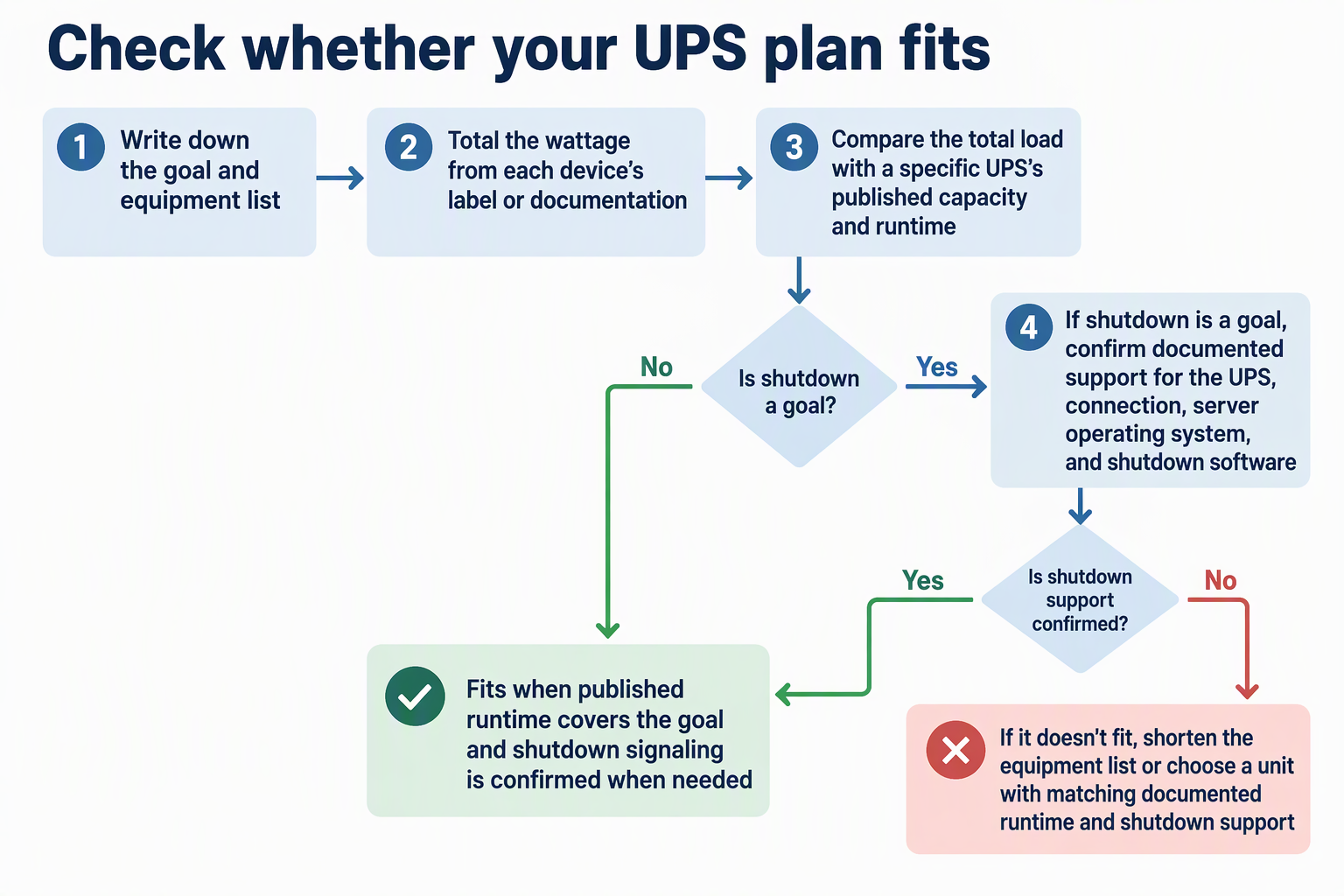
The result is a clear go or no-go. If the published runtime for your load covers your goal, and shutdown signaling is confirmed when you need it, the setup fits. If not, shorten the equipment list or look for a unit whose documented runtime and shutdown support match what you wrote down in step 1.
FAQs
Why does adding more devices shorten backup time?
Runtime depends on both battery capacity and the load connected to the UPS. Each device you add raises the load, so the same battery has to supply more power and covers less time. That is why the equipment list should include only devices your goal actually needs.
Will any UPS shut my server down automatically?
Not on its own. Automatic shutdown needs a supported signaling connection between the UPS and the server, plus software that acts on the signal. Schneider Electric documents this for PowerChute with supported UPS ranges over serial or USB, but you need to confirm the same support for whatever UPS and server you actually use.
Can a UPS keep my home server running through a long outage?
Plan as if it can’t. A UPS supplies power only until its battery runs down, and how long that takes depends on your connected load and the battery’s capacity. For outages longer than that window, the realistic goal is an orderly shutdown, not continued operation.